


Contributor II
July 11, 2023
Solved

Show/Hide Blocks with IF/ELSE condition for images

  • July 11, 2023
  • 6 replies
  • 804 views

Hi!

I’ve been reading about the Show/Hide function but I still can’t figure it out to apply it to my use case.


I want to show image 1 to US customers and image 2 to UK customers and image 3 to the rest of the users. How can I use the Show/Hide function + the IF/ELSE condition to make this work? or is there any other option for this?


Right now I applied the logic: person.Country == "US" to image 1 and person.Country == "UK" to image 2, but I’m still seeing image 3 (for the rest) when I preview the email for each country.


Thank you for your help!
    This topic has been closed for replies.
    Best answer by VH.Email

    @AlmaMedinaaa - perhaps double check in your client profiles what the exact format of the area you are trying to pull is. 100% they will hide, I had this exact logic sent out to my list this morning and it the appropriate blocks were hidden.

    I also noticed in your original post you have “ instead of just ‘ just trying just the ‘ vs the double. That worked for me where as the “ didn’t. No clue why. But give it a go!


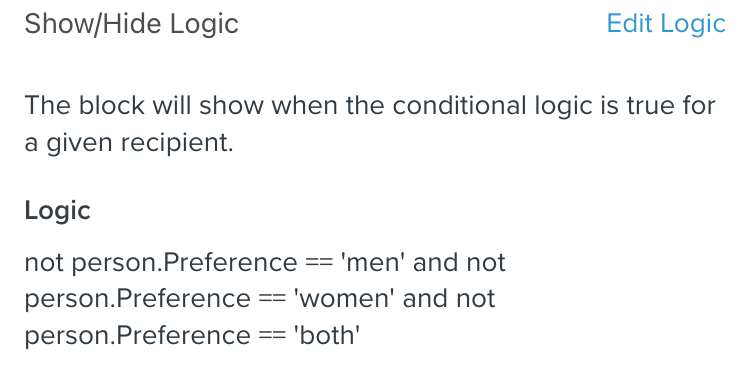
    For example this was my logic (this email went out this morning and worked perfectly). I copy and pasted the below directly from the platform so you know exactly how I did it. I also included a screenshot of what the ‘not’ logic looks like in the show/hide logic section. 


    Block 1: Wanted to show to only Women preference

    person.Preference == 'women'


    Block 2: Wanted to show to only Men preference

    person.Preference == 'men'


    Block 3: Wanted to show to Both preference


    person.Preference == 'both'


    Block 4: Wanted to show where no preference was selected

    not person.Preference == 'men' and not person.Preference == 'women' and not person.Preference == 'both'


    6 replies

    Jessica eCommerce Badassery
    Partner
    Partner
    July 11, 2023

    @AlmaMedinaaa 


    On the image for the rest you have to put the condition:

    not person.Country == "US" and not person.Country == "UK"


    see more details here: 

    https://help.klaviyo.com/hc/en-us/articles/7655926841499

    eCommerce + Email Marketing Strategist | eCommerceBadassery.com
    Contributor II
    July 11, 2023

    Hi @Jessica eCommerce Badassery 


    I’m still getting both versions when I preview with the US customer. I also tried “!-” but it didn’t work

    Contributor I
    July 12, 2023

    I just had the same issue and after like 2 hours figured it out. It’s very dependant on whether your property is capitalized or not. Try capitalizing or making the areas lower case (whichever you haven’t already tried) to see if that helps! It worked for me. 

    Contributor II
    July 12, 2023

    @VH.Email I did that, but it’s still not working, it’s weird because it works on the side of “show” but not the “hide”. I mean, these blocks are supposed to do that too, right?

    VH.EmailAnswer
    Contributor I
    July 12, 2023

    @AlmaMedinaaa - perhaps double check in your client profiles what the exact format of the area you are trying to pull is. 100% they will hide, I had this exact logic sent out to my list this morning and it the appropriate blocks were hidden.

    I also noticed in your original post you have “ instead of just ‘ just trying just the ‘ vs the double. That worked for me where as the “ didn’t. No clue why. But give it a go!


    For example this was my logic (this email went out this morning and worked perfectly). I copy and pasted the below directly from the platform so you know exactly how I did it. I also included a screenshot of what the ‘not’ logic looks like in the show/hide logic section. 


    Block 1: Wanted to show to only Women preference

    person.Preference == 'women'


    Block 2: Wanted to show to only Men preference

    person.Preference == 'men'


    Block 3: Wanted to show to Both preference


    person.Preference == 'both'


    Block 4: Wanted to show where no preference was selected

    not person.Preference == 'men' and not person.Preference == 'women' and not person.Preference == 'both'


    Contributor II
    July 24, 2023

    Thank you @VH.Email! This worked for me! 💃
