


Contributor IV
February 11, 2024
Solved

Sign-up form not connecting to SMS list

  • February 11, 2024
  • 3 replies
  • 251 views

I have a Sign-Up Form connected to my SMS list "SMS Subscribers" but even when people fill out the form and click submit, no customers are flowing into either the "SMS Subscribers" list nor my “Consent to Receive SMS Marketing” segment.

It shows these users have received the “Send this text to subscribe to recurring automated personalized marketing alerts (e.g. special promotions, cart reminders) from...” text, and both my keyword “JOIN” and SMS list are set to double-opt in. 

Is that “Send this text to subscribe to recurring automated personalized marketing alerts (e.g. special promotions, cart reminders) from...” text considered the double opt-in text? Do they have take action after they “send the text” to themselves when using the sign-up form?

And if that is NOT the double opt-in text, what does that look like? Because I went through the exercise of signing myself up and received the “Send this text to subscribe to recurring automated personalized marketing alerts (e.g. special promotions, cart reminders) from...” text but never received anything after that to check for opt-in again. I also did not land in the “SMS Subscribers” list after conducting this test.

    This topic has been closed for replies.
    Best answer by kaila.lawrence

    Hey @amanda_d! Jumping in here and want to clarify something.


    You’re referring to the “tap to text” functionality through an SMS subscribe link, yes? In this case, your subscribers are not “receiving” that text or sending it to themselves. Clicking your subscribe link simply opens the message in their device’s message app so THEY can send it to YOU. This essentially cuts the first step out the traditional double opt-in method where you would send them a text first and then they reply with a keyword to complete the double opt-in. In this instance, the tap to text IS the replacement for your JOIN keyword. 


    With that said, I’m a little unclear what you mean when you say they “send the text to themselves”. It should only be Click link → send pre-populated text to you. Can you show me what you mean by that?


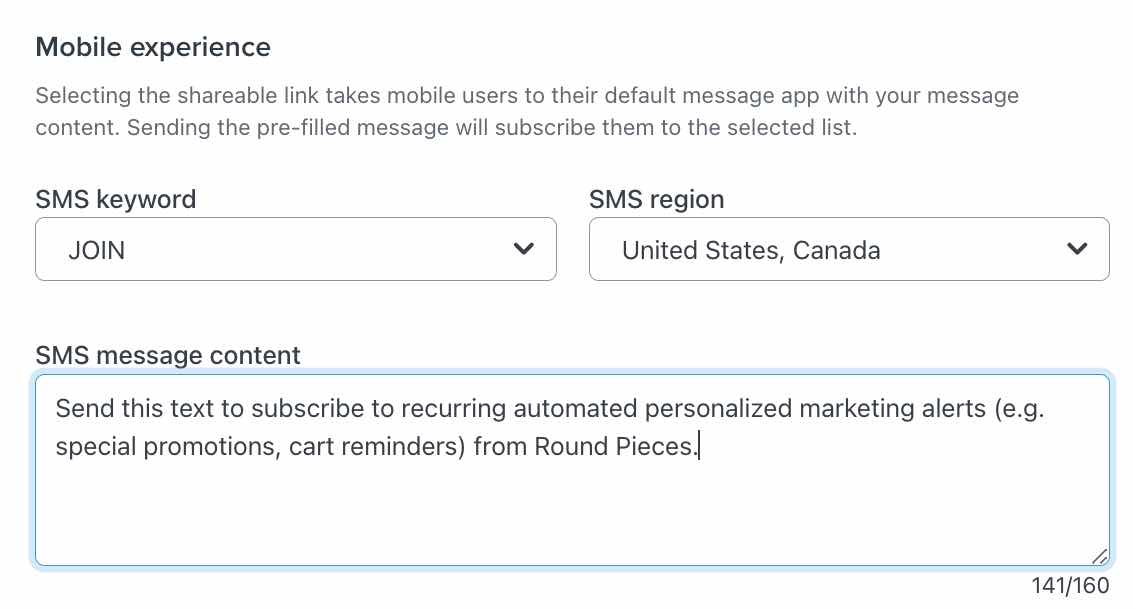
    Separately, is your mobile experience assigned to your JOIN keyword like below?


    Here’s some more documentation on the tap-to-text link and how to set them up:

    3 replies

    stam_marko
    Expert Problem Solver II
    Expert Problem Solver II
    February 12, 2024

    Hi Amanda,

    That’s so strange! Let’s find out what’s going on!

    If you go to your sign up form, in the button of the SMS Subscribe, what do you see in the List to Submit?


    How about when you look at your profile? Are you SMS subscribed?
    Profiles > your email


    Hope that helps to clarify the situation a bit,

    Feel free to reach out at: stam@retenso.com
    amanda_dAuthor
    Contributor IV
    February 12, 2024

    Hey @stam_marko ! I have my SMS list as the list to submit to. And on my profile I am not showing as SMS subscribed.

    kaila.lawrence
    Community Manager
    Community Manager
    February 14, 2024

    Hey @amanda_d! Jumping in here and want to clarify something.


    You’re referring to the “tap to text” functionality through an SMS subscribe link, yes? In this case, your subscribers are not “receiving” that text or sending it to themselves. Clicking your subscribe link simply opens the message in their device’s message app so THEY can send it to YOU. This essentially cuts the first step out the traditional double opt-in method where you would send them a text first and then they reply with a keyword to complete the double opt-in. In this instance, the tap to text IS the replacement for your JOIN keyword. 


    With that said, I’m a little unclear what you mean when you say they “send the text to themselves”. It should only be Click link → send pre-populated text to you. Can you show me what you mean by that?


    Separately, is your mobile experience assigned to your JOIN keyword like below?


    Here’s some more documentation on the tap-to-text link and how to set them up:
