Contributor I
September 21, 2022
Solved

single words at bottom of paragraphs

  • September 21, 2022
  • 3 replies
  • 788 views

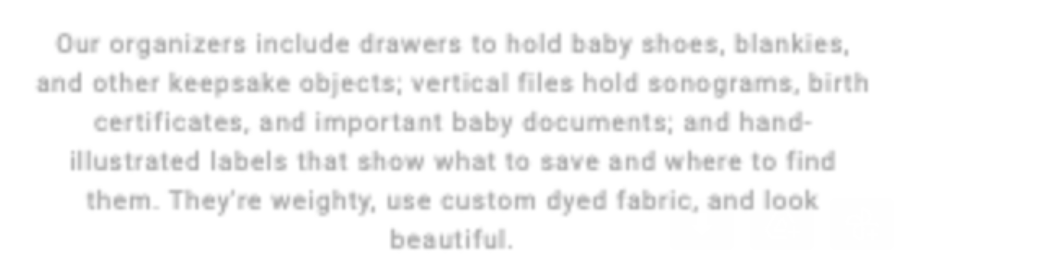
I know emails will render differently in different places, but is there no way to control for single words at the bottom of paragraphs like teh below?

 

    This topic has been closed for replies.
    Best answer by chelsgrove

    @savor 

    In your source code, you can try adding a non-breaking space,   between look and beautiful. So like this: look beautiful.


    3 replies

    stephen.trumble
    Klaviyo Alum
    September 21, 2022

    Hey @savor 

    Thank you so much for reaching out for help with your email template.

    You are correct, that depending on the browser and the device, your emails may look slightly different. Besides adjusting the sizing of your font in the editor, there are no native features that would allow you to force a single word into another line. I will roll this idea up to our product team for their evaluation. 

    Thanks for being part of the Klaviyo Community!

    -Stephen
    savorAuthor
    Contributor I
    September 22, 2022

    Hi Stephen,

    Your answer may be the same, but I’m less interested in forcing a word into another line.  More concerned with the windows/orphan of a single one being on its own.

    Thanks,

    Jenny

    chelsgrove
    Partner - Gold
    Partner - Gold
    September 28, 2022

    @savor 

    In your source code, you can try adding a non-breaking space,   between look and beautiful. So like this: look beautiful.