Active Contributor II
September 10, 2021
Solved

SMS source code issue

  • September 10, 2021
  • 4 replies
  • 170 views

Hey everyone!

I’ve followed the guide https://help.klaviyo.com/hc/en-us/articles/360035056972-Guide-to-Collecting-SMS-Consent

I’m making a text box and I’ve followed the GIF instructions with the following code

<p style="text-align: center;"><a href="sms:+1%20<(844)933-4127&gt;?&amp;body=Send%20this%20text%20to%20subscribe%20to%20SMS%20Updates!%20%28ref:JOIN%29">Text JOIN to (844) 933-4127</a></p>



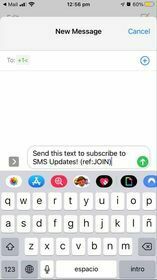
As you can see it’s looking fine, but the ‘To’ section when I actually click the message it looks wrong.

I am based in Australia, so I’m wondering whether it’s because of that, a code mistake, and if someone based in the US would see an actual number instead of +1<

Also, with this source code would I be able to create this into a button? Just for appearances and better CTA clicking, I imagine.

Thanks heaps in advance :)

Michael

 

    This topic has been closed for replies.
    Best answer by retention

    Hey @Michael - welcome to the community!

    I think you might have added an extra “space” between the +1 and the number.  %20 is URL encoding for a “space” so that’s why it stopped after the +1

    Try this code (assuming 844-933-4127 is your number):

    <a href="sms:+18449334127?&amp;body=Send%20this%20text%20to%20subscribe%20to%20SMS%20Updates!%20%28ref:JOIN%29">
    Text JOIN to (844) 933-412
    </a>

    Try to copy/paste the code above in the “Source” editor in Klaviyo to make sure it’s a clean copy/paste. Let me know if it worked!


    4 replies

    retention
    Partner - Platinum
    retentionAnswer
    2025 Champion
    September 10, 2021

    Hey @Michael - welcome to the community!

    I think you might have added an extra “space” between the +1 and the number.  %20 is URL encoding for a “space” so that’s why it stopped after the +1

    Try this code (assuming 844-933-4127 is your number):

    <a href="sms:+18449334127?&amp;body=Send%20this%20text%20to%20subscribe%20to%20SMS%20Updates!%20%28ref:JOIN%29">
    Text JOIN to (844) 933-412
    </a>

    Try to copy/paste the code above in the “Source” editor in Klaviyo to make sure it’s a clean copy/paste. Let me know if it worked!


    Joseph Hsieh // retentioncommerce.com // X: @retention
    MichaelAuthor
    Active Contributor II
    September 12, 2021

    Hi Joseph,

    Yes that’s perfect! Thank you so much for the help :)

    Michael

    Contributor I
    July 25, 2023

    I just tried this and it isn’t working (anymore)….has anyone else faced this issue?

    David To
    Klaviyo Employee
    Klaviyo Employee
    July 25, 2023

    Hey @JeffInDallas,

    Have you tried copy and pasting without format and/or manually typing out the code as HTML instead of just placing it in the text editor? A lot of times I see users make the mistake of simply copying and pasting code. However, this causes additional formatting to be brought over which breaks the code function.

    Alternatively, what inbox provider are you using and/or testing in? As called out in our How to use an email to collect SMS consent Help Center article:

    Note that this approach is designed to automatically open a text message, but it will not work with Gmail or in Microsoft Outlook; however, everyone can see the banner and manually text your number to subscribe, regardless of their inbox provider.


    David