


Nico01
Partner - Silver
Partner - Silver
April 8, 2024
Solved

Suspicious SPAM adresses signing up

  • April 8, 2024
  • 17 replies
  • 1458 views

Hello,

Recently, I've been getting these computer-generated sign-ups like:

XXXX+sdf8yf@gmail.com and their locations are like weird international places.
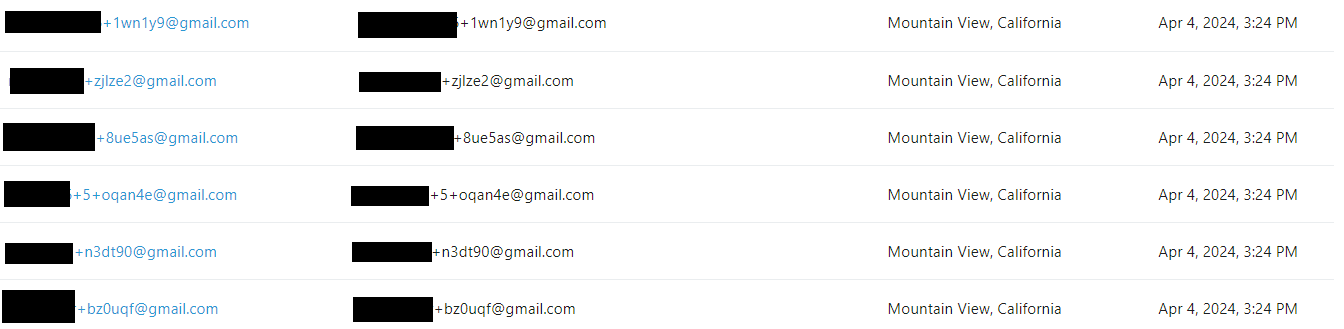
Screenshot from a segment I built (with some deletions for privacy)

My question is are they spammers or is this the new privacy feature that apple users. Or VPN features?

I know that the + sign is a way of redirecting your emails within Gmail, not sure if it works in other systems.

Because I have been getting a few and wither way it sucks for working out legit customers.

PS: I know I can activate double opt-in to prevent spam.

 
    This topic has been closed for replies.
    Best answer by kaila.lawrence

    Hey there @The ZOOM guy @realnoni @Nico01 


    I know it’s super frustrating to be attacked by bots. Unfortunately, it’s an industry-wide problem that doesn’t just affect Klaviyo. Our Product team is definitely aware and is actively working on solutions to combat bot activity. In the meantime, our Support team can take a closer look at each of your accounts and tease out exactly where the profiles are coming from if you’re really curious!


    Regardless of what the case may be, it’s important to remember that with double opt-in enabled on your forms these bot profiles will never become confirmed subscribers and therefore do not count towards your active profile count and will not be sent campaigns. You can absolutely bulk suppress or delete them if they’re really bugging you.


    Alternatively, you can also try beefing up the security of your website to block bot traffic at the source. A popular tool the community references a lot is SpamAssasin, but there are lots of options out there.

    Hope that helps :)

    17 replies

    Contributor I
    April 25, 2024

    I am new to Klaviyo and opened an account less than a month ago. I am still creating my forms, and I've published one on a hidden page in Shopify. I don’t get how spammy subscribers can bypass mandatory fields. My form asks for name, email, and phone number; all fields are mandatory. However, I am getting a bunch of spammy subscribers with email only. How is that possible?

    kaila.lawrence
    Community Manager
    Community Manager
    April 26, 2024

    @DianaSantos They aren’t being bypassed. Bots can fill out those fields automatically. Do you have double opt-in enabled in your list?

    Contributor I
    April 29, 2024

    Bots can fill out those field, but the field is empty in their profile. I don’t have double opt in, and I will not add to this specific form because of a marketing strategy I am using.

    kaila.lawrence
    Community Manager
    Community Manager
    April 30, 2024

    @DianaSantos It is possible for bots to enter blank spaces as data. This is a known issue the team is working on in my answer above! Unfortunately though, using single opt-in makes it harder to manage bot activity. At least with double opt-in you can be sure the only profiles subscribed to your list are real people. 


    If you want to maintain single opt-in, you can create a segment with conditions you notice for patterns of these bot profiles and periodically suppress them. 

    Contributor I
    June 8, 2024

    Having the same issue - here’s what I did.

    Created a new segment called ‘+’ (used the AI feature) - segment defined by ‘email addresses that include the + symbol’

    That then trawls and adds all these unwanted addresses to the ‘+’ segment.

    Then daily I look at the segment to see if they are all rubbish and when confirmed I go to:

    Settings (bottom left) / Other / Profile Maintenance / Remove Profiles / Select a List to delete / + / delete people

    Purged!

    Contributor I
    June 13, 2024

    I am getting these emails subscribe also.. And then they receive the email flows and even open them.. how can that be if they are BOTS, and then some are marked by them as SPAM? 

    kaila.lawrence
    Community Manager
    Community Manager
    June 14, 2024

    @bythehorns Typically a malicious bot will target forms or checkout pages and flood them with real emails they are looking to attack. Since these are real emails, they might respond in different ways: open, click, mark as spam or even reach out. What we would recommend is enabling double opt-in and turn on ReCaptcha if you can on your checkout page.
