Problem Solver I
April 23, 2024
Solved

Teext box is gone

  • April 23, 2024
  • 16 replies
  • 1311 views

Hi.

I am trying to edit a campaign but the text box to edit a section is not there anymore. It was replaced with source code. Please help.

    This topic has been closed for replies.
    Best answer by chamban

    Klaviyo Support response:


    The interface you see is due to a recent change in our UI.

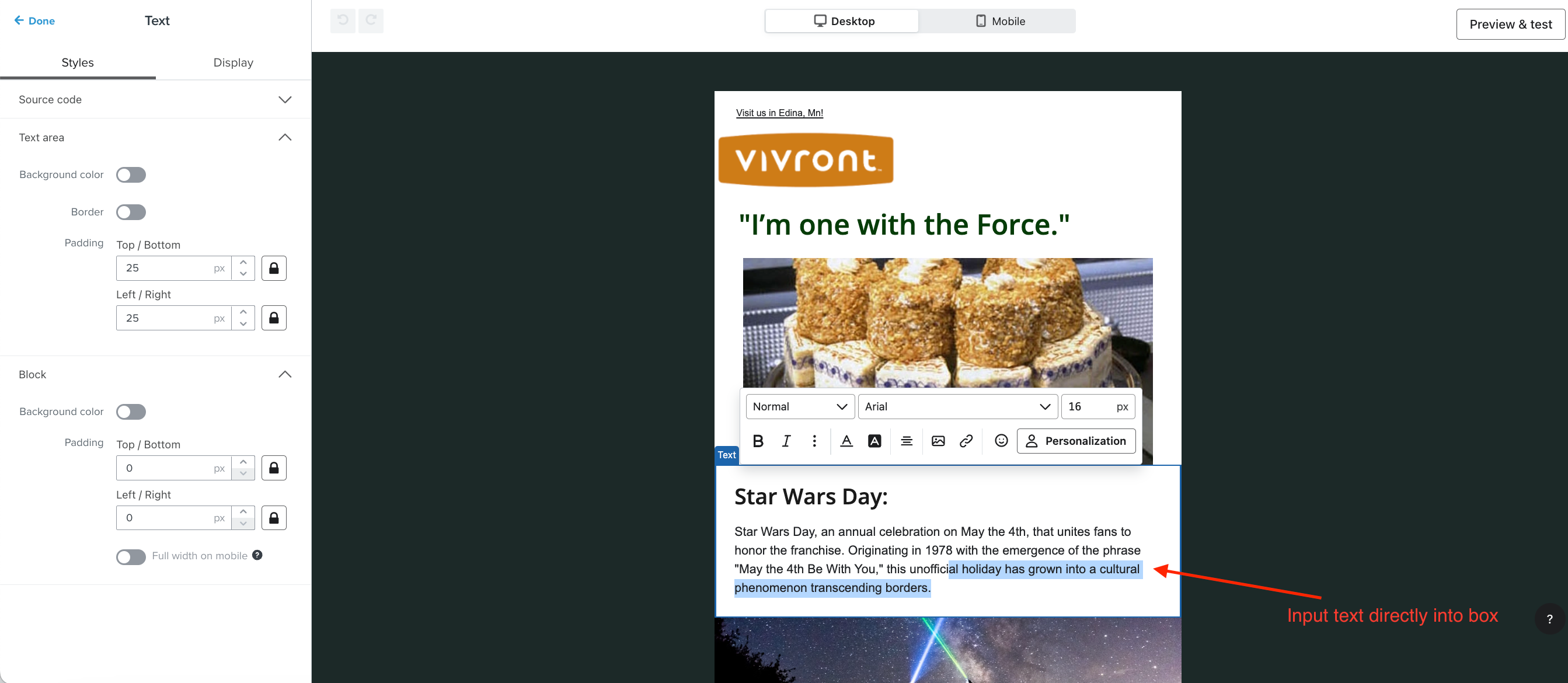
    Instead of inputting text into the left side panel as before, you can now directly input text into the template's text box like below: 


    16 replies

    JessFosnough
    Expert Problem Solver IV
    Expert Problem Solver IV
    April 23, 2024

    Hi @chamban,

    I’m guessing you are seeing something like this:


    If so, click on the gray button with the </> symbol, and it will toggle you back to the text box.
    Best of luck!

    Jessica
    chambanAuthor
    Problem Solver I
    April 23, 2024

    Hi @jess

    unfortunately, I don’t see that. This is what I have


    JessFosnough
    Expert Problem Solver IV
    Expert Problem Solver IV
    April 23, 2024

    @chamban,

    Interesting, I have not seen that before. I can see there is an Apply button, perhaps clicking that would make it go back to the normal view? If it applies something you don’t like, you can always use the Undo button. I’ll see if I can find any other answers in the meantime.

    Jessica
    chambanAuthor
    Problem Solver I
    April 23, 2024

    @JessFosnough

    I completed a campaign yesterday using the source but it takes hours 😫

    So what’s happening is, you edit the source code box then click apply to see if what you’re doing is correct. If not, you have to redo.

    Thank you for helping out! I really appreciate it!

    JessFosnough
    Expert Problem Solver IV
    Expert Problem Solver IV
    April 23, 2024

    @chamban
    Wow, that’s awesome that you can even do that - I sure would not be able to!!
    I have one other idea - copy the HTML, insert a new text box into the campaign, toggle the source code, and then paste - mabe then you will be able to toggle back to the “normal” editor? (I’m sorry, I’m not sure if you are still looking for an anwer or not!)

    Jessica
    chambanAuthor
    Problem Solver I
    April 23, 2024

    @JessFosnough

    Thanks! I tried my hardest but I was spent though.

    Yes, I am still looking for an answer. Been playing around the editor and tried your suggestion, text box is still not there.

    I tried adding text box using drag and drop but it’s the same, source code 😣

    JessFosnough
    Expert Problem Solver IV
    Expert Problem Solver IV
    April 23, 2024

    @chamban,

    Oh man, that’s frustrating! Unfortunately I’m out of ideas. It wouldn’t be a bad idea to contact support - there could be something going on behind the scenes that only they can fix. Hope you find a solution soon!

    Jessica
    chambanAuthor
    Problem Solver I
    April 23, 2024

    Thank you so much @JessFosnough for your ideas. I will contact support. I think that’s the best we can do.

    chambanAuthorAnswer
    Problem Solver I
    April 24, 2024

    Klaviyo Support response:


    The interface you see is due to a recent change in our UI.

    Instead of inputting text into the left side panel as before, you can now directly input text into the template's text box like below: 


    JessFosnough
    Expert Problem Solver IV
    Expert Problem Solver IV
    April 24, 2024

    Thank you for posting this, @chamban.

    I still haven’t seen that functionality in my account, but at least I know it’s coming. It definitely would have scared me to see source code with no way to toggle it back and forth!

    Jessica