


Contributor I
February 8, 2024
Solved

Test emails not sending

  • February 8, 2024
  • 7 replies
  • 1507 views

When I send a test email nothing arrives.

I do not get a warning about hitting the test email send limit.

Nothing found in spam folder or “promotions”.

No changes to firewalls or any other security.

Sent to our domain, gmail and yahoo, none received email.

Klaviyo help kept circling “Check spam folder” and “must be your domain security”, NOT THE ISSUE.

Hung up with Klaviyo help because they were not helpful.


UPDATE: I sent the test to a temp-mail.org address and the email arrived WTF

UPDATE: Because the temp-mail.org worked, I re-tried our domain, gmail and yahoo addresses, none worked.

UPDATE: I have access to a totally different Klaviyo account and test emails sent from that account arrive without any issues to all the same email addresses.

    This topic has been closed for replies.
    Best answer by Dward

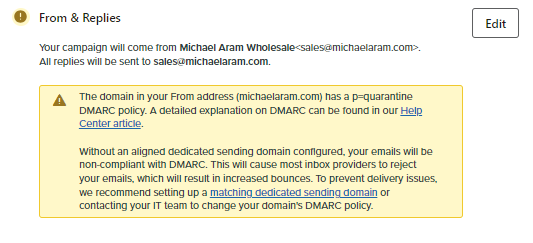
    I found the issue:


    7 replies

    Partner
    February 8, 2024

    Hello @Dward 

    Could you please share screenshot of that screen with developer tools opened?
    It would look something like this:


    https://theforms.pro
    DwardAuthor
    Contributor I
    February 8, 2024

    You requested the “network” tab, correct?

    Partner
    February 8, 2024

    You requested the “network” tab, correct?

    Please keep the network tab open and then try to send the test email.
    Notice, In my screenshot there is a test-send call (highlighted in blue). Do you see the status of test-send as 204 or  is it something else?

    https://theforms.pro
    DwardAuthor
    Contributor I
    February 8, 2024

    Yes, it is 204


    Partner
    February 8, 2024

    Yes, it is 204


    Interesting, I only issue I can think it the licensing. Do you have enough emails remaining in your Klaviyo plan?

    https://theforms.pro
    DwardAuthor
    Contributor I
    February 8, 2024

    Plenty of emails remaining:

    My workday is ending, I will re-visit this in the morning.

    DwardAuthorAnswer
    Contributor I
    February 9, 2024

    I found the issue: