


Contributor I
January 26, 2023
Solved

Trigger filter not working
  • January 26, 2023
  • 4 replies
  • 397 views

Hi there. 
 

I want to send a specific email to customers who order one particular item from me. 
 

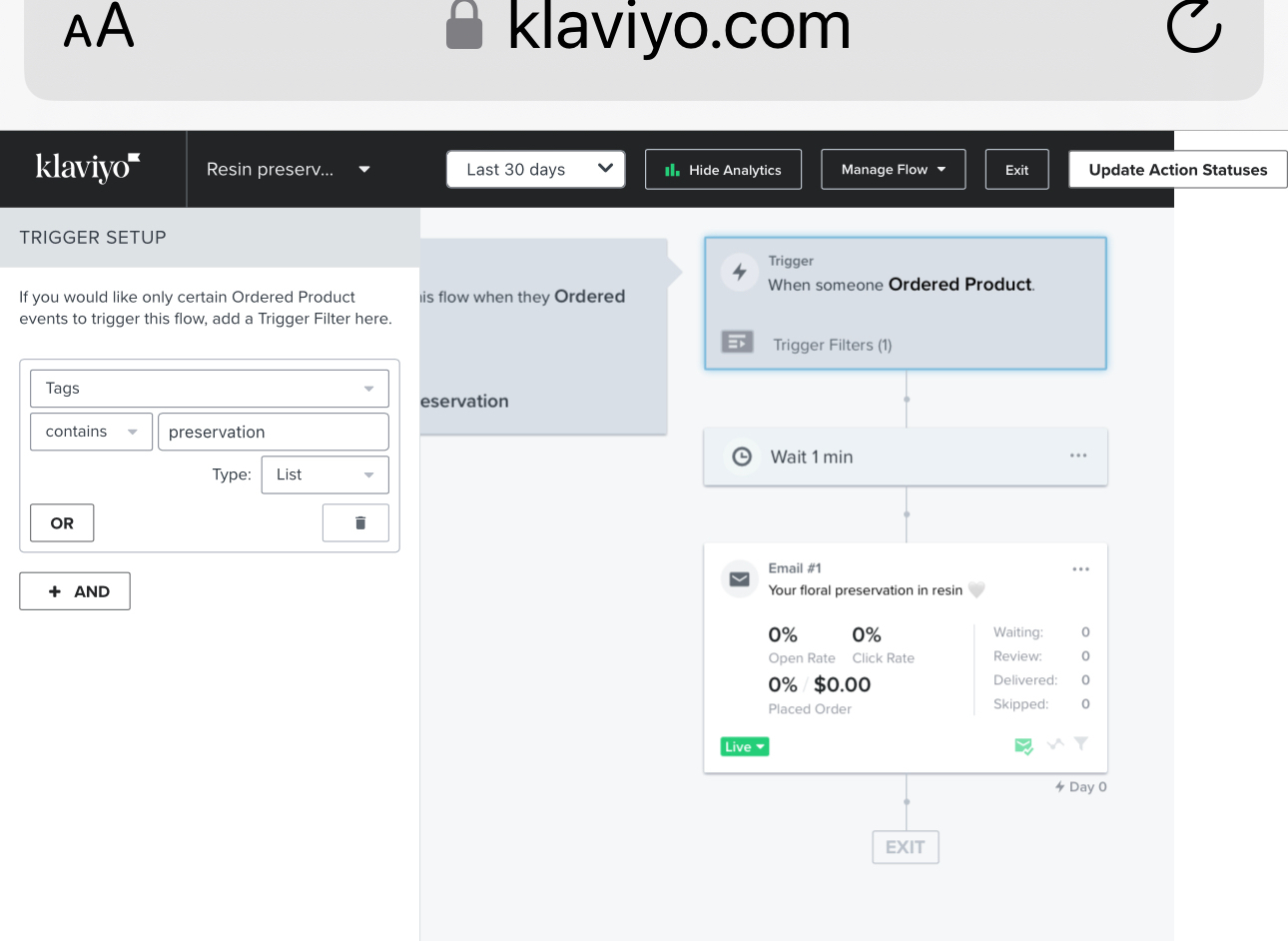
I’ve got it tagged on Shopify with “preservation”. I set up a trigger filter in Klaviyo to send to orders placed with the “preservation” tag but it’s not working.


can anyone shed some light please?

thank you 

    This topic has been closed for replies.
    Best answer by Jessica eCommerce Badassery

    @Thefinerdetailbykim  Instead of using a tag, use the product name on the filter. That should be more reliable.


    You’ll also want to remove that smart sending (the little green envelope) otherwise people will get skipped if they received an email from you in the last X hours. Default is 16. 

    • Click on the email card and then you’ll see additional filters toward the bottom of the edit screen on the left-hand side. 

    4 replies

    Jessica eCommerce Badassery
    Partner
    Partner
    January 26, 2023

    @Thefinerdetailbykim  Instead of using a tag, use the product name on the filter. That should be more reliable.


    You’ll also want to remove that smart sending (the little green envelope) otherwise people will get skipped if they received an email from you in the last X hours. Default is 16. 

    • Click on the email card and then you’ll see additional filters toward the bottom of the edit screen on the left-hand side. 
    eCommerce + Email Marketing Strategist | eCommerceBadassery.com
    Contributor I
    January 26, 2023

    Thank you so much! I didn’t even realise product name was an option, I must have missed it. Thank you about the smart sending too, I’ll switch that off. 
     

    thank you again!

    DanJacobs
    Partner - Gold
    Partner - Gold
    January 26, 2023

    Hey @Thefinerdetailbykim

    If you’re using Shopify, I recommend using the ProductID filter. Using ProductName works, but if the product name ever changes in the future, even just a minor edit, the flow filter will stop working.

    The ProductID can be found in the back-end of the Shopify product page. It’s the very last assortment of numbers in the URL, should look something like 7880268742834.

    Or, if you’re on Windows, you can also find the ProductID by going to the live product page and following these steps:

    → crtl+u
    → ctrl+f
    → search productid
    → hit the enter key until you find a string of numbers.

    Good luck! All the best,

    Dan

    Dan Jacobs, CEO of Samadhi Marketing
    Contributor I
    January 26, 2023

    Hi @DanJacobs 

    thank you! That’s really good advice. I’ll do my best to find the product ID. I was trying last night but couldn’t find it anywhere! I’ll try your steps.

    Thanks so much!

    Kim