

Contributor III
January 2, 2024
Solved

Turn off auto upgrade

  • January 2, 2024
  • 8 replies
  • 681 views

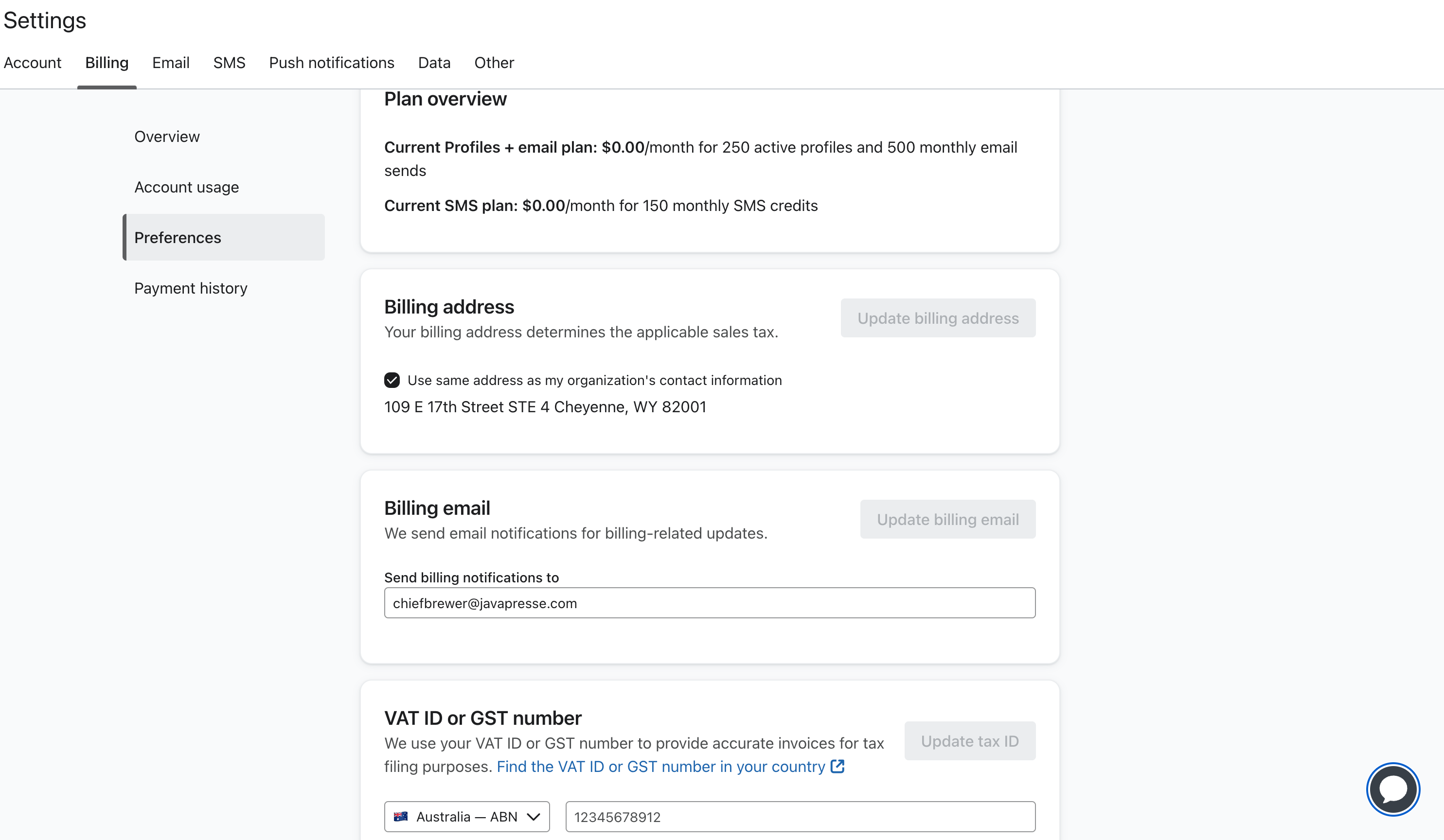
Hi, I followed the Help Center article to disable the auto upgrade, but I can’t find this option on my account. Please help. Here is what I see on settings>billing>preferences>

 

    This topic has been closed for replies.
    Best answer by Taylor Tarpley

    Hi there @chiefbrewer


    Thanks for your patience, 


    To be clear, auto-upgrade will not occur or be triggered on free plans. If you exceed the free plan limits, you will have to manually upgrade!


    Once you do upgrade to a free account, you should see the toggle. However, the if you still do not see the auto upgrade option, I would reach out to support to investigate this further! 


    Thank you for participating in the Community!

    -Taylor 

    8 replies

    Taylor Tarpley
    Community Manager
    Community Manager
    January 2, 2024

    Hi @chiefbrewer


    Welcome to the Community! Happy to help!


    While our documentation on how to turn on auto-upgrade for you account states you can do this in the Billing Preference, you will need to head to another section of the Billing tab to turn off auto upgrade. 


    To turn off auto upgrade head to Billing > Overview > Change Plan. When you get to the plan changing section, you will be able to toggle off the auto upgrade option when you choose a higher plan.

    Hope this helps!

    -Taylor 

    Contributor III
    January 3, 2024

    Hi Taylor,


    Thanks for the message. Two things here

    • I would like to be on the same plan
    • And even when I try changing to a different plan, I do not get the option to toggle off the auto upgrade :( What can I do?


    Contributor III
    January 4, 2024

    Anyone?

    Taylor Tarpley
    Community Manager
    Community Manager
    January 4, 2024

    Hi @chiefbrewer


    Thanks for the follow up, 


    I am confirming with my colleagues on how to ensure the auto upgrade is toggled off on the free account. I will follow up when I get a response! 


    For when you toggle to a paid account, as in my screenshot, I tested on my own and believe the option wouldn’t show until you have a card on file with your account. 


    -Taylor 

    Contributor III
    January 5, 2024

    Hi Taylor,


    Thanks for the message. Please, let me know.


    As you can see here, I do have the card on my account, but still don’t see the option to toggle on/of auto upgrade. 


    Contributor III
    January 9, 2024

    Hi there!

    I am following up on this. I really appreciate your support. It looks like there is no other way to find out this.

    Thank you!

    Contributor III
    January 19, 2024

    I am reaching out again. Thanks for your help!

    Taylor Tarpley
    Community Manager
    Community Manager
    February 5, 2024

    Hi there @chiefbrewer


    Thanks for your patience, 


    To be clear, auto-upgrade will not occur or be triggered on free plans. If you exceed the free plan limits, you will have to manually upgrade!


    Once you do upgrade to a free account, you should see the toggle. However, the if you still do not see the auto upgrade option, I would reach out to support to investigate this further! 


    Thank you for participating in the Community!

    -Taylor

