Solved

Unique coupon error in campaign.

  • February 1, 2022
  • 2 replies
  • 553 views

Forum|alt.badge.img+2

Hello.
My name is Takahashi.
I would like to include a unique coupon in my campaign.
I have issued a coupon and pasted the following code.
{% coupon_code 'NAME_OF_YOUR_COUPON' %}
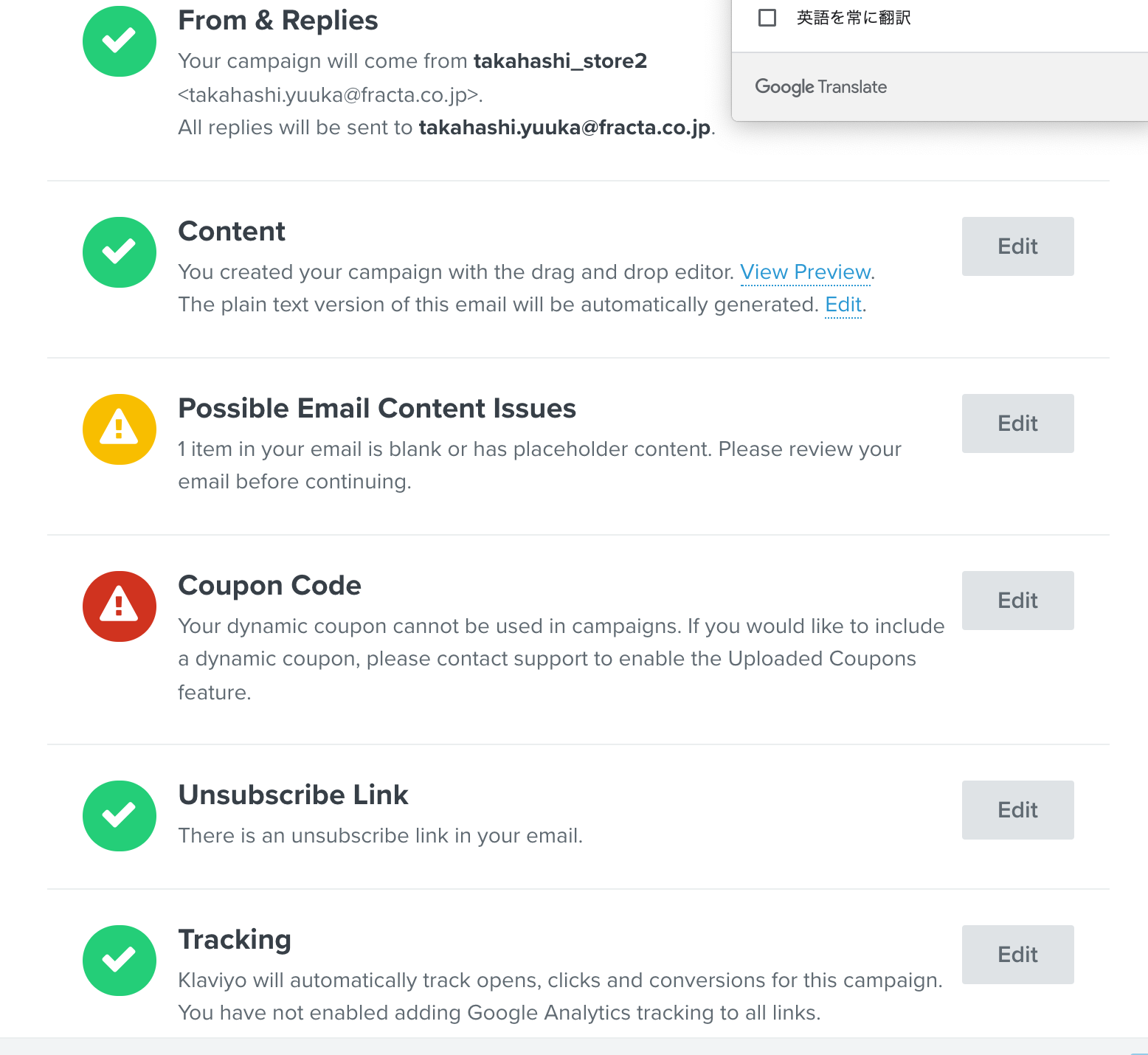
However, I get an error.
Error statement
"Your dynamic coupon cannot be used in campaigns. If you would like to include a dynamic coupon, please contact support to enable the Uploaded Coupons feature."

Why is this? I would like support.
Thank you.


Best answer by Dov

Hi @takahashi,

Thank you for sharing this question with us.

First, make sure that the coupon code you are trying to use in your Campaign email does not have a variable expiration date. A coupon with a variable expiration date will use radio button: “Expiration after a certain number of days/hours”. We recommend using “Expiration: On a certain date” instead for campaign sends. For more information. I recommend reviewing our documentation on Using Your Coupon in an Email Campaign.

Additionally, please also make sure you have added a sufficient amount of codes prior to scheduling your Campaign. You can generate coupon codes for a particular coupon by clicking the dropdown menu and selecting Add Codes. Once you select Add Codes, you will be prompted to input the number of codes you would like to generate. You’ll need to make sure to generate at least as many codes as you have expected recipients for your campaign, otherwise, you will not be able to send or schedule it.

The dropdown menu for the coupon is located on the far right side. Click the dropdown menu to add codes, view the coupons history, or delete the coupon


I hope that is helpful! Let us know how it goes.

2 replies

Dov
Forum|alt.badge.img+61
  • Klaviyo Alum
  • Answer
  • February 1, 2022

Hi @takahashi,

Thank you for sharing this question with us.

First, make sure that the coupon code you are trying to use in your Campaign email does not have a variable expiration date. A coupon with a variable expiration date will use radio button: “Expiration after a certain number of days/hours”. We recommend using “Expiration: On a certain date” instead for campaign sends. For more information. I recommend reviewing our documentation on Using Your Coupon in an Email Campaign.

Additionally, please also make sure you have added a sufficient amount of codes prior to scheduling your Campaign. You can generate coupon codes for a particular coupon by clicking the dropdown menu and selecting Add Codes. Once you select Add Codes, you will be prompted to input the number of codes you would like to generate. You’ll need to make sure to generate at least as many codes as you have expected recipients for your campaign, otherwise, you will not be able to send or schedule it.

The dropdown menu for the coupon is located on the far right side. Click the dropdown menu to add codes, view the coupons history, or delete the coupon


I hope that is helpful! Let us know how it goes.


  • Contributor I
  • December 12, 2025

So even if I remove the 

{% coupon_code 'SAMPLECODE' %} text from my campaign/template and just type in the code in plain text I would still get this error?

In my case, the coupon code already existed in my Shopify admin before I created the Klaviyo “Shopify Coupons” (which sync up to my Shopify store).