Contributor I
February 26, 2025
Solved

Updating Flow Status Not Working

  • February 26, 2025
  • 2 replies
  • 352 views

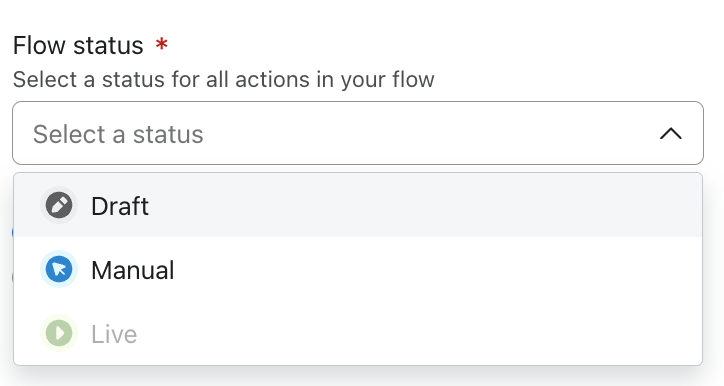
I cannot update the status of my flow to “live” 
The option is not clickable and I am not sure why, I’ve never had this issue before:


    Best answer by Faidat

    Hello BeautyCopywriter94,

     The inability to set your flow to “Live” is likely due to an issue with flow configuration, compliance restrictions, or platform limitations. Check the following:

    1. Email & Flow Status – Ensure all emails are marked “Ready to Send” and no steps are left in draft mode.
    2. Flow Trigger & Filters – An improperly configured trigger or restrictive filter can disable the “Live” option. Review and adjust accordingly.
    3. Account & Compliance – Restrictions due to account verification, sending limits, or compliance flags may prevent activation. Check your Klaviyo settings.
    4. Browser & Cache – Try clearing your cache, switching browsers, or using an incognito window to rule out UI-related issues.
    5. Klaviyo System Status – If this issue is unusual, check Klaviyo’s Status Page for potential outages or reach out to support.

    If none of these resolve the issue, deeper troubleshooting within your account settings may be necessary.

    You can reach out to me if you need help.



    2 replies

    HayleyR
    Problem Solver III
    2025 Champion
    February 26, 2025

    Hey there,


    Thanks for reaching out to the community. I’ll try my best to try and resolve this for you. Have you recently upgraded or downgraded your account level? 


    Hayley

    Hayley
    FaidatAnswer
    Problem Solver I
    February 26, 2025

    Hello BeautyCopywriter94,

     The inability to set your flow to “Live” is likely due to an issue with flow configuration, compliance restrictions, or platform limitations. Check the following:

    1. Email & Flow Status – Ensure all emails are marked “Ready to Send” and no steps are left in draft mode.
    2. Flow Trigger & Filters – An improperly configured trigger or restrictive filter can disable the “Live” option. Review and adjust accordingly.
    3. Account & Compliance – Restrictions due to account verification, sending limits, or compliance flags may prevent activation. Check your Klaviyo settings.
    4. Browser & Cache – Try clearing your cache, switching browsers, or using an incognito window to rule out UI-related issues.
    5. Klaviyo System Status – If this issue is unusual, check Klaviyo’s Status Page for potential outages or reach out to support.

    If none of these resolve the issue, deeper troubleshooting within your account settings may be necessary.

    You can reach out to me if you need help.