Contributor II
January 17, 2025
Solved

Using email frequency/preferences in campaigns

  • January 17, 2025
  • 12 replies
  • 504 views

Hi all,

I have set up a preference centre, and have started collecting email frequency preferences (always, weekly and monthly) This mainly relates to our newsletter, which we send weekly. However, I need to obviously exclude anyone that has picked ‘monthly’. My only idea on how to do this is to manually exclude this segment when sending a campaign, but is there an easier way? 

Thanks!

Katie

    Best answer by emma.owens

    Hi ​@katie_hull ! 
     

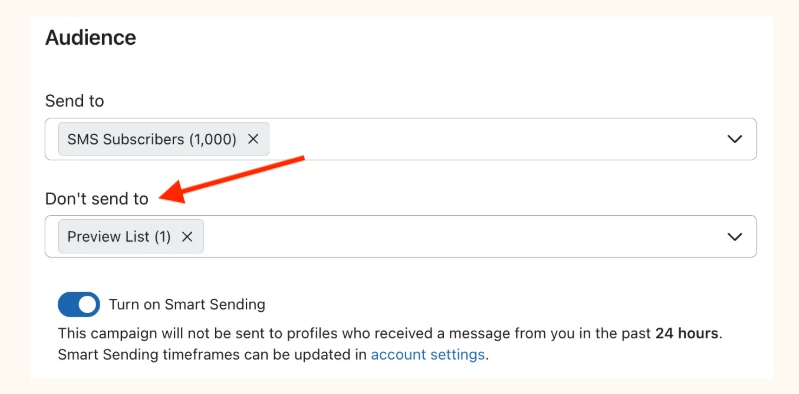
    Just wanted to follow up on this thread - the simplest way to go about this would be to exclude your monthly segment from your campaign sends, to make sure that anyone that has selected that preference aren’t receiving weekly newsletter emails! When you get to the ‘Audience’ page when scheduling your campaign, you will just want to select your monthly segment under ‘Do not send to’: 


    I hope this helps and please let me know if you have any additional questions! 

    12 replies

    Christiannoerbjerg
    Expert Problem Solver II
    2025 Champion
    January 18, 2025

    Hi ​@katie_hull 

    Thank you for posting in the Community!

    As you suggested, the easiest way would be to manually exclude the segment from your sending or you could make an automation, which removes the subscriber from your primary list. When the subscriber can receive e-mails again, then a flow could be triggered, when they will be subscribed to the list again. 

    As a man, that likes to make a simple, but effective setup - I would go with the manually exclusion of the setup. 

    Hope that helps! :-) 

    Christian Nørbjerg Enger
    Partner & CPO
    Web: Segmento.dk
    LinkedIn: @christianfromsegmento
    Voldbjergvej 22b, 8240 Risskov

    Amos Peace
    Problem Solver III
    Problem Solver III
    January 18, 2025

    Hello ​@katie_hull,

    Yes, there’s a simpler way to handle this in Klaviyo using segments and dynamic lists! Instead of manually excluding the "monthly" subscribers each time you send a campaign, you can set up a segment that automatically filters out anyone who has selected "monthly" frequency preferences.

    Here’s how you can do it:

    Steps:

    1. Create a Segment for "Weekly" and "Always" Subscribers:
      • Go to Lists & Segments in Klaviyo.
      • Click Create List / Segment and choose Segment.
      • Set up the segment to include only subscribers who have selected "weekly" or "always" under email frequency preferences.
    2. Use This Segment for Campaigns:
      • When sending a campaign, simply select this segment (excluding "monthly" subscribers) instead of manually excluding them.

    Benefits:

    • Automatic Exclusion: This segment will update automatically as subscribers update their frequency preferences.
    • No Manual Work: You don’t need to manually manage exclusions for each campaign, saving you time.

    By setting up this dynamic segment, you'll ensure that only subscribers who want weekly or more frequent emails will receive your newsletters, without needing to manually exclude anyone.


    Let me know if you'd like more guidance on setting up segments.

    Peace - Turning Emails Into Opportunities 💼 Email Marketing Specialist | 🚀 Klaviyo Expert 📧 amosfolashade2@email.com WhatsApp -+2349023453575 “Delivering the right message, to the right person, at the right time.”
    MANSIR2094
    Expert Problem Solver IV
    Expert Problem Solver IV
    January 18, 2025

    Hello ​@katie_hull ,
    To manage email frequency preferences effectively, you can automate the process by creating dynamic segments in Klaviyo. For instance, set up a segment to include only those who selected "weekly" or "always" as their preference. Use this segment as the recipient list for your weekly newsletters, ensuring "monthly" preferences are automatically excluded.

    If you need help implementing this setup, feel free to reach out for support.

    Mansir Digital Portfolio
    emma.owens
    Community Manager
    Community Manager
    January 24, 2025

    Hi ​@katie_hull ! 
     

    Just wanted to follow up on this thread - the simplest way to go about this would be to exclude your monthly segment from your campaign sends, to make sure that anyone that has selected that preference aren’t receiving weekly newsletter emails! When you get to the ‘Audience’ page when scheduling your campaign, you will just want to select your monthly segment under ‘Do not send to’: 


    I hope this helps and please let me know if you have any additional questions! 

    Contributor II
    January 25, 2025

    Hi all,

    Everyone has suggested the same sort of solution - thank you for replying! However, I still can’t wrap my head around the fact that the ‘monthly’ segment still need to receive a campaign every 4 weeks. So I will have to exclude this segment for 3 weeks of every month, but then include them on the 4th week, so they get their monthly email… Is that the only way? Seems prone to error, with me having to keep track of when I’ve last included them! 

    Thanks again!

    MANSIR2094
    Expert Problem Solver IV
    Expert Problem Solver IV
    January 25, 2025

    You can streamline this process by creating a flow in Klaviyo triggered once every 4 weeks to send campaigns to the "monthly" segment. This eliminates the need for manual tracking and ensures the emails go out on schedule. If you'd like assistance setting this up, let me know.


    Mansir Digital Portfolio
    Contributor II
    January 25, 2025

    You can streamline this process by creating a flow in Klaviyo triggered once every 4 weeks to send campaigns to the "monthly" segment. This eliminates the need for manual tracking and ensures the emails go out on schedule. If you'd like assistance setting this up, let me know.


    Wow, it sounds great, but I have no idea how to do that! I manually create a new newsletter campaign each week… How would I set up the flow to automate the campaigns for this monthly segment? I’m intrigued (and hopeful!)

    MANSIR2094
    Expert Problem Solver IV
    Expert Problem Solver IV
    January 26, 2025

    Hello ​@katie_hull , Thank you for your enthusiasm! I’m glad you’re intrigued. Setting up an automated flow in Klaviyo for your monthly segment is simpler than you might think, and I’m happy to guide you through it step by step.


    Here’s how we can set it up:

    1. Create or Identify Your Monthly Segment

    First, we’ll ensure your "monthly" segment is already created. This should be a dynamic segment that updates automatically based on criteria like engagement or preferences.

    2. Set Up a Flow in Klaviyo: Go to the Flows section in your Klaviyo account and click Create Flow.

    Choose "Create from Scratch" or select a relevant template if one fits your needs.

    3. Choose the Trigger: Set the flow trigger to the Segment Entry Trigger. Select your "monthly" segment.

    Adjust the timing so the flow starts sending emails to segment members once every 4 weeks.

    4. Add Email Content: Drag and drop an Email Card into the flow.

    Design the email or use a pre-made template that fits your branding.

    5. Schedule Email Timing: Use a Time Delay if needed to ensure the email goes out at a specific time, like the first Monday of the month.

    6. Test and Review: Send a test email to yourself to confirm everything looks good.

    Review the flow setup to ensure it meets your goals.

    This setup ensures your newsletters for the "monthly" segment are sent automatically. The best part is that you can still tweak the content as needed before each send.


    If you’d like me to handle the setup or walk you through it live, just let me know, and we can get this going for you right away!

    Mansir Digital Portfolio
    Contributor IV
    November 11, 2025

    Hi all,

    im running into some issues creating an automatic segment (not exclusion segment) like some have suggested here. I created an Email Frequency property using the radio buttons on the global default preference page and published it. But now when I go to add the definition = Properties about someone = Email Frequency (Daily, Weekly, Monthly) the email frequency doesn’t show up as a property. Do I have to wait until someone actually selects the frequency? Seems like something I should be able to set up before hand.

    Kim from Cadence
    Partner
    Partner
    November 11, 2025

    But now when I go to add the definition = Properties about someone = Email Frequency (Daily, Weekly, Monthly) the email frequency doesn’t show up as a property. Do I have to wait until someone actually selects the frequency? Seems like something I should be able to set up before hand.

    @pwieland, yes unfortunately, you need to have the property be set for at least one profile for this to show up in the segment builder. 

    The easiest way to do this is to add the custom property “Email Frequency” to a profile from the profile page using the “Add custom property” button

    Kim — Founder @ Cadence | Helping brands automate recurring campaigns (daily, weekly, monthly) | Happy to connect! | https://cadencecampaigns.com