Contributor I
May 29, 2023
Solved

Why am I unable to preview emails in Klaviyo after importing template HTML?

  • May 29, 2023
  • 1 reply
  • 505 views

I am not able to preview one of the  templates in a flow I created today. Everything I typed in appears to be correct yet I am not able ro preview the email i n Klavio. I keep getting the following message.

“Your template contains placeholders we can't replace. No problem, de-select that option to view a preview.”


How and where do I go  to de-select the placeholder oiption mentioned in this warning message?

    This topic has been closed for replies.
    Best answer by Taylor Tarpley

    Hi @ZenMan101


    Welcome to the Community, happy to help! 


    This is most likely due to a syntax error in your email. I would go back in and see if there are any broken tags in the blocks of your template by navigating to the Source option of each block. It is likely that a tag is likely because of how it was edited after it was pasted. 


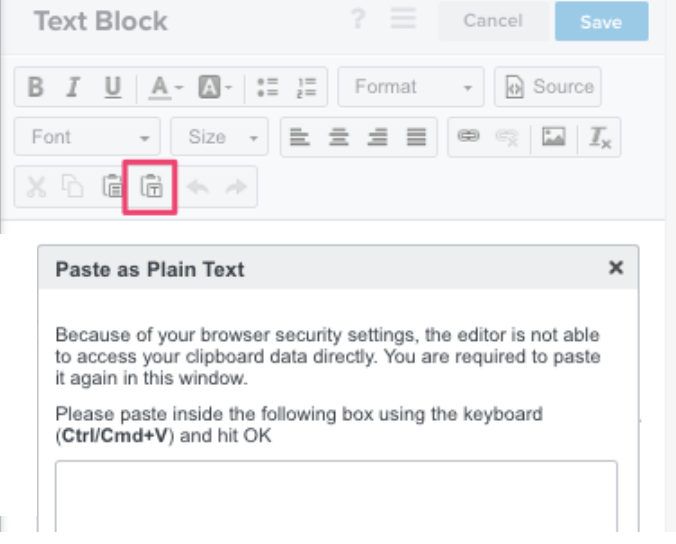
    In the future, I’d advise using our "paste as plain text" tool to avoid this in the future as seen below!


    Thanks for participating in the Community!

    -Taylor 

    1 reply

    Taylor Tarpley
    Community Manager
    Community Manager
    May 30, 2023

    Hi @ZenMan101


    Welcome to the Community, happy to help! 


    This is most likely due to a syntax error in your email. I would go back in and see if there are any broken tags in the blocks of your template by navigating to the Source option of each block. It is likely that a tag is likely because of how it was edited after it was pasted. 


    In the future, I’d advise using our "paste as plain text" tool to avoid this in the future as seen below!


    Thanks for participating in the Community!

    -Taylor