Contributor I
April 5, 2023
Solved

Why does my CSV Import page look different?

  • April 5, 2023
  • 3 replies
  • 124 views

Hi

I’m trying to import some contacts into my master email list and only update properties and not subscribe them.

According to this documentation article and several other doc articles….

https://help.klaviyo.com/hc/en-us/articles/1260806293150-How-to-import-profile-properties-using-a-CSV-upload


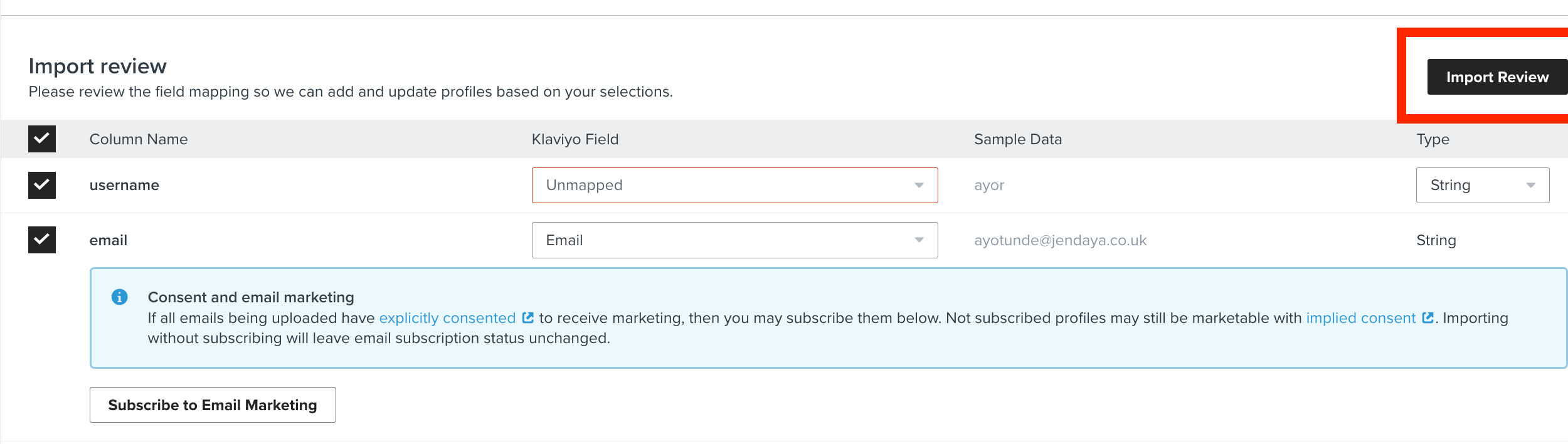
...once I upload a CSV file and get to the column matching page there is supposed to be a checkbox called “Subscribe to Email Marketing”. If I leave it unchecked the contacts will get imported and any matching contacts will have their properties updated but not subscribe data will be changed.

Unfortunately, this checkbox does not exist.

There is also supposed to be a “Review Import” button, but that does not exist either.

Anyone else having this issue or can tell me how to import this way?


Thanks so much!

    This topic has been closed for replies.
    Best answer by Taylor Tarpley

    Hi @osaga


    Welcome to the Community! Thanks for sharing your question with us! 


    So the consent to email marketing isn’t exactly a checkbox, but should look like a blue information box as you see below. To not have them be subscribe, you would not click the ‘subscribe to email marketing’ button. Additionally, the ‘Import Review’ button should appear in the top right of your screen in the import review stage after you upload your CSV. 


    If you don’t see either of these options, can you share screenshots of what you are seeing instead?


    Thanks for partipcating in the Community!

    -Taylor

    3 replies

    Taylor Tarpley
    Community Manager
    Community Manager
    April 6, 2023

    Hi @osaga


    Welcome to the Community! Thanks for sharing your question with us! 


    So the consent to email marketing isn’t exactly a checkbox, but should look like a blue information box as you see below. To not have them be subscribe, you would not click the ‘subscribe to email marketing’ button. Additionally, the ‘Import Review’ button should appear in the top right of your screen in the import review stage after you upload your CSV. 


    If you don’t see either of these options, can you share screenshots of what you are seeing instead?


    Thanks for partipcating in the Community!

    -Taylor

    osagaAuthor
    Contributor I
    April 8, 2023

    Hi Taylor


    Thanks for the help with this. I got this figured out just before you replied.


    Appreciate the help!!!


    Taylor Tarpley
    Community Manager
    Community Manager
    April 10, 2023

    Hi @osaga


    Do you mind sharing what the issue was to help any future community users who might run into this issue as well?


    Thank you!

    -Taylor