I created a campaign to go out today. I tested and it worked fine yesterday on both desktop AND mobile. But after the campaign started sending, I discovered the content ONLY shows on desktop - NOT mobile. All I see is a screen showing the background color on mobile. I cancelled the send but have no idea how to fix it. Please help! TYIA!
Thanks for sharing your question with us! I an sincerely sorry you’ve had this frustrating experience!
Unfortunately, it is not possible to go back and edit a live campaign after it’s been sent. A campaign can only be edited while in Draft status. However, you could create a segment of your users who were on your intended recipient list(s) and didn’t get the email after you canceled the send. This could show you how many users are in this segment and if its worth sending the corrected version to any users who did not receive your campaign.
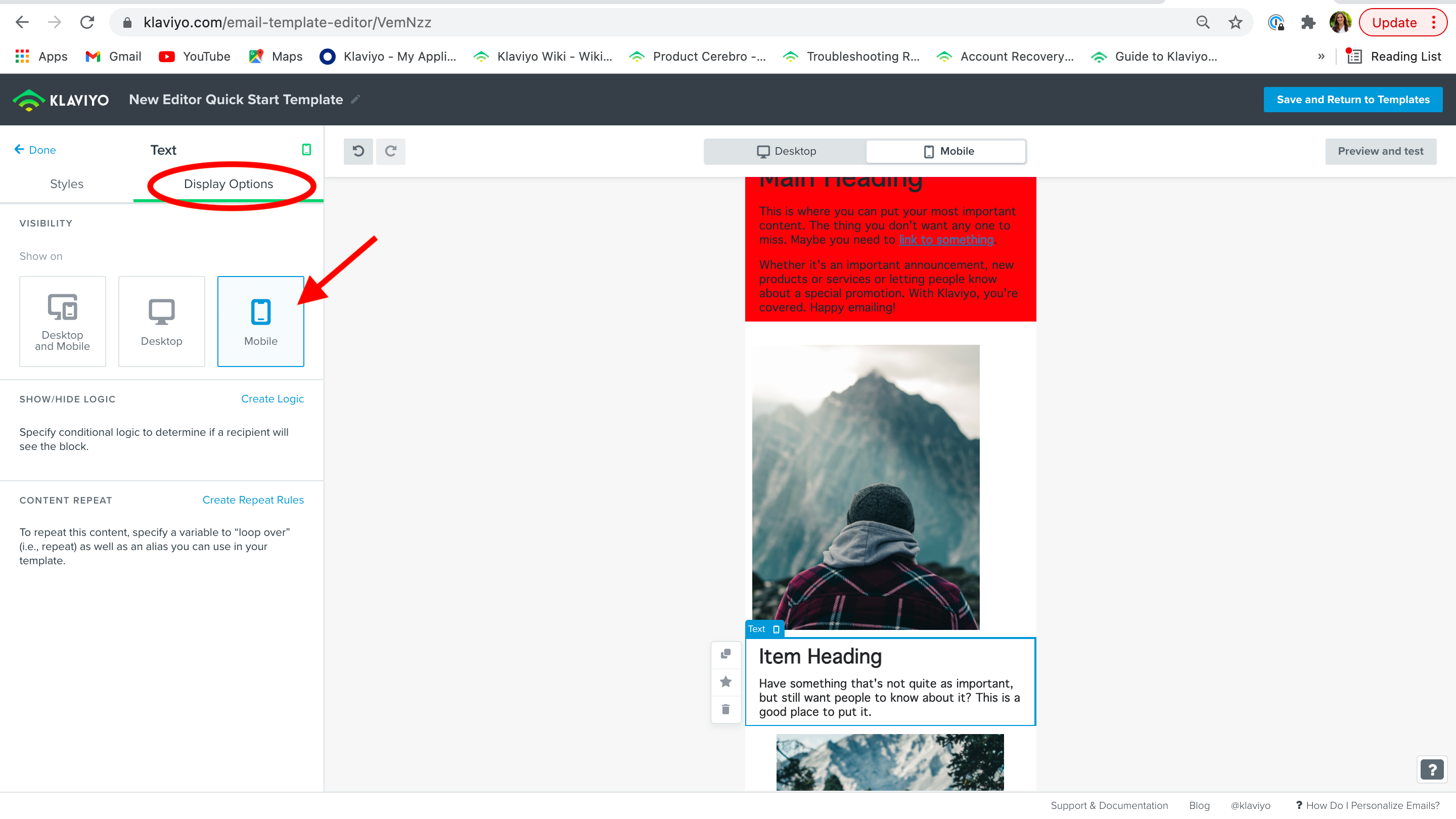
Each block of your email has a display options to confirm how that block will display depending how it’s viewed. There are three options, display on both, mobile only and desktop only. It is likely that the ‘desktop only’ option was selected for the blocks in your email.
I would utilize our mobile <> desktop button option in our template editor that can give you a good estimate of how your message will look on both display options. However, the most accurate way to see how a message will look when sent to inboxes is to send a test campaign and/or use mail preview tools like Litmus or Email on Acid.
I am so sorry you have experienced this! Here are some helpful template resources to learn more about this feature to avoid this in the future!
Thanks for sharing your question with us! I an sincerely sorry you’ve had this frustrating experience!
Unfortunately, it is not possible to go back and edit a live campaign after it’s been sent. A campaign can only be edited while in Draft status. However, you could create a segment of your users who were on your intended recipient list(s) and didn’t get the email after you canceled the send. This could show you how many users are in this segment and if its worth sending the corrected version to any users who did not receive your campaign.
Each block of your email has a display options to confirm how that block will display depending how it’s viewed. There are three options, display on both, mobile only and desktop only. It is likely that the ‘desktop only’ option was selected for the blocks in your email.
I would utilize our mobile <> desktop button option in our template editor that can give you a good estimate of how your message will look on both display options. However, the most accurate way to see how a message will look when sent to inboxes is to send a test campaign and/or use mail preview tools like Litmus or Email on Acid.
I am so sorry you have experienced this! Here are some helpful template resources to learn more about this feature to avoid this in the future!
Like @Taylor Tarpley mentioned the main culprit will likely be because of what you mentioned. This is also why we don't use this feature (or at least try not to).
It's very easily overlooked which causes issues. Good thing, those oops emails sometimes work very well.
Now moving forward my suggestion would be to always do a QA (Quality Assurance) and check your email in multiple devices (or use a tool like Litmus). This way you're sure it works as expected.
The issue could be that you are in another place other than your block. Do you mind confirming that you are clicking into the individual block of your template as you can see in my pinned answer above? If so, could you send a larger screenshot of where you are in your template when you’re seeing this message?