

Contributor IV
May 3, 2024 5:33 PM UTC
Solved

Why is shows me 'Source Code' on every email template

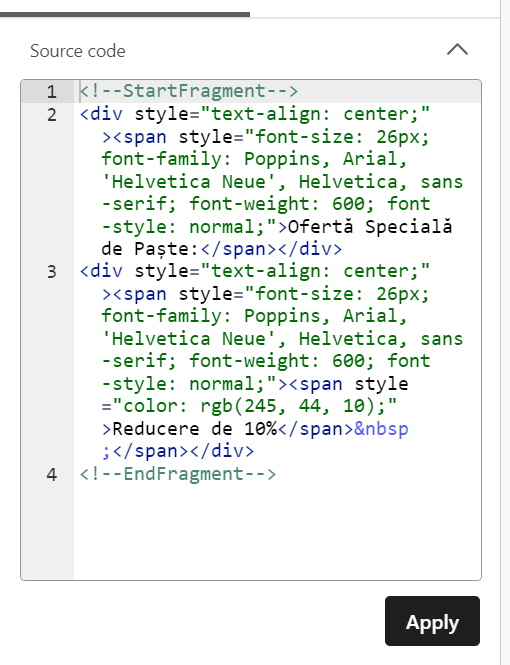
Hello, is something wrong with my accounts that’s shows me ‘Source Code’ to edit text block in editor?

I will show you the photo (it doesn’t let me to edit the text in another way):


    This topic has been closed for replies.
    JessFosnough
    Expert Problem Solver IV
    May 3, 2024 5:37 PM UTC

    Hi @Alinga,

    See this thread:


    Apparently they changed the UI and now editing the text box is not on the left side panel. I have not yet seen this functionality in my account, though.

    Good luck!

    Jessica

    7 replies

    JessFosnough
    Expert Problem Solver IV
    Expert Problem Solver IV
    May 3, 2024 5:37 PM UTC

    Hi @Alinga,

    See this thread:


    Apparently they changed the UI and now editing the text box is not on the left side panel. I have not yet seen this functionality in my account, though.

    Good luck!

    Jessica
    AlingaAuthor
    Contributor IV
    May 3, 2024 5:39 PM UTC

    Hi @Alinga,

    See this thread:


    Apparently they changed the UI and now editing the text box is not on the left side panel. I have not yet seen this functionality in my account, though.

    Good luck!

    Ohh many many many thanks!

    Contributor I
    Jul 25, 2024 10:25 AM UTC

    is there a way I can change it so my account isn't code? just normal text. I don't understand code and I can't do basic functions such as change font, text size and colour etc

    JessFosnough
    Expert Problem Solver IV
    Expert Problem Solver IV
    Jul 25, 2024 11:18 AM UTC

    Hi @kirigreen,

    I don’t think there is a way to not have the code on the left hand side, but you can hide it by clicking the carrot at the top right - see screen shot below.  To edit text the normal way, just double click in any text box. The toolbar should be at the top. I have heard there are issues while using the new editor on tablets or on a mobile device; I only use it on a desktop and haven’t had any issues. Let me know if you have any more questions!


    Click arrow to hide code.


    To edit text the normal way, just double click in any text box. The toolbar should be at the top.


    Screen shot of toolbar after double clicking in text box.


    I have heard there are issues while using the new editor on tablets or on a mobile device; I only use it on a desktop and haven’t had any issues. Let me know if you have any more questions!

    Jessica
    Contributor I
    Feb 11, 2025 6:21 PM UTC

    I’m running into this exact same issue now. For some reason, it’s only when I access emails for editing via the flows section. Right now, my only option is to style via source code… anyone else running into this issue? 

    retention
    Partner - Platinum
    2025 Champion
    Feb 18, 2025 9:40 PM UTC

    ​@karlschopf - The UI changed, so now you edit the style inline in the Text Block by double clicking it. The style tools are now on the upper right hand side of the editor like the picture shown by ​@JessFosnough above.   

    Maybe this will help:


    Joseph Hsieh // retentioncommerce.com // X: @retention
    Contributor I
    Feb 19, 2025 10:08 AM UTC

    Thanks super helpful managed to find it after the fact but nonetheless, appreciate you closing the loop!