


Contributor I
April 10, 2024
Solved

Woocommerce checkbox issue on mobile

  • April 10, 2024
  • 4 replies
  • 145 views

Hello,

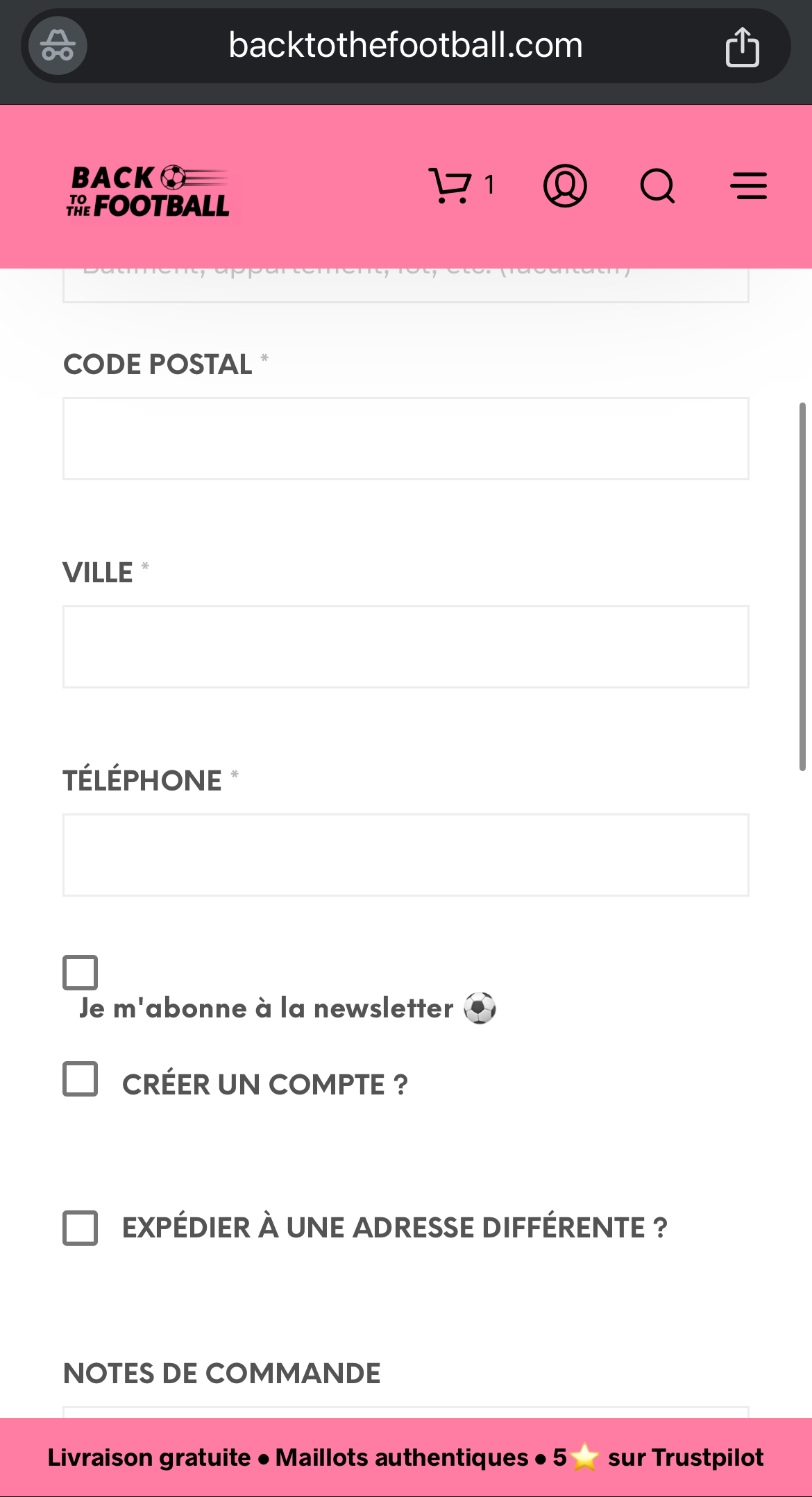
I have an issue with my Klaviyo checkbox on the checkout page. On mobile, the text is under the checkbox. On desktop, it’s better but the text is a little bit above the checkbox.

I would just like to get the text aligned with the checkbox. Anyone has a solution?

Thank you
 

    This topic has been closed for replies.
    Best answer by bluesnapper

    Hi @BTTF 

    Understand now! It’s WooC checkout.

    I’m not sure how much this helps you, but I can see that the checkbox's position is not aligned within its container. By changing its value for ‘top’ from 3 to 0, it does align. See below.

    I’m afraid that’s as far as I’m able to go, so I think you’ll have to get a dev involved unless any other community member can help out further. 

    Hope that helps a bit!

    Regards

    Andy 


    CSS fix
    Fix applied


    4 replies

    bluesnapper
    Partner
    Champion & Partner
    April 10, 2024

    Welcome to the community @BTTF 

    It doesn’t look like an issue with your Klaviyo form configuration - I don’t believe any options there would produce that specific misalignment. So it may be some other website CSS that’s causing this.

    Does the form look OK in the editor?

    I took a look at your website to see the form and investigate further, but the pop-up does not appear, so it may not be live yet.

    Regards

    Andy

    https://bluesnapper.com - Klaviyo Champion '24 & Partner
    BTTFAuthor
    Contributor I
    April 10, 2024

    Hello Andy,

    It is live on the website : https://backtothefootball.com/ : it’s on the checkout page, so you have to put an item in your basket and then begin checkout to see it. 

    I don’t have any editor for this : I’ve just allowed Klaviyo checkbox to be on the checkout page and I can only change the text. Nothing on Woocommerce. 


    bluesnapper
    Partner
    Champion & Partner
    April 10, 2024

    Hi @BTTF 

    Understand now! It’s WooC checkout.

    I’m not sure how much this helps you, but I can see that the checkbox's position is not aligned within its container. By changing its value for ‘top’ from 3 to 0, it does align. See below.

    I’m afraid that’s as far as I’m able to go, so I think you’ll have to get a dev involved unless any other community member can help out further. 

    Hope that helps a bit!

    Regards

    Andy 


    CSS fix
    Fix applied


    https://bluesnapper.com - Klaviyo Champion '24 & Partner
    BTTFAuthor
    Contributor I
    April 10, 2024

    It works well on desktop for Chrome, the text is now aligned with the checkbox. But on Safari and on mobile it’s still the same, the text is under the checkbox. 

    That helps a bit, thank you, I will wait if someone can help me on this 😊

    Regards

    Tristan



