Contributor I
October 10, 2022
Solved

WooCommerce Products Variants not assigned

  • October 10, 2022
  • 1 reply
  • 216 views

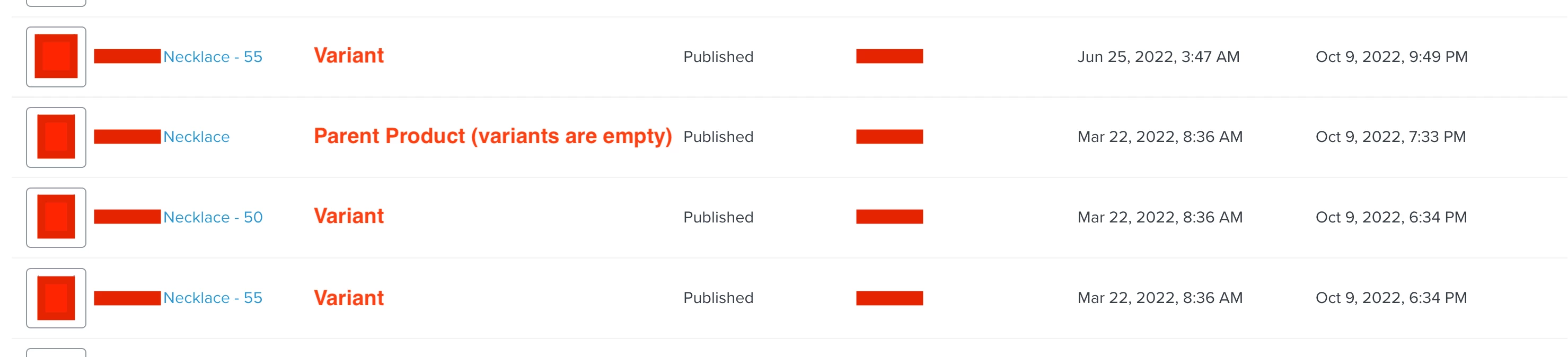
Unfortunately there seems to be a huge bug in the woocommerce product feed. All products are imported, variable and childs, but the product variants are not assigned to its variable parent products.

Therefore we cannot use the dynamic product block as it gives us the product name with the size, which is completely irrelevant to some users. Nobody wants to see a size in the name that doesn’t fit him.


Please let us know how we can solve this.

    This topic has been closed for replies.
    Best answer by Dov

    Hi @markmaurerrr,

    Thanks for sharing this question with us.

    You’re seeing the catalog items displayed in that manner because each variant from WooCommerce is considered a discrete product.

    In terms of populating dynamic variables, despite this catalog organization, everything will still work if you’re using any of our flows to dynamically display the contents of the user’s cart i.e. abandoned cart, browse abandonment. This is because we will only target the variants or parents products that are relevant for that particular user. For example, if the user has Necklace in their cart only, that’s the parent item we’ll show in the email (rather than any of the variants). If they have a parent item + a variant, we’ll show both of those items, and so on.

    I’d also consider adding categories or tags for these items on WooCommerce’s end. That way you can limit your product feed to only contain items with particular tags or categories. This will be helpful to further organize your parent > variant items. For example, if you created categories for parent vs. variant items, in your product feed, set it to “limit to specific categories” & select “parent” so users only see parent items in the dynamic product feed. You can make categories or tags as broad or as granular as you’d like.

    You can also manually curate parent products or their variants using a product block.

    I hope that’s helpful.

    1 reply

    Dov
    DovAnswer
    Klaviyo Alum
    October 11, 2022

    Hi @markmaurerrr,

    Thanks for sharing this question with us.

    You’re seeing the catalog items displayed in that manner because each variant from WooCommerce is considered a discrete product.

    In terms of populating dynamic variables, despite this catalog organization, everything will still work if you’re using any of our flows to dynamically display the contents of the user’s cart i.e. abandoned cart, browse abandonment. This is because we will only target the variants or parents products that are relevant for that particular user. For example, if the user has Necklace in their cart only, that’s the parent item we’ll show in the email (rather than any of the variants). If they have a parent item + a variant, we’ll show both of those items, and so on.

    I’d also consider adding categories or tags for these items on WooCommerce’s end. That way you can limit your product feed to only contain items with particular tags or categories. This will be helpful to further organize your parent > variant items. For example, if you created categories for parent vs. variant items, in your product feed, set it to “limit to specific categories” & select “parent” so users only see parent items in the dynamic product feed. You can make categories or tags as broad or as granular as you’d like.

    You can also manually curate parent products or their variants using a product block.

    I hope that’s helpful.

    DD