


How to set the variables of the completed purchase email unsuccessfully?
  • June 9, 2025
  • 1 reply
  • 33 views

Forum|alt.badge.img

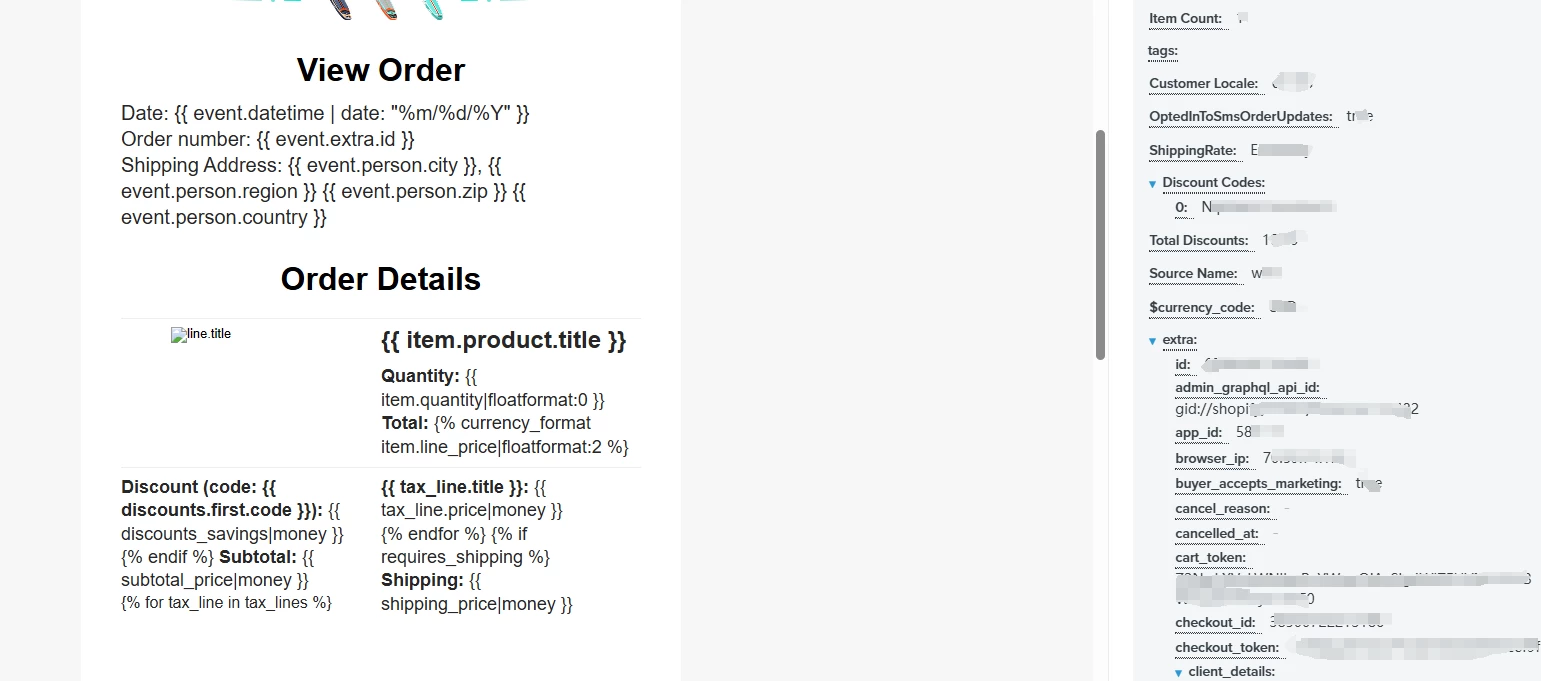
I am setting up a customer purchase completion email. The email content contains the variable customer order information. No matter how I modify it, it cannot be set successfully. What should I do?

1 reply

MikeKumlin
Problem Solver I
Forum|alt.badge.img+2
  • 2025 Champion
  • June 9, 2025

Hi Elas!

Happy to try and help out here. Based on your screenshot it appears that currently you are not referencing the event data using the correct format. One way to double check that things are set up correctly is to click the variables you’re looking to use while in your proof view, this will copy the correct code snippet needed to reference that item automatically for you then you just have to simply paste it into your template where you’d like to leverage it. 

It also appears you’re trying to feature some some content that repeats. For that I suggest following this tutorial https://help.klaviyo.com/hc/en-us/articles/4408802445339 it’ll give you the specific steps needed for you to repeat the items that need it.

Once you’ve got those things set up correctly you will see them populate while in your proofing view which is your best bet when confirming you have all your variables set up.

Hope that helps!

-Mike