


Klaviyo October 2026 new features: quiet hours in campaigns, and more
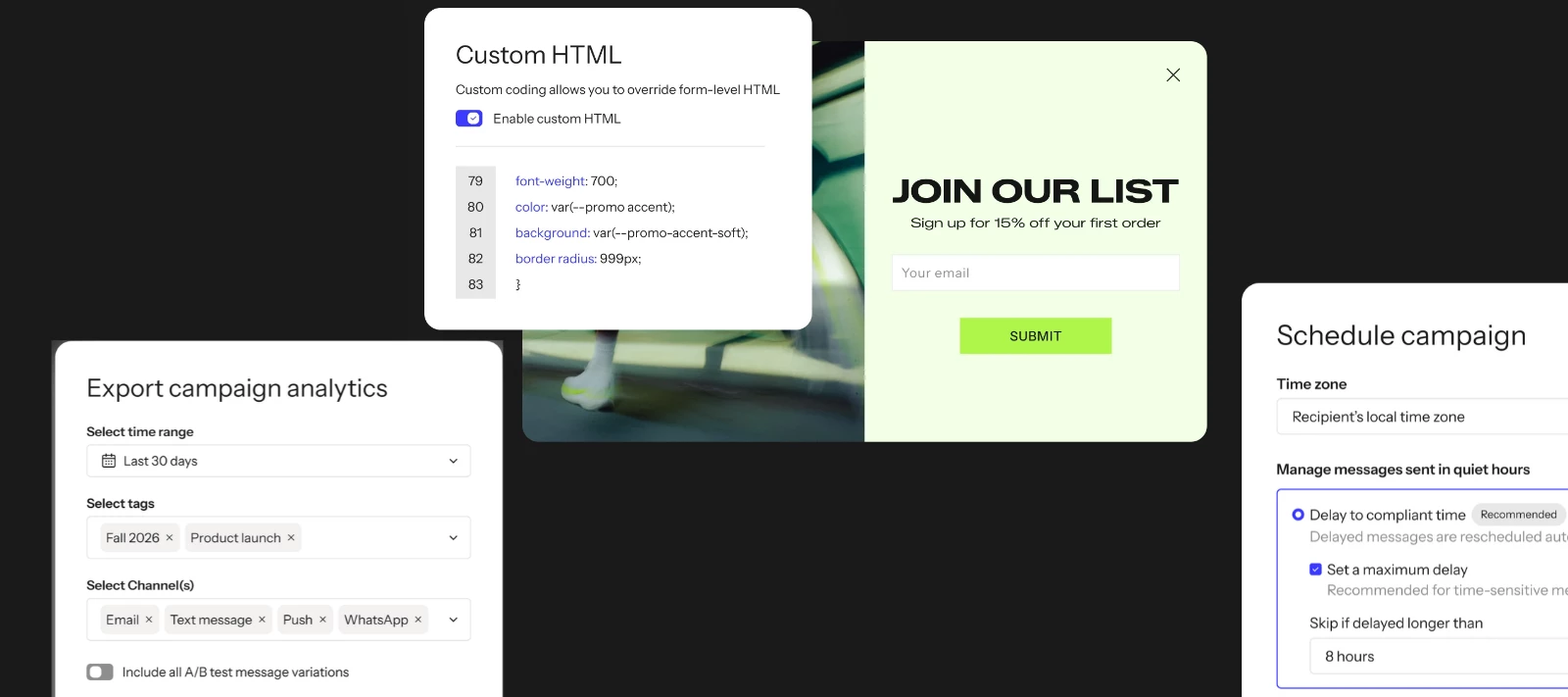
The quick version: You can now add custom HTML to in-app forms, apply quiet hours to text message campaigns, preview Customer Hub on your live site before publishing, and export email, SMS, push, and WhatsApp campaign analytics in one CSV.
Hey everyone,
Four updates in October’s release list are more about saving you real time or taking real risk off your plate: quiet hours protection for text campaigns, a more flexible in-app HTML block, a Customer Hub preview, and one export instead of four. None of them are flashy, but all of them are worth 5 minutes.
If you are looking for the flashy product news, check out the release article from earlier this month →
Custom HTML block is now available in in-app forms
What’s new
If you caught our September roundup, you already know the custom HTML block made its way to in-app forms. It’s since gone fully GA, so here’s the complete picture: if you have a mobile app, you can drop this block into an in-app form and write your own markup, comparison tables, custom layouts, richer text formatting, links, whatever the supported tags allow.
How it works
It’s the same block and the same editor you’d use for web forms, so if you’ve already built with it there, there’s nothing new to learn. Add the HTML block from Add blocks in the forms editor, write your markup in the code editor, and preview before publishing.
A few things worth knowing before you dive in: it’s available on paid plans only, it can only add new content (you can’t use it to edit the HTML of your form’s existing blocks), and Klaviyo Support can’t troubleshoot custom code if something breaks. Test on both desktop and mobile before it goes live.
Why it matters
This closes a real gap for brands with apps. The standard blocks cover a lot, but once you need a layout outside them, the options used to be “wait for Klaviyo to build it natively” or skip it entirely. Now you can build it yourself and keep it inside Klaviyo instead of reaching for a workaround.
Learn more: How to use custom HTML block in sign-up forms
Quiet hours now protect your text message campaigns
What’s new
Klaviyo already had quiet hours protection in flows. That same protection now extends to campaigns, for any text message send that includes SMS, MMS, or RCS content.
How it works
At scheduling, you choose what happens to a message that would land inside someone’s quiet hours. Delay it until quiet hours end, with an optional cap of one to 12 hours before it’s skipped instead, or skip it outright. Klaviyo checks every recipient individually at send time based on their location, so two people on the same campaign can get it at different moments. Say your account’s quiet hours are 9 p.m. to 8 a.m., and you send at 10:30 p.m. recipient time. That person’s message waits until 8 a.m., unless your max-delay setting is shorter than the 9.5-hour wait, in which case it’s skipped instead. You can see what happened after the fact, too: delayed and skipped counts show on the campaign overview, and skipped recipients are flagged in recipient activity.
Why it matters
Sending during quiet hours can expose you to real legal and financial risk, and until now that protection only existed in flows. If you’ve been manually working around send times, or avoiding certain time zones in your audience altogether, this takes that guesswork off your plate. One honest caveat: quiet hours rules vary by region, and this is genuinely a compliance question. If you’re unsure how it applies to your business, that’s a conversation for legal counsel, not a community thread.
Learn more: Quiet hours in campaigns
Preview Customer Hub on your site before it goes live
What’s new
You can now see how Customer Hub will actually look and behave on your website before you publish it to shoppers.
How it works
Set up or adjust your Hub, then preview it in place on your own site to check the experience and refine your setup, without it being visible to real visitors yet. Once it looks right, publish.
Why it matters
This is a “let me see it before I ship it” request we hear constantly, not just for Hub. Up to now, a lot of Hub setup meant publishing first and adjusting based on what you saw live, which isn’t great when the thing you’re adjusting is customer-facing. This closes that gap.
Learn more: Customer Hub help center
One export for email, SMS, push, and WhatsApp campaign data
What’s new
You can now export campaign analytics across email, SMS, push, and WhatsApp in a single CSV, instead of pulling each channel separately.
How it works
From the Campaigns tab, open the options menu next to View library and select Export analytics (not Export analytics (legacy), which still uses the old single-channel format). Choose your date range, filter by tag or channel, and optionally include A/B test variation rows, then export. Past exports stay available for 30 days under Settings > Other > Downloads.
Why it matters
If you’ve been stitching together separate exports per channel for a monthly report, this cuts real manual work.
One flag before you build on it: some of you have told us that renamed or missing columns in past exports broke downstream workflows, Power Query especially. The Help Center now lists the full column set for this export, in order, so before you plug it into an existing process, check it against what you’re currently pulling. This export isn’t a promise of column parity with whatever you were using before - that check is still on you!
Learn more: How to export campaign analytics
Share your experience and feedback below👇
Do these features make a difference for you? Or are you still waiting on another update to get excited about?