Answer

Disabling Customer Hub

  • August 1, 2025
  • 3 replies
  • 101 views

Forum|alt.badge.img+5

How do I disable Customer Hub? It is a bit intrusive on my Shopify store and is injecting some metrics and fields in my orders that I don’t like.

Best answer by RachelF

Hi ​@jmacman


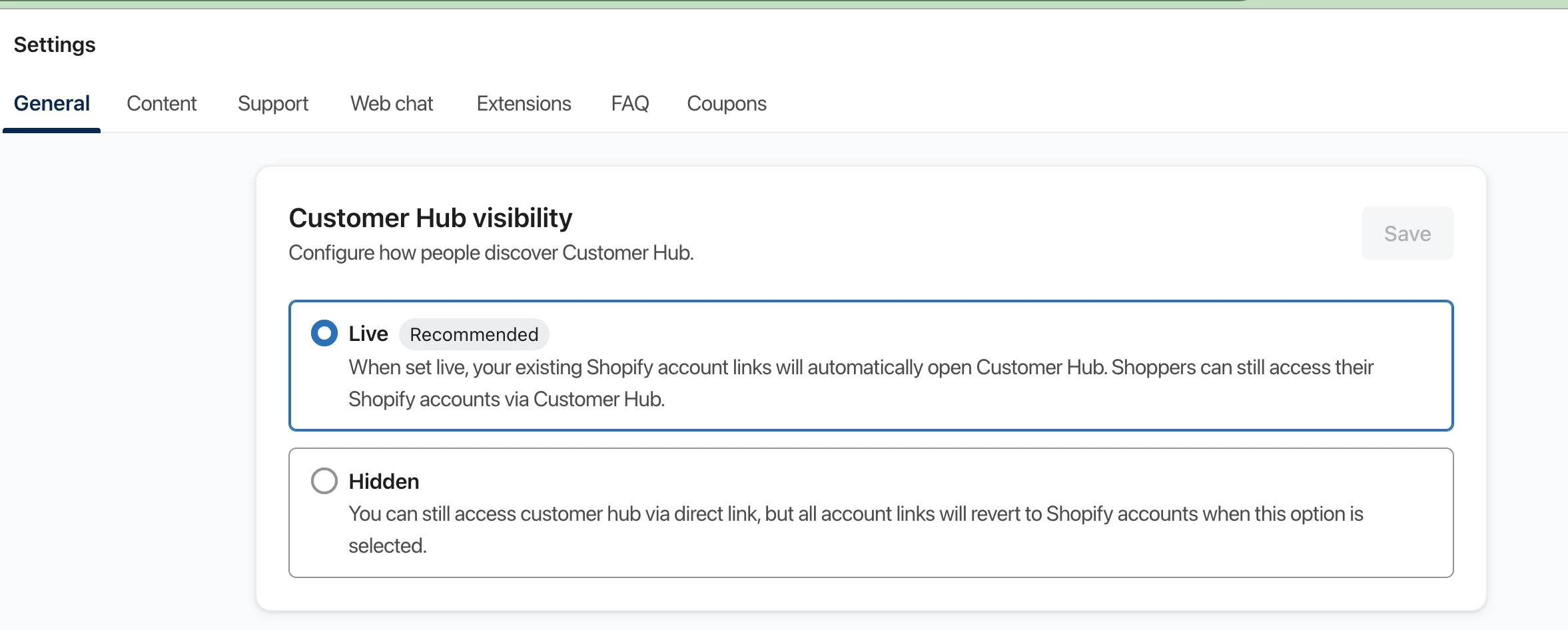
I can help you with that. You can go into Customer Hub, select Settings, and then choose Hidden. This will revert to using Shopify accounts. 


Before you do that, can I ask what it is injecting into your orders? We have had it enabled for a while and have never had an issue with that; maybe it is something we can figure out how to correct.


Thank you, ​​​​​​​

Rachel 

3 replies

RachelF
Problem Solver IV
Forum|alt.badge.img+8
  • 2025 Champion
  • Answer
  • August 1, 2025

Hi ​@jmacman


I can help you with that. You can go into Customer Hub, select Settings, and then choose Hidden. This will revert to using Shopify accounts. 


Before you do that, can I ask what it is injecting into your orders? We have had it enabled for a while and have never had an issue with that; maybe it is something we can figure out how to correct.


Thank you, ​​​​​​​

Rachel 


Forum|alt.badge.img+5
  • Author
  • Problem Solver II
  • August 1, 2025

It is injecting extra stuff in one of my products backend order details. That is way too intrusive and don’t even know what those values are.


RachelF
Problem Solver IV
Forum|alt.badge.img+8
  • 2025 Champion
  • August 1, 2025

Thanks for sharing the screenshot.

Those line items indicate that the order was attributed to Customer Hub, meaning the customer purchased the product after it was shown in their personalized recommended products block. I find this especially useful since we use line item data to tag customers based on their purchases. 

I can see how the additional line items could seem intrusive at first, but we have had great success using Customer Hub!

Thank you,

Rachel