Contributor I
September 16, 2021
Solved

"Add to cart" event isn't showing up

  • September 16, 2021
  • 4 replies
  • 299 views

Hello everyone. I know there are a lot of topics about this issue, but it seems like nothing is working for me. I did everything that is written on ‘How to Create a Custom "Added to Cart" Event for Shopify’ article.

Here is my button code on Shopify:
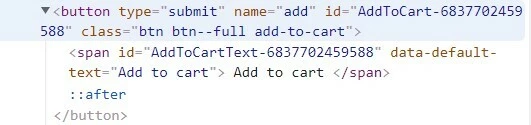
 

I have tried to install with ID and with class notation. Here is screenshot with ID:

 

Screenshot with class:
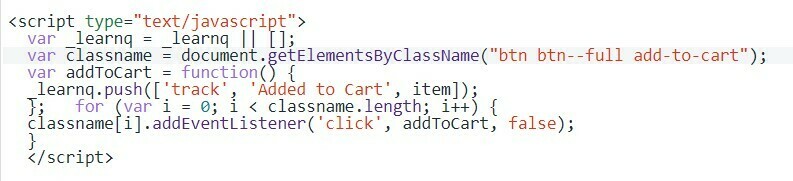
 

Even tried to add both codes at the same time.. Event still not showing up on analytics.

Viewed product event is set up and is working good. Can you help me to fix this issue please?

Will appreciate every recommendation!

    This topic has been closed for replies.
    Best answer by julie.accardo

    Hi @barrelmaker,

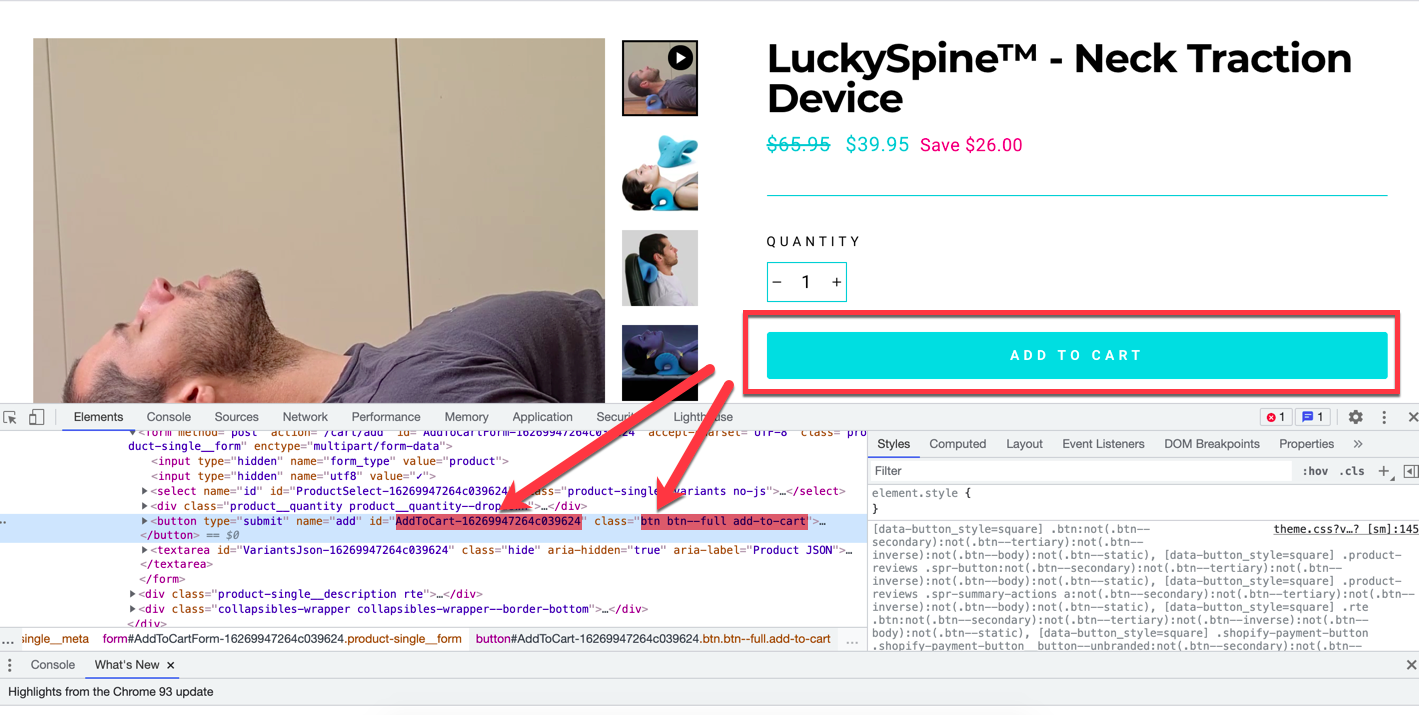
    I just took a look at your website and the button ID that I’m seeing is a little different than the button ID you are using in your code snippet screenshot. I’d recommend trying to use the ID “AddToCart-16269947264c039624"

    Best,

    Julie

    4 replies

    cbarley
    Klaviyo Employee
    Klaviyo Employee
    September 16, 2021

    Hey @barrelmaker , this thread and this post specifically might help you out here. When you’re testing this out by completing an “Add To Cart” event, are you sure you’re known by the Klaviyo cookie? The post I linked has more detail on who Klaviyo tracks and how you might go about testing this, but the TLDR is that Klaviyo does not track anonymous visitors, and there are a certain number of actions that somebody can do to identify themselves to the cookie.

    If you’d also be able to share the website where you’ve added the code so that I could troubleshoot on my own, that might help too!

    - Connor Barley, Klaviyo Solution Architect
    Contributor I
    September 16, 2021

    Hello @cbarley 

    Thanks for your reply. Here is my website url:getluckyspine.com

    Contributor I
    September 17, 2021

    Hey @barrelmaker , this thread and this post specifically might help you out here. When you’re testing this out by completing an “Add To Cart” event, are you sure you’re known by the Klaviyo cookie? The post I linked has more detail on who Klaviyo tracks and how you might go about testing this, but the TLDR is that Klaviyo does not track anonymous visitors, and there are a certain number of actions that somebody can do to identify themselves to the cookie.

    If you’d also be able to share the website where you’ve added the code so that I could troubleshoot on my own, that might help too!

    I have added my email to a subscribers list on a product page, so View Product event is working fine. Also I provided my website URL above. Thanks for assistance.

    julie.accardo
    Klaviyo Employee
    Klaviyo Employee
    September 18, 2021

    Hi @barrelmaker,

    I just took a look at your website and the button ID that I’m seeing is a little different than the button ID you are using in your code snippet screenshot. I’d recommend trying to use the ID “AddToCart-16269947264c039624"

    Best,

    Julie

    JA