Problem Solver I
September 5, 2024
Solved

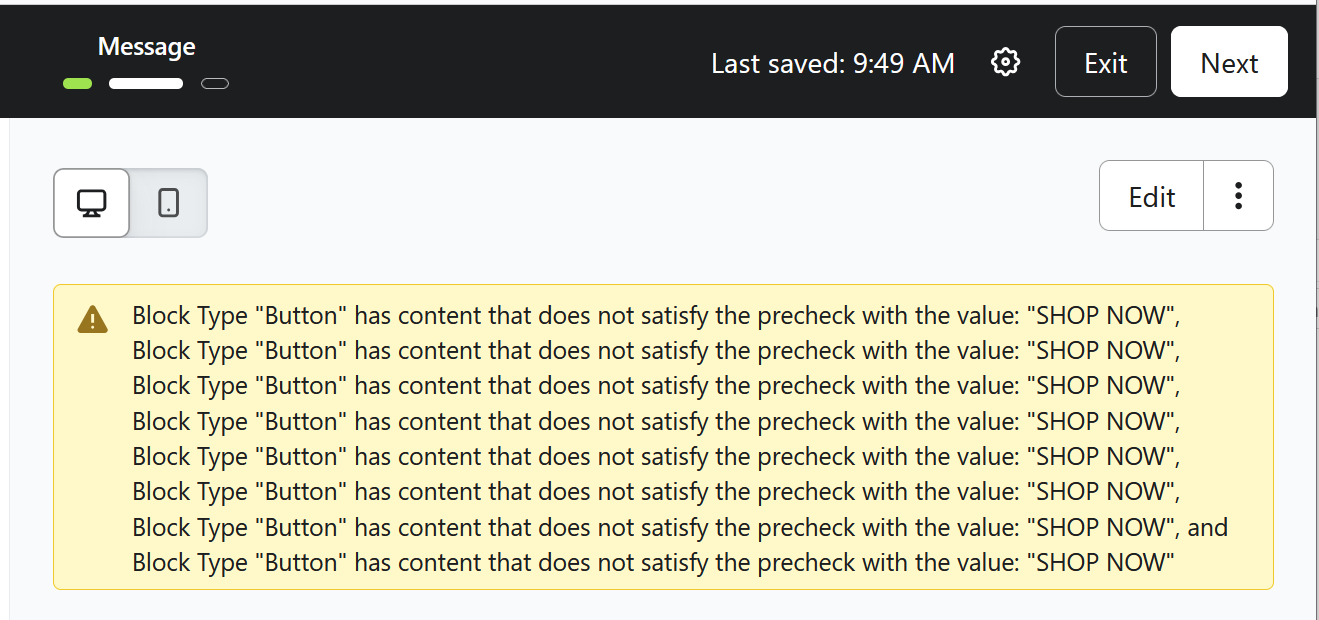
"Block Type "Button" has content that does not satisfy the precheck" Error Message

  • September 5, 2024
  • 4 replies
  • 4092 views

Hi! When starting a new email blast based off an existing one, I’m getting this error message about my eblasts’ buttons. Everything still appears to work once I click in to edit the content - anything I should be doing different? Thanks!

    This topic has been closed for replies.
    Best answer by Tcapyatt

    I have also seen the same alert when building a new campaign this week. I just spoke to a Klaviyo agent who advised me of the following:

    "This alert is due to "Shop Now" being the default text on the block when it is brought in, and since this is the default configuration, the alert is to remind you that you may want to change it. With that said, this is a warning about that, and not something which would prevent you from sending the campaign. If you are good with that button text, then you can proceed in sending/scheduling out the campaign."

    "There is no need to change anything, Our team is also working to remove that warning, but you are all good to send your campaign:slightly_smiling_face:"️

    4 replies

    Contributor I
    September 6, 2024

    My email has come up with the same error! I’ve never experienced this before and it seems like the links are testing fine.

    Problem Solver I
    September 6, 2024

    Me three! I’ve tried looking this up and can’t find any information. I don’t think the error really explains it either so it would be great to know what it actually means...

    TcapyattAnswer
    Problem Solver I
    September 6, 2024

    I have also seen the same alert when building a new campaign this week. I just spoke to a Klaviyo agent who advised me of the following:

    "This alert is due to "Shop Now" being the default text on the block when it is brought in, and since this is the default configuration, the alert is to remind you that you may want to change it. With that said, this is a warning about that, and not something which would prevent you from sending the campaign. If you are good with that button text, then you can proceed in sending/scheduling out the campaign."

    "There is no need to change anything, Our team is also working to remove that warning, but you are all good to send your campaign:slightly_smiling_face:"️

    chloe.strange
    Community Manager
    Community Manager
    September 6, 2024

    Thank you for sharing this with us - we have shared this feedback with the product team. I will update this thread as we receive updates. 

    ~Chloe