Problem Solver II
September 13, 2021
Solved

Change the font used in the "back in stock" notifcation button and modal?

  • September 13, 2021
  • 3 replies
  • 711 views

Hi all, just wondering if this is possible or if you can only customize the stuff already in the snippet? It seems like something that should be doable. Thanks!

    This topic has been closed for replies.
    Best answer by Mailbox Manny

    Ahhh.. should be possible still.  Test it out :)


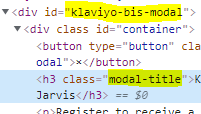
    If it doesn’t, you should be able to add custom css to your theme and override the klaviyo attributes:


    Let me know if it works out, I’d be curious (I’ve only done work on Shopify stores)

    3 replies

    Mailbox Manny
    Partner - Silver
    Partner - Silver
    September 14, 2021

    Hi! 

    Welcome to the community! You definitely can :)

    Here’s the attribute name to change the fonts in the modal (you can find more info of what parameters can be modified at the help page article - How to Install Back in Stock for Shopify):


    For the button, you can add a class to the button as one of the parameters and the modify the css in your theme to choose what font you want to match your store styling:


    Hope that helps!

    Subscribe. Segment. Send. Repeat.
    wernstromAuthor
    Problem Solver II
    September 14, 2021

    Hi @Mailbox Manny, this same option isn’t listed in the documentation for BigCommerce (which is what I’m working in) is this still possible to edit?


    Thanks! 

    Mailbox Manny
    Partner - Silver
    Partner - Silver
    September 14, 2021

    Ahhh.. should be possible still.  Test it out :)


    If it doesn’t, you should be able to add custom css to your theme and override the klaviyo attributes:


    Let me know if it works out, I’d be curious (I’ve only done work on Shopify stores)

    Subscribe. Segment. Send. Repeat.