Erik-Gilpa
Problem Solver I
Problem Solver I
August 22, 2022
Solved

Edit Preference page

  • August 22, 2022
  • 3 replies
  • 217 views

Hi there 

I am working on my Preference pages. 

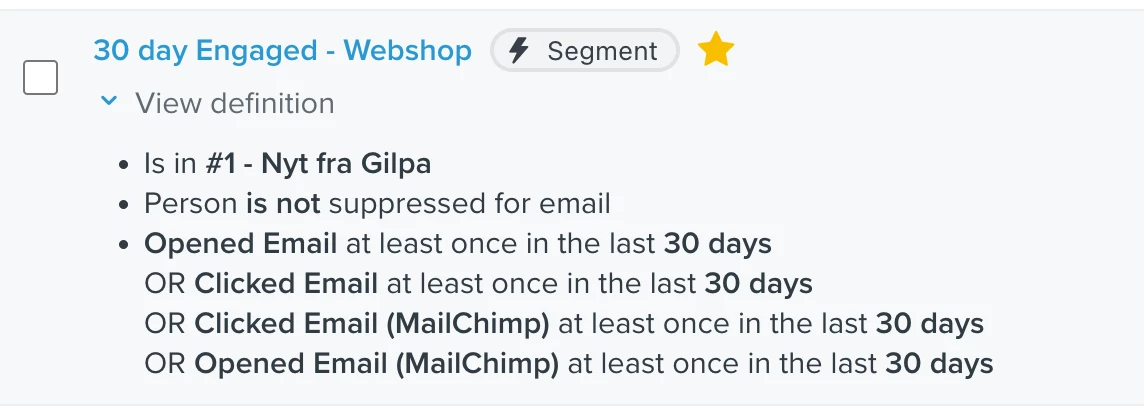
I know that I have to do it under each list, but if I send to a Segment (see picture) then the Preference page for a list is not used. 

Do I need to ad the list the campaign and the the segement? to make sure that the right Peference page is used?


    This topic has been closed for replies.
    Best answer by alex.hong

    Hi @Erik-Gilpa,

    Thanks for sharing with the Community.

    If you were not using hosted pages, the main Preferences Pages tab in the left sidebar of your account would be the default email forms used in the following cases:

    • Emails sent to segments
    • Flows triggered by an event
    • Emails sent to multiple lists and/or segments


    When emails are sent to subscriber lists, however, the default email forms are not used. This is because there are unique forms connected to specific lists, so additional customization can be done within the Subscribe & Preference pages section of a given list.    

    Additional Resource for Reference:

    Any email that is sending to a specific list (and only a specific list) will only display the preference page associated with that list.
     
    However, you can change the list-specific preference page to match the global preferences page by editing the subscribe page for the list. Changes made to the subscribe page for the list will be reflected in the list-specific preference page.
     
     
    Each List has the option to edit their own Preference pages and can be done by going into the Subscribe and Preference Pages for that list:
     
     
    ?name=image.png
     

    Hope that helped,

    Alex

    3 replies

    alex.hong
    alex.hongAnswer
    Klaviyo Alum
    August 23, 2022

    Hi @Erik-Gilpa,

    Thanks for sharing with the Community.

    If you were not using hosted pages, the main Preferences Pages tab in the left sidebar of your account would be the default email forms used in the following cases:

    • Emails sent to segments
    • Flows triggered by an event
    • Emails sent to multiple lists and/or segments


    When emails are sent to subscriber lists, however, the default email forms are not used. This is because there are unique forms connected to specific lists, so additional customization can be done within the Subscribe & Preference pages section of a given list.    

    Additional Resource for Reference:

    Any email that is sending to a specific list (and only a specific list) will only display the preference page associated with that list.
     
    However, you can change the list-specific preference page to match the global preferences page by editing the subscribe page for the list. Changes made to the subscribe page for the list will be reflected in the list-specific preference page.
     
     
    Each List has the option to edit their own Preference pages and can be done by going into the Subscribe and Preference Pages for that list:
     
     
    ?name=image.png
     

    Hope that helped,

    Alex

    Erik-Gilpa
    Problem Solver I
    Problem Solver I
    August 25, 2022

    Hi @alex.hong 


    Thank you for your answer. 


    I not quite sure I understand it correct. 
     

    I.e. I send a campaign yesterday to the segment on the picture. 

    The preference page for this e-mail is the preference from the menu on the left side?


    Best Regards Erik /Gilpa.dk Denmark
    alex.hong
    Klaviyo Alum
    August 25, 2022

    Hi @Erik-Gilpa,

    If you are sending to a segment the main Preferences Pages tab in the left sidebar of your account.