


Active Contributor I
March 16, 2023
Solved

Error Message when I try to make my SMS live

  • March 16, 2023
  • 12 replies
  • 398 views

Hello.  I can’t seem to find any information here.  Can you please help.

I’m getting this message when I go to make my SMS live:
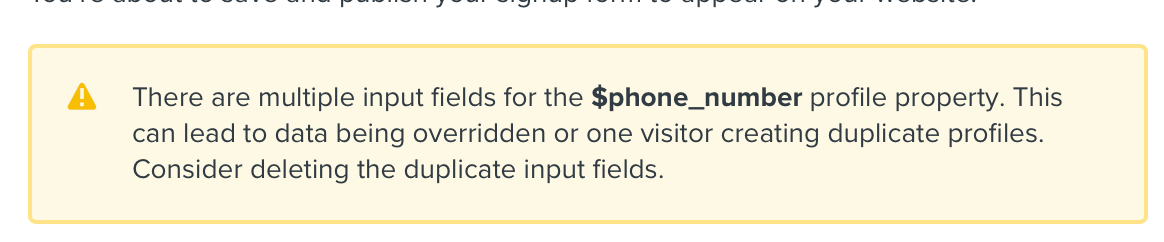
Not sure what this “$phone_number” profile property is referring to. I have a verified toll free number for the US and Canda that is the same number.

Thank you.

Denise

This topic has been closed for replies.
Best answer by David To

Hello @Denise D,

As that error message states, this typically means you have more than one capture field on your form linked to the $phone_number property.

I would suggest double checking all your input fields in your form and ensure their property options are set accordingly so that you only have one input field configured as $phone_number. 

In my experience, this is typically an easy mistake when you’re working on a multi-step signup form and have two separate phone number input fields in each of the steps.

I hope this helps!

David


12 replies

David To
Klaviyo Employee
David ToAnswer
Klaviyo Employee
March 17, 2023

Hello @Denise D,

As that error message states, this typically means you have more than one capture field on your form linked to the $phone_number property.

I would suggest double checking all your input fields in your form and ensure their property options are set accordingly so that you only have one input field configured as $phone_number. 

In my experience, this is typically an easy mistake when you’re working on a multi-step signup form and have two separate phone number input fields in each of the steps.

I hope this helps!

David


Denise DAuthor
Active Contributor I
March 17, 2023

Hi David,

Thank you.  I think that I got it.  There are two input field for phono number?

I’ll double check.

Thanks!

Denise

Denise DAuthor
Active Contributor I
March 17, 2023

Quick follow up?  Is there a quick way to delete extra phone number field?

Thank you. Denise

David To
Klaviyo Employee
Klaviyo Employee
March 17, 2023

Hey @Denise D,

You should be able to remove and delete an extra phone number input field from your form like any other block - selecting the block you want to delete and clicking on the trash icon. 

David

Denise DAuthor
Active Contributor I
March 17, 2023

I tried that but it deleted the whole block, resulting in no phone number block.  I added the block back in and still getting the same message?

Should I publish, overriding the error and try deleting block from published content?

Thank you.

Denise DAuthor
Active Contributor I
March 20, 2023

Hello David,

I’ve tried multiple times to delete the extra phone block but it just doesn’t seem to be there.  When I delete the block, the whole block deletes and there is not another one present.  I decided to go live to see what it looked like.  The newsletter and sms block appear but when I input information the get this:

Any advise would be appreciated...I’m at a loss.

Thanks!

Denise

David To
Klaviyo Employee
Klaviyo Employee
March 20, 2023

Hey @Denise D,

Have you checked to see if you have other phone number block on different step of the form?

If you’ve deleted the phone number block and are still receiving the same error when publishing, this could just mean you have multiple phone number blocks through different steps. As I’ve mentioned prior, this is oftentimes a simple mistake when working with a multi-step signup form. I would recommend checking all the steps of your form and ensuring that you only have one phone number block throughout your entire form before publishing.

David


Denise DAuthor
Active Contributor I
March 20, 2023

Thanks David!  I actually figured out that I had two SMS forms (each with a phone block), which is why I was having a challenging time trying to delete the phone block on the single SMS block.

Thank you.

Denise

Denise DAuthor
Active Contributor I
March 20, 2023

For some reason, I’m still getting the error message after I removed the extra SMS step?  Does it take some time for Klaviyo?

Thank you!

Denise

David To
Klaviyo Employee
Klaviyo Employee
March 20, 2023

Hey @Denise D,

if you’re still seeing that “there are multiple input fields for the $phone_number profile property...” after ensuring that you only have one phone number input field through your multi-step signup form, this suggests you may have an input field that’s not assigned correctly. For example, you may have an input field labeled First Name, but whose profile property is assigned as $phone_number.

If instead, the error you’re talking is the second one you previously brought up of “An error has occurred when submitting...”, I would recommend taking a look at some additional resources below from past Community posts:

This type of error is typically caused by some onsite behavior on your own website or some blockers through the browser or network you’re using. To investigate further, you may want to speak with your developer to dig deeper into this error.

David
