Hello, I’ve just started setting up some of my flows, including my welcome flow. I send out mini campaigns every week, and would like to exclude anyone that’s in the welcome flow so they don’t get the campaign emails just yet. I know I can exclude certain segments from the campaign but how do I go about creating a segment of anyone that’s in the welcome flow? I couldn’t see an option for ‘Is in X flow’ within the segments builder, what’s the best (neatest/easiest!) way to do this?
Hi @meetapapersandgems , thank you for sharing with the community.
The first thing you need to do is create a label for subscribers in the welcome email flow, and then you’d be able to exclude them from your campaigns.
You are going to update the profile property of these customers.
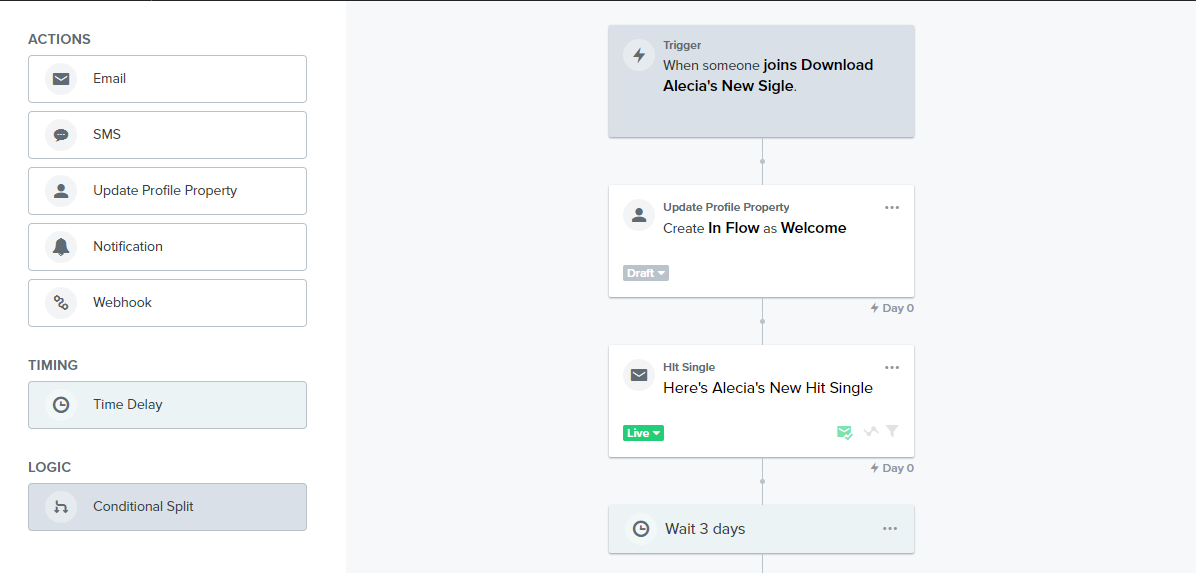
In your welcome email flow, drag the “Update Profile Property” block to the beginning of the flow before the first email. Select “Create New Property” as the property action .
For the Property Label, input “In Flow” and for the Property Value, input “Welcome”. This is an example I created here for you;
Now, if in future you want to exclude subscribers in a particular flow, all you need to do is input the Flow’s title as the property value since you have already created the label here;
At the end of your Welcome Email Flow, drag the “Update Profile Property” block again after the last email. This time select “Remove existing property” as property action.
You’d notice that the property value you assigned at the beginning doesn’t show in the drop down option of the “Remove existing Property” or in the segment builder in Klaviyo. This is become Klaviyo will update this when at least one profile in your account has the new property “in Flow” value (which is welcome) assigned to it. In other words, when at least one subscriber enter the welcome email flow.
Here’s the final step:
Once a Profile now has the property assigned, you can now create a segment for them.
In the “Properties about someone” » In Flow equals “Welcome”
Then, exclude them from your campaigns you are sending.
If I've helped you solve your question, feel free to book a call here: https://calendly.com/klaviyo-email-marketing/30min. Or email me at edgar.o@workean.net
I have set up the flow as explained, but can’t see how to exclude those people from the campaign - ‘don’t send to’ is only a list or a segment? Could you please show me where/how to exclude them? Thank you
If you want to exclude subscribers still part of a flow when you send out the campaign emails, what you can do is tag them with a profile property when they enter the flow. Once you tag them, only users that enter this flow have this property, for example, Welcome Series equals True. Now that these people have been tagged, when we go to schedule and send campaigns, all we have to do is create a segment of those with this profile property tag and exclude sends to them. At the end of your flow, you'll want to remove the profile property tag.
You would need to add a Create Profile Property action to the beginning of the Flow, and then a Remove Profile Property to the end. You can then use this temporary Property as a Segment definition as it will only apply while a customer is in the Flow path.
Here's a visual look:
You can then build a Segment with the following definition: Properties about someone Flow equals Welcome
This will pull everyone with that value into a Segment; after they exit the Flow and the property is removed, they will no longer be a member of the Segment.
You've all said exactly how to exclude welcome accounts from other flows or campaigns, but the really correct way is another.
Surely inserting a new property and deleting it at the end of the flow is the correct way, but have you ever thought that if a user enters the welcome series and the welcome filters are set, it will be all those who have not placed an order, from the moment the user will place an order before the end of the flow, will the ownership never be removed?
So my advice is to remove the property even if the user has made the first order, inserting the removal within the post-purchase flow.
What I'm saying always depends on how you set up the welcome series flow, for example for my ecommerce I don't want to send more welcome emails if the user buys and for this I had to insert a property removal both at the end of the welcome flow (if he does not purchase) the purchase trigger is triggered.
In this way we will have the possibility to communicate correctly with users once they leave the flow.
You've all said exactly how to exclude welcome accounts from other flows or campaigns, but the really correct way is another.
Surely inserting a new property and deleting it at the end of the flow is the correct way, but have you ever thought that if a user enters the welcome series and the welcome filters are set, it will be all those who have not placed an order, from the moment the user will place an order before the end of the flow, will the ownership never be removed?
So my advice is to remove the property even if the user has made the first order, inserting the removal within the post-purchase flow.
What I'm saying always depends on how you set up the welcome series flow, for example for my ecommerce I don't want to send more welcome emails if the user buys and for this I had to insert a property removal both at the end of the welcome flow (if he does not purchase) the purchase trigger is triggered.
In this way we will have the possibility to communicate correctly with users once they leave the flow.
I found the easiest way to deal with that is to place a conditional split before each email in my welcome flow. If an order has been placed since entering the flow, the In Flow property is removed and they exit the flow at that point. They are then included in any relevant other flows or campaigns.
You've all said exactly how to exclude welcome accounts from other flows or campaigns, but the really correct way is another.
Surely inserting a new property and deleting it at the end of the flow is the correct way, but have you ever thought that if a user enters the welcome series and the welcome filters are set, it will be all those who have not placed an order, from the moment the user will place an order before the end of the flow, will the ownership never be removed?
So my advice is to remove the property even if the user has made the first order, inserting the removal within the post-purchase flow.
What I'm saying always depends on how you set up the welcome series flow, for example for my ecommerce I don't want to send more welcome emails if the user buys and for this I had to insert a property removal both at the end of the welcome flow (if he does not purchase) the purchase trigger is triggered.
In this way we will have the possibility to communicate correctly with users once they leave the flow.
I found the easiest way to deal with that is to place a conditional split before each email in my welcome flow. If an order has been placed since entering the flow, the In Flow property is removed and they exit the flow at that point. They are then included in any relevant other flows or campaigns.