


Solved

Flow ownership when campaigns are handled by remote teams

  • December 18, 2025
  • 4 replies
  • 65 views

Forum|alt.badge.img

If campaigns and flows are built by remote marketers, how do you handle documentation and ownership in Klaviyo? We’re working with email specialists sourced via a remote recruitment agency like Crew Bloom and trying to keep things organized long-term.

Best answer by Byrne C

Hi ​@felixleo12,

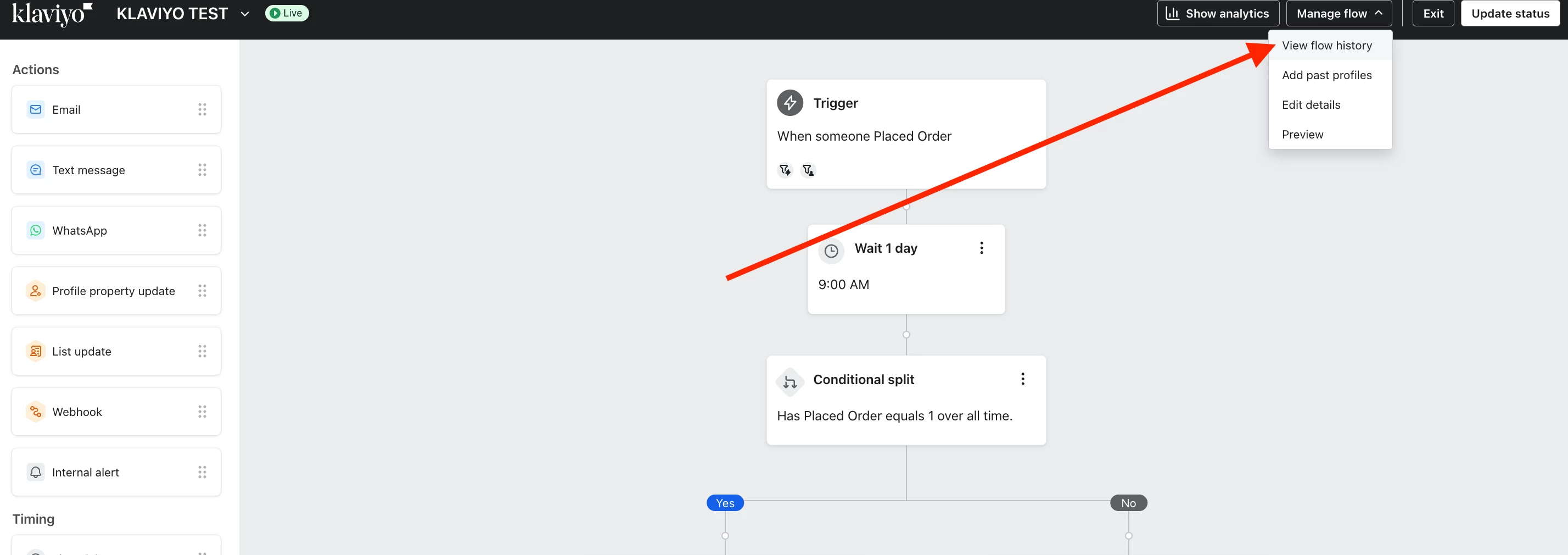
I wanted to chime in and make you aware of the Flow History for each flow in your account. It functions as a change log, and shows a timeline of what changed, with timestamps, and the user to make that change. You can find the flow history by clicking “Manage flow” in the top right, and then “View flow history.”


Additionally, we just released the Activity Logger, which is currently in beta, which gives you visibility into all actions in your account. Take a look at our help article here, that explains this new feature: Understanding the activity logger (beta).

4 replies

whereisjad
Expert Problem Solver IV
Forum|alt.badge.img+17
  • Expert Problem Solver IV
  • December 18, 2025

@felixleo12 what are you looking to know specifically, the changes and timestamps of which they make in the design of flows or campaigns in your account?  Are they using their own logins?


Forum|alt.badge.img
  • Author
  • Contributor I
  • December 19, 2025

Thanks for the clarification, @whereisjad! Yes, we’re mainly looking to track changes, timestamps, and maintain ownership, especially since our remote marketers are using their own logins.

We’ve also been exploring how other teams handle this with support from a remote recruitment agency to streamline onboarding and documentation. Any tips on keeping everything organized long-term would be super helpful!


whereisjad
Expert Problem Solver IV
Forum|alt.badge.img+17
  • Expert Problem Solver IV
  • December 19, 2025

@felixleo12 you should work with Support.  They might have access to some system activities from their level of access.  There isn’t a streamlined or automated way of doing this, you can ask Support and they could provide you a log perhaps. 


Byrne C
Community Manager
Forum|alt.badge.img+28
  • Community Manager
  • Answer
  • December 22, 2025

Hi ​@felixleo12,

I wanted to chime in and make you aware of the Flow History for each flow in your account. It functions as a change log, and shows a timeline of what changed, with timestamps, and the user to make that change. You can find the flow history by clicking “Manage flow” in the top right, and then “View flow history.”


Additionally, we just released the Activity Logger, which is currently in beta, which gives you visibility into all actions in your account. Take a look at our help article here, that explains this new feature: Understanding the activity logger (beta).