Hello guys, I’ve creating multiplee flows and they are all live, but none of them seem to be working. For example I have the browse abandonment for viewing products flow set up, but when people view my products there have been no emails sent out, does anyone know how tofu this please?
@JoeOwen Ah - we found the issue! These are not the right triggers.
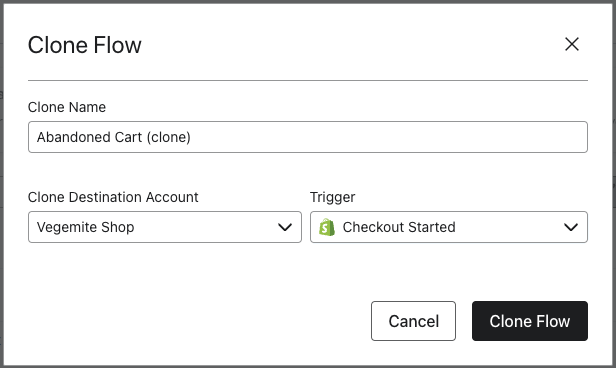
Unfortunately you can’t change the trigger on a flow, but you can achieve this by copying the flow and changing the trigger.
For each of the flows, if you click on the … next to the flow and click clone, then set the trigger to the correct one with the Shopify logo in front you should be good to go!
Once all of your flows are cloned, just set the new cloned flows live and you can delete the old ones.
Zyber is New Zealand's leading Shopify Premier & Klaviyo Master Platinum Partner passionate about helping merchants succeed. www.zyber.co.nz & www.unlocked.co.nz
@JoeOwen Good point! This one is indeed a custom piece (not part of the native Shopify integration). For this to fire, you need to have the Onsite Tracking feature embedded.
In your Shopify Integration Settings make sure the tickbox is ticket and it’s showing the message in green below. If that’s not green it will show instructions on how to turn it on in this place.
Zyber is New Zealand's leading Shopify Premier & Klaviyo Master Platinum Partner passionate about helping merchants succeed. www.zyber.co.nz & www.unlocked.co.nz