Hello guys, I’ve creating multiplee flows and they are all live, but none of them seem to be working. For example I have the browse abandonment for viewing products flow set up, but when people view my products there have been no emails sent out, does anyone know how tofu this please?
@JoeOwen Ah - we found the issue! These are not the right triggers.
Unfortunately you can’t change the trigger on a flow, but you can achieve this by copying the flow and changing the trigger.
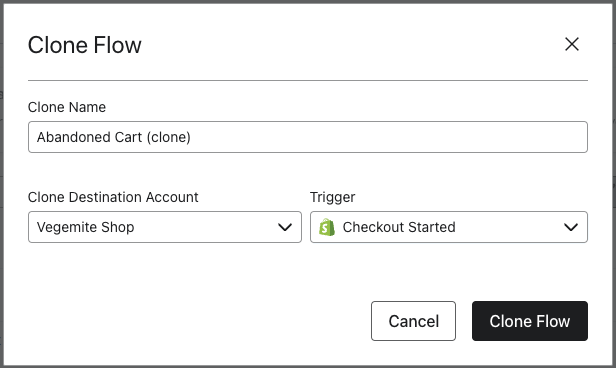
For each of the flows, if you click on the … next to the flow and click clone, then set the trigger to the correct one with the Shopify logo in front you should be good to go!
Once all of your flows are cloned, just set the new cloned flows live and you can delete the old ones.
Zyber is New Zealand's leading Shopify Premier & Klaviyo Master Platinum Partner passionate about helping merchants succeed. www.zyber.co.nz & www.unlocked.co.nz
Your metrics may not be firing, because your integration wasn’t set up correctly/verified. Besides this, we may need more information before we’re able to help adequately.
Are you using Shopify?
Are you able to send us a screenshot of one or several of your flow setups?
Get in touch at https://www.linkedin.com/in/stefan-milicevic-706331137/
Next, specifically about the “Viewed Product” event that is required to trigger the browse abandonment Flow - you can follow these troubleshooting steps to make sure that you are getting events whenever someone views a product.
If you can let us know what platform you are, some screenshots or explanation of what you’ve tried or looked into, we would be able to help more here. Let us know!
Joseph Hsieh // retentioncommerce.com // X: @retention
Your metrics may not be firing, because your integration wasn’t set up correctly/verified. Besides this, we may need more information before we’re able to help adequately.
Are you using Shopify?
Are you able to send us a screenshot of one or several of your flow setups?
It looks like the integration with Shopify is all set up correctly, yeah here are a couple is there anything you can see from these please?
Based on the screen images above I can see that no emails are sent, but the question is more if the integration is firing correctly.
If you go to this link (Sits in the menu with your account name bottom right corner → Integrations → Shopify) you should be able to see recent data. That should look something like this:
Is there anything on this page to suggest the integration isn’t live? The top right corner should say “Disable Integration” and the store URL should be your correct myshopify.com link.
If the data itself isn’t feeding through from Shopify the emails themselves won’t fire. The flow looks to be set up correctly so this is the most likely cause.
Thanks David
Zyber is New Zealand's leading Shopify Premier & Klaviyo Master Platinum Partner passionate about helping merchants succeed. www.zyber.co.nz & www.unlocked.co.nz
Thank you David, yes the data is still coming through where it should be on the link you just sent me so I think it might just be the flows that is the problem?
@JoeOwen here’s another thought - if you go to for example your abandon cart flow, can you click on “trigger”. This will open a menu on the right:
Does it have the “Checkout Started” with the Shopify logo next to it?
If so, can you click on “preview trigger” - this should show you some recent examples where this has passed, example:
Does this show?
Thanks David
Zyber is New Zealand's leading Shopify Premier & Klaviyo Master Platinum Partner passionate about helping merchants succeed. www.zyber.co.nz & www.unlocked.co.nz
@JoeOwen Ah - we found the issue! These are not the right triggers.
Unfortunately you can’t change the trigger on a flow, but you can achieve this by copying the flow and changing the trigger.
For each of the flows, if you click on the … next to the flow and click clone, then set the trigger to the correct one with the Shopify logo in front you should be good to go!
Once all of your flows are cloned, just set the new cloned flows live and you can delete the old ones.
Zyber is New Zealand's leading Shopify Premier & Klaviyo Master Platinum Partner passionate about helping merchants succeed. www.zyber.co.nz & www.unlocked.co.nz
ahh you're the man thank you David! knew we’d get there in the end haha, just one more question.. I see when I go to change ‘browse abandonment’ flow for ‘viewed product’ that the option to change the trigger to where the logo is there isn't an option, is it supposed to be like this?