

Contributor I
Oct 11, 2021 10:19 AM UTC
Solved

GDPR sign-up with competition collaboration

I want to create a form sign-up which enables consent for now only our database, but our collaborating partner, which I will export and send to them after the competition closes.

How do I go about setting up the right format plus, enabling exportation to specific ‘Yes’ and ‘No’ to consent? The way I’ve tried it doesn’t really seem to work as it adds both test email addresses in as ‘Yes’ when one selected ‘Yes’ and the other ‘No’. 
This topic has been closed for replies.
retention
retentionAnswer
2025 Champion
Oct 11, 2021 6:52 PM UTC

Hi @clstrong - welcome to the community!

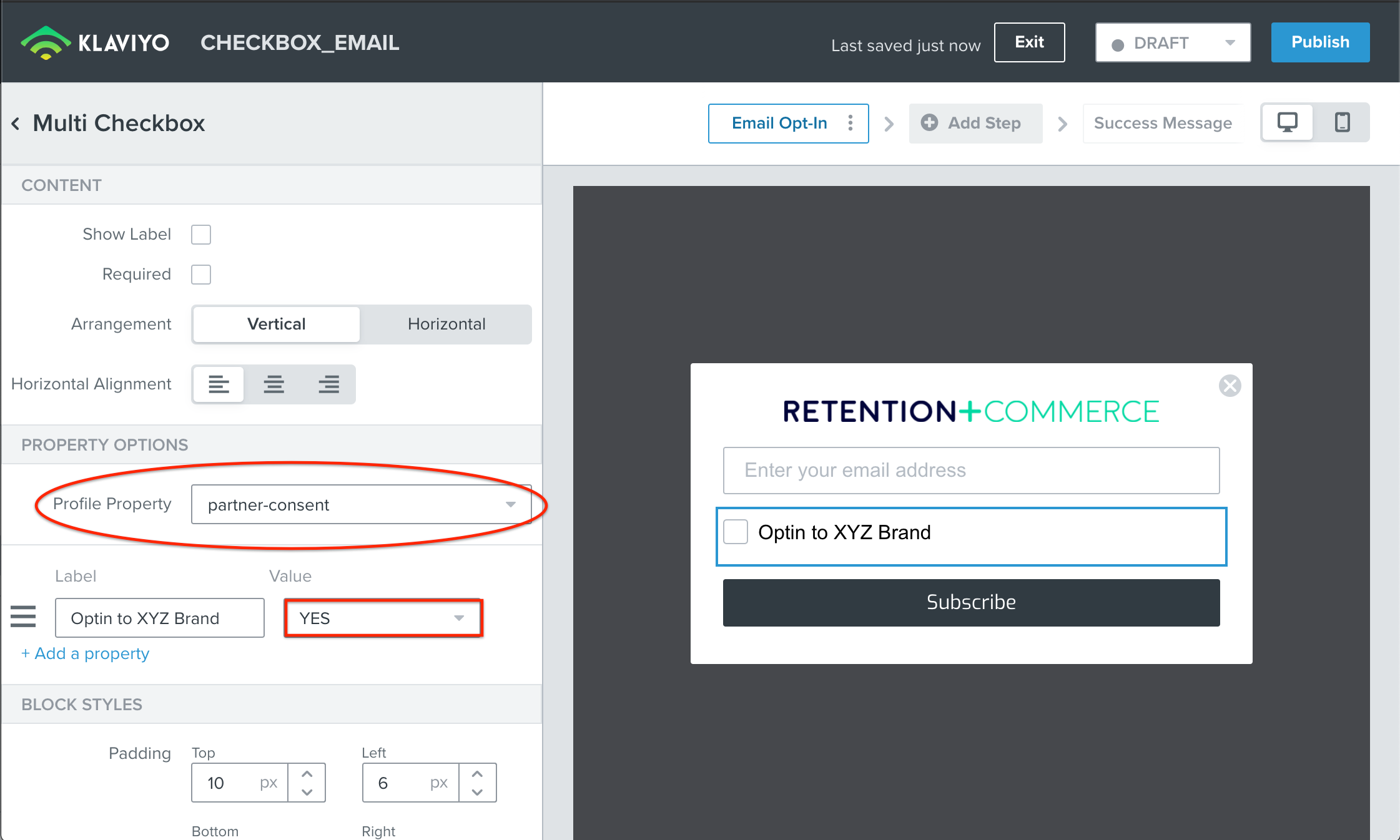
If you are planning to create a separate Consent for export to a partner, you can add another Checkbox in the Signup Form and set a separate Custom Property Name like “partner-consent = YES” or any field name you want to use. 

The “Consent” property you are referring to is a native reserved keyword in Klaviyo so that you can use that in your Klaviyo Campaigns/Flow to send them emails.  Since your partner emails aren’t sent from your account, you can create an arbitrary Custom Property Name you would like to call it.  You can then create a Segment matching that Custom Property Name with a specific value (YES) and export that Segment to your partner.  

See this to help get you started:

Hope this helps!

P.S. As a Bonus, you might want to A/B test this against a Multi Step Form and put the second opt-in on a second “step” to see if your email capture improves overall!

Joseph Hsieh // retentioncommerce.com // X: @retention

2 replies

retention
Partner - Platinum
retentionAnswer
2025 Champion
Oct 11, 2021 6:52 PM UTC

Hi @clstrong - welcome to the community!

If you are planning to create a separate Consent for export to a partner, you can add another Checkbox in the Signup Form and set a separate Custom Property Name like “partner-consent = YES” or any field name you want to use. 

The “Consent” property you are referring to is a native reserved keyword in Klaviyo so that you can use that in your Klaviyo Campaigns/Flow to send them emails.  Since your partner emails aren’t sent from your account, you can create an arbitrary Custom Property Name you would like to call it.  You can then create a Segment matching that Custom Property Name with a specific value (YES) and export that Segment to your partner.  

See this to help get you started:

Hope this helps!

P.S. As a Bonus, you might want to A/B test this against a Multi Step Form and put the second opt-in on a second “step” to see if your email capture improves overall!

Joseph Hsieh // retentioncommerce.com // X: @retention
clstrongAuthor
Contributor I
Oct 12, 2021 7:59 AM UTC

Oh wow that’s brilliant thank you Joseph! Super helpful!