


Contributor I
Oct 28, 2026 11:30 PM UTC
Question

Get rid of fine lines between blocks
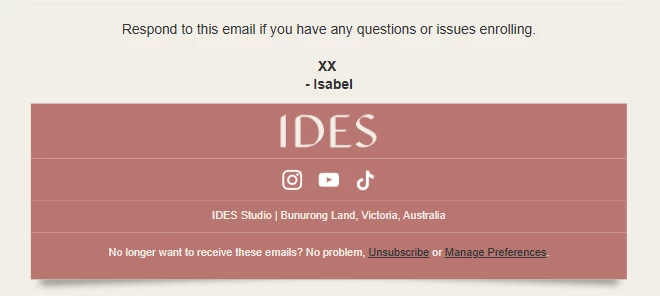
Hi there, how do I get rid of these fine white lines between blocks in my email campaign? I have changed the background colour to match the block colour, but still get these lines. It is not just an outlook issue, it shows in Gmail and the Klaviyo preview as well. Thanks!

3 replies

Nick
Expert Problem Solver I
Oct 29, 2026 5:14 AM UTC

Do you use the background color on the block or on the Section > Content Color? 

Contributor I
Oct 29, 2026 5:53 AM UTC

The block background colour I guess. Because the section colour changes the whole background right? I want it to look like that pink block is floating in the middle of the cream colour. Is there a way to change the colour behind the pink without changing whats on the sides and below?

Nick
Expert Problem Solver I
Oct 29, 2026 7:52 AM UTC

Ah yeah I see what you mean, and yes there are several options to add background colors. Starting with section background, Content background, block and then text background. 


For what you are trying to achieve you would have to use the text background. In my tests there is no line then between the text / social elements so maybe worth checking with the klaviyo support if they see anything that could cause it (as they will have access to the template). 

Alternatively you could also just try to have your footer as one html element using for example: 


<!-- IDES Studio Footer -->
<table role="presentation" width="100%" cellpadding="0" cellspacing="0" border="0"
style="background-color:#F1EFE7;">
<tr>
<td align="center" style="padding:0 30px 20px;">

<!-- Floating pink block -->
<table role="presentation" width="100%" cellpadding="0" cellspacing="0" border="0"
style="width:100%;max-width:600px;background-color:#B97975;
box-shadow:0 5px 9px rgba(0,0,0,0.15);">

<!-- Logo -->
<tr>
<td align="center" style="padding:12px 20px 8px;">
<span style="font-family:Georgia,serif;
font-size:46px;font-weight:400;
letter-spacing:1px;color:#FFFFFF;">
IDES
</span>
</td>
</tr>

<!-- Social Icons -->
<tr>
<td align="center" style="padding:12px 20px;">

<table role="presentation" cellpadding="0"
cellspacing="0" border="0">
<tr>

<!-- Instagram -->
<td align="center" style="padding:0 8px;">
<a href="https://www.instagram.com/">
<img src="INSTAGRAM_ICON_URL"
width="22" height="22"
alt="Instagram"
style="display:block;width:22px;
height:22px;border:0;">
</a>
</td>

<!-- YouTube -->
<td align="center" style="padding:0 8px;">
<a href="https://www.youtube.com/">
<img src="YOUTUBE_ICON_URL"
width="22" height="22"
alt="YouTube"
style="display:block;width:22px;
height:22px;border:0;">
</a>
</td>

<!-- TikTok -->
<td align="center" style="padding:0 8px;">
<a href="https://www.tiktok.com/">
<img src="TIKTOK_ICON_URL"
width="22" height="22"
alt="TikTok"
style="display:block;width:22px;
height:22px;border:0;">
</a>
</td>

</tr>
</table>

</td>
</tr>

<!-- Address -->
<tr>
<td align="center"
style="padding:12px 15px;
font-family:Arial,sans-serif;
font-size:11px;line-height:18px;
color:#FFFFFF;">
IDES Studio | Bunurong Land, Victoria, Australia
</td>
</tr>

<!-- Unsubscribe -->
<tr>
<td align="center"
style="padding:13px 15px 20px;
font-family:Arial,sans-serif;
font-size:11px;line-height:18px;
color:#FFFFFF;">
No longer want to receive these emails?
No problem,
<a href="{% unsubscribe_link %}"
style="color:#FFFFFF;text-decoration:underline;">
Unsubscribe</a>
or
<a href="{% manage_preferences_link %}"
style="color:#FFFFFF;text-decoration:underline;">
Manage Preferences</a>.
</td>
</tr>

</table>
</td>
</tr>
</table>

You still would need to find a solution for the social icons (add them as images to klaviyo and then just reference here) but this should definitely not come up with any additional lines. I am not a big fan of using just html blocks but since it is your footer and you dont have to change it as much or use it for other emails as a first template it’s probably okay.