


Contributor I
July 20, 2021
Solved

Hide block if someone purchased a certain item

  • July 20, 2021
  • 3 replies
  • 346 views

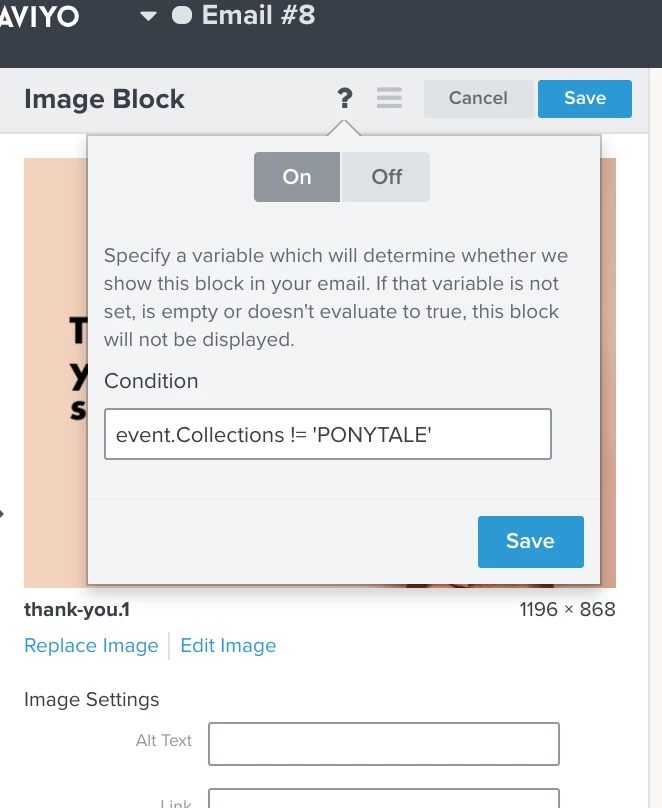
I’m trying to build an upsell block for a Placed Order triggered post purchase email. I want the block NOT to show if they purchased this particular item, and SHOW if they did not purchase this item. This is what I tried and it doesn’t seem to be working. Please help! Thanks!

 

    This topic has been closed for replies.
    Best answer by Dov

    Hi @KristaJoy,

    Thanks for sharing this with the Klaviyo Community.

    You’ll need to use the syntax for event variables using the hide/show feature. Using your example, with the collection name of PONYTALE. You’d want the statement to look like the following:

    not "PONYTALE" in event.Collections

    This will only display the block if PONYTALE is not a part of the collection(s) they purchased. If it is part of the collection they purchased, the block will hide.

    3 replies

    Dov
    DovAnswer
    Klaviyo Alum
    July 21, 2021

    Hi @KristaJoy,

    Thanks for sharing this with the Klaviyo Community.

    You’ll need to use the syntax for event variables using the hide/show feature. Using your example, with the collection name of PONYTALE. You’d want the statement to look like the following:

    not "PONYTALE" in event.Collections

    This will only display the block if PONYTALE is not a part of the collection(s) they purchased. If it is part of the collection they purchased, the block will hide.

    DD
    KristaJoyAuthor
    Contributor I
    July 21, 2021

    Thanks @dov.derin that did the trick! Now, how would you go about adding multiple rules? Say exclusing another collection?

    Dov
    Klaviyo Alum
    July 22, 2021

    Hi @KristaJoy,

    Thanks for your reply.

    You can use “and” or “or” conditions to add multiples rules to the conditional hide/show statement. If you use “and”, you will require that the user meets both criteria. For example, using “HOUSE” as another collection:

    not "PONYTALE" in event.Collections and not "HOUSE" in event.Collections
    DD