


Contributor I
February 2, 2021
Solved

How can I set up a flow so that I get notified when a customer joins my list?

  • February 2, 2021
  • 12 replies
  • 1604 views

Hello,


I am trying to set up a flow where I get notified when a customer joins my list.

I saw “You can also customize the triggered notification to include all key details about the new subscriber as well as any form data that got populated to their profile after filling out your form.” - how do I get this information included on the notification email?

This topic has been closed for replies.
Best answer by retention

@JavaHub - You can use the Notification Action in the Flow, or @AndriyBoychuk method to BCC yourself.  Either way, you can add the “Form Values” by making sure it’s in the email template.  All Klaviyo Signup Form values become Custom Properties for user that submits the form.

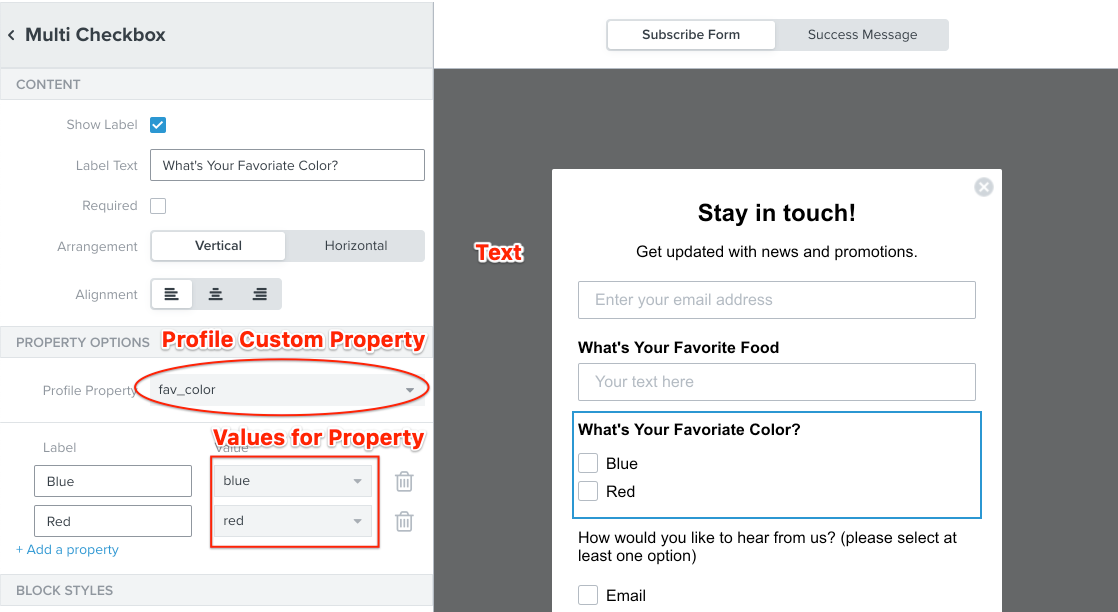
When you create additional Form input vaules, they show up in your Klaviyo Signup Form and specifies the “Field Name” and the “Value” like this:

In the email template (either as a notification email, or via a BCC), you can add these values like any other Custom Property template variable:

{{ person|lookup:'fav_color' }}

Here’s more guides on using Custom Properties or Dynamic Variables:

Hope this helps, let us know!

---

Joseph Hsieh // retentioncommerce.com // twitter: @retenion 

12 replies

JavaHubAuthor
Contributor I
February 2, 2021

Also how do I actually view the form submission data?

AndriyBoychuk
Partner - Platinum
Partner - Platinum
February 2, 2021

@JavaHub you can add your emails as BCC to the first message you send them after they join your list. It is under Sender Email Address. 


JavaHubAuthor
Contributor I
February 2, 2021

And this will include the form data? Like the options they have chosen from my dropdown in the form etc?

retention
Partner - Platinum
retentionAnswer
2025 Champion
February 2, 2021

@JavaHub - You can use the Notification Action in the Flow, or @AndriyBoychuk method to BCC yourself.  Either way, you can add the “Form Values” by making sure it’s in the email template.  All Klaviyo Signup Form values become Custom Properties for user that submits the form.

When you create additional Form input vaules, they show up in your Klaviyo Signup Form and specifies the “Field Name” and the “Value” like this:

In the email template (either as a notification email, or via a BCC), you can add these values like any other Custom Property template variable:

{{ person|lookup:'fav_color' }}

Here’s more guides on using Custom Properties or Dynamic Variables:

Hope this helps, let us know!

---

Joseph Hsieh // retentioncommerce.com // twitter: @retenion 

Joseph Hsieh // retentioncommerce.com // X: @retention
AndriyBoychuk
Partner - Platinum
Partner - Platinum
February 3, 2021

@retention shame on me :) . I did not see that notification action in Klaviyo. When did they add it? It is very cool. 

retention
Partner - Platinum
2025 Champion
February 3, 2021

@retention shame on me :) . I did not see that notification action in Klaviyo. When did they add it? It is very cool. 

@AndriyBoychuk - LOL - I still learn new things about Klaviyo every day.  But to answer, the Notification Action was launched on October 6th, 2020. :) 

Joseph Hsieh // retentioncommerce.com // X: @retention
AndriyBoychuk
Partner - Platinum
Partner - Platinum
February 3, 2021

@retention Thank you!!


any creative ways you use it for? 

Contributor I
April 19, 2021

I’ve figured out how to send a notification email to my team when a business inquiry comes in including the name, phone number and email of the new inquiry, but I can’t seem to get it to also show the address. I at least need to send the city, state and country of the incoming request, but I can’t figure out a way to get the dynamic tags to show this info.  Thoughts?

David To
Klaviyo Employee
Klaviyo Employee
May 2, 2021

@retention and @AndriyBoychuk, thank you both for sharing your knowledgeable insights! 

The notification action within a flow is typically used as an alert when someone joins a list and/or filled out a lead to be a part of the list. Other use cases for this could be a notice if someone has ordered a specific product or taken a specific action; often times a custom event clients have synced to Klaviyo that they want to be notified about. 

Would love to hear more about other use cases on this feature, though!


@JamesD5, are you already collecting this location information somehow such as through a form? If so, then you should be able to use the {{ person|lookup: }} tag within your notification action in your flow to return their specific profile property. You can learn more about utilize the {{ person|lookup: }} tag to display your profile’s properties and personalize these emails from the Template Tags and Variable Syntax article. 

For example, to display your customer’s list City, you can use {{ person.location.city }}, for State, {{ person.location.state }}, and Country, {{ person.location.country }}

If you aren’t already collecting this sort of information from your customers, you would not be able to display and personalize your emails with their respective profile properties. You can learn more about profile properties and best practices and suggestions on how to collect them from the Guide to Properties article. 

Hope this helps!

-David

Contributor I
May 4, 2021

Thank you so much @david.to! I was missing the “location” part of the tag.
