Solved

How do I do browse abandonment flow profile filter 'has not been in this flow'?

  • March 1, 2026
  • 2 replies
  • 33 views

How do I do browse abandonment flow profile filter 'has not been in this flow', as my coach has recommended to do this but it is no longer an option?

Best answer by ArpitBanjara

Hey ​@TrueRelief 

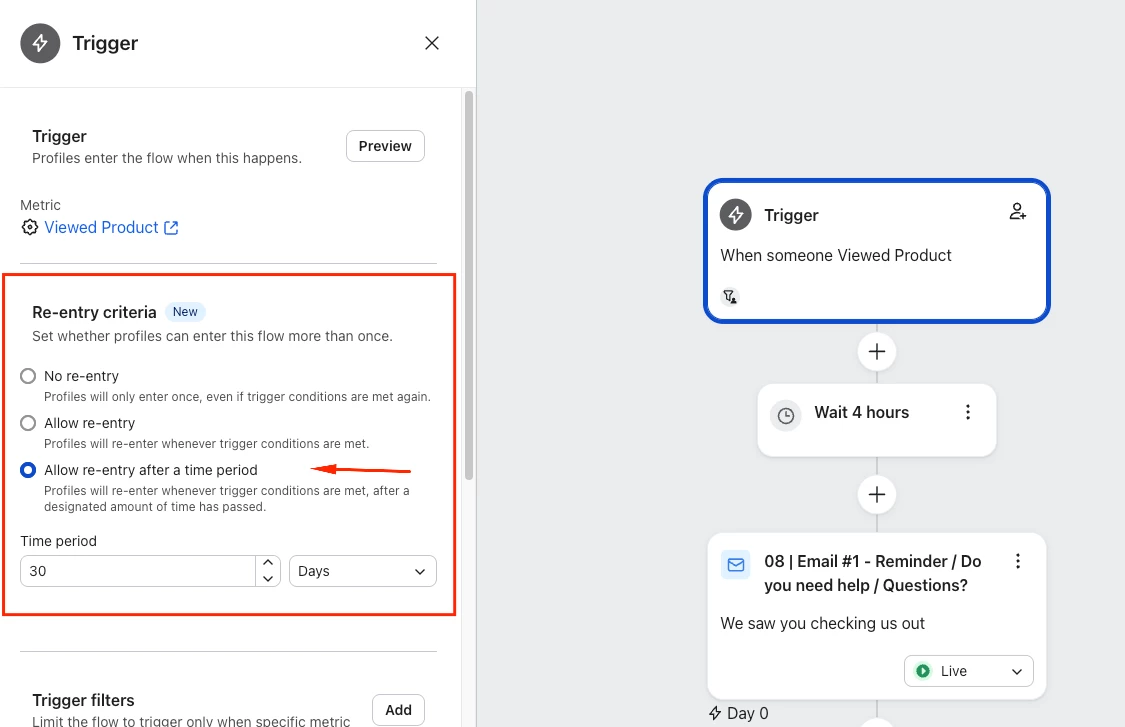
So klaviyo has changed a few things around. You can Achieve that now by selecting the Re-entry Criteria when you click on the Trigger. As you see in the below screenshot - this is same as adding “has not been in this flow in the last 30 days”

I hope this helps and thank you for sharing your question here in the community.

Cheers

Arpit

2 replies

ArpitBanjara
Principal User II
Forum|alt.badge.img+37
  • Principal User II
  • Answer
  • March 2, 2026

Hey ​@TrueRelief 

So klaviyo has changed a few things around. You can Achieve that now by selecting the Re-entry Criteria when you click on the Trigger. As you see in the below screenshot - this is same as adding “has not been in this flow in the last 30 days”

I hope this helps and thank you for sharing your question here in the community.

Cheers

Arpit


Byrne C
Community Manager
Forum|alt.badge.img+28
  • Community Manager
  • March 2, 2026

Hi ​@TrueRelief,

Just to add onto Arpit’s suggestion, you can select “No re-entry” if you want to ensure profiles don’t ever re-enter.