Contributor I
March 1, 2026
Solved

How do I do browse abandonment flow profile filter 'has not been in this flow'?

  • March 1, 2026
  • 2 replies
  • 123 views

How do I do browse abandonment flow profile filter 'has not been in this flow', as my coach has recommended to do this but it is no longer an option?

    Best answer by ArpitBanjara

    Hey ​@TrueRelief 

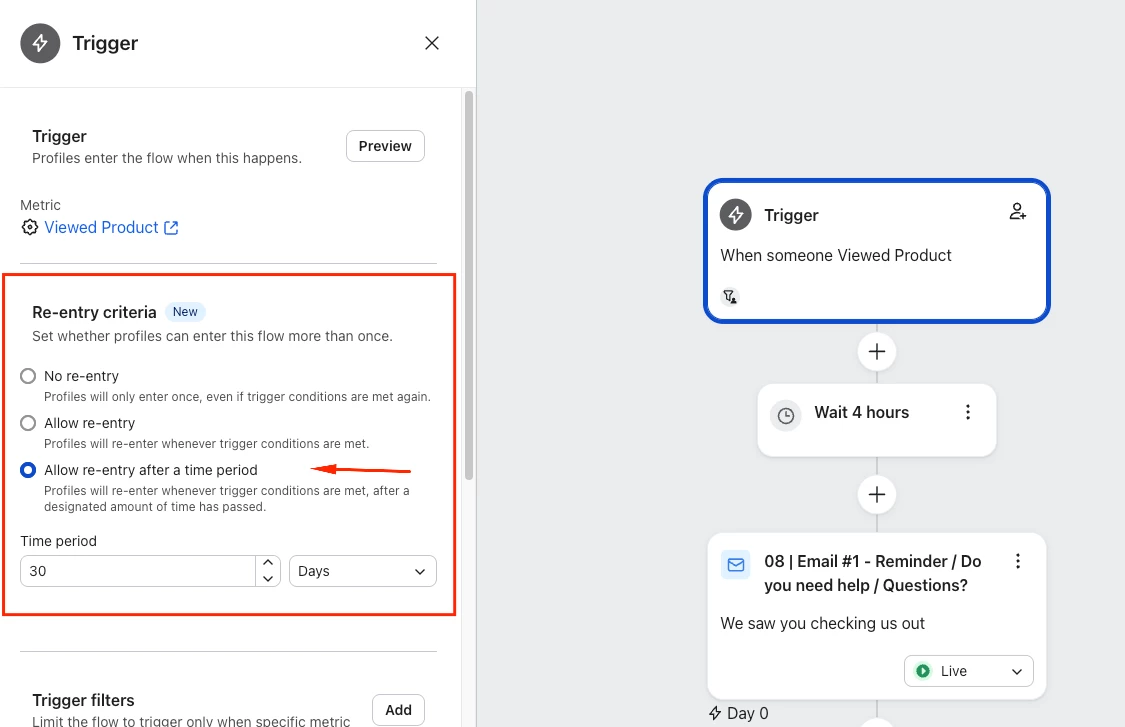
    So klaviyo has changed a few things around. You can Achieve that now by selecting the Re-entry Criteria when you click on the Trigger. As you see in the below screenshot - this is same as adding “has not been in this flow in the last 30 days”

    I hope this helps and thank you for sharing your question here in the community.

    Cheers

    Arpit

    2 replies

    ArpitBanjara
    Principal User II
    Principal User II
    March 2, 2026

    Hey ​@TrueRelief 

    So klaviyo has changed a few things around. You can Achieve that now by selecting the Re-entry Criteria when you click on the Trigger. As you see in the below screenshot - this is same as adding “has not been in this flow in the last 30 days”

    I hope this helps and thank you for sharing your question here in the community.

    Cheers

    Arpit

    Arpit Banjara - Lead Email Marketing Specialist at Flowium
    Byrne C
    Community Manager
    Community Manager
    March 2, 2026

    Hi ​@TrueRelief,

    Just to add onto Arpit’s suggestion, you can select “No re-entry” if you want to ensure profiles don’t ever re-enter.