

AnkaV
Contributor I
Contributor I
August 19, 2024
Solved

How to add coupon in the email subject line with countdown timer

  • August 19, 2024
  • 1 reply
  • 192 views

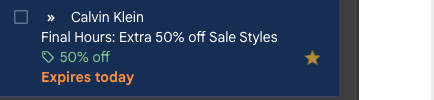
I have recently received an email from a store that in the mailbox comes with extra information (discount tag, and time-sensitive expiration date) - however, this information is not being shown in the email it is in the subject line and with a countdown. 

Can you help me understand how this can be coded? Is it possible to code like this? 
 

    This topic has been closed for replies.
    Best answer by chloe.strange

    Hi@AnkaV

    Thanks for being a part of our community! Interesting question! Can you confirm, did this message count down dynamically (for example 2 days, 1 day, expires today)? Or did “Expires today” get triggered by your email service provider?

    If you want to display a discount dynamically in your subject line, that is possible. For example, since the percentage drop is displayed as part of an event, you can call it with {{ event.price_drop_percent }}. For example, your subject could look like this:
     
    [LIMITED TIME OFFER] Save {{ event.price_drop_percent }}% on {{ event.ProductName }} until DATE!

    I hope this helps!

    ~Chloe

    1 reply

    chloe.strange
    Community Manager
    Community Manager
    August 29, 2024

    Hi@AnkaV

    Thanks for being a part of our community! Interesting question! Can you confirm, did this message count down dynamically (for example 2 days, 1 day, expires today)? Or did “Expires today” get triggered by your email service provider?

    If you want to display a discount dynamically in your subject line, that is possible. For example, since the percentage drop is displayed as part of an event, you can call it with {{ event.price_drop_percent }}. For example, your subject could look like this:
     
    [LIMITED TIME OFFER] Save {{ event.price_drop_percent }}% on {{ event.ProductName }} until DATE!

    I hope this helps!

    ~Chloe