We sell a STEM product and have different kits depending on whether you’re a grandparent buying it as a gift for a grandchild, or a teacher purchasing a kit suited to their kindergarten.
We’re wanting 1 master list, and to segment that by different verticals that use our products. Our list size is around 5k contacts.
We want segments such as “gift buyers,” “kindergarten teachers,” “primary school teachers,” etc.
I’m lost as to where to start, have tried to look into tags, segments, properties...
So far I suspect it’s best to create custom properties?
But I can’t see how to bulk add properties to existing profiles.
Do I need to export our list, add the new column/property, then re-upload? I’m so worried it will override the existing profile of each email address!!!
But am OK with manually going thru the exported spreadsheet and updating each contact if that’s the best way to do it and it won’t affect other existing profile data when we re-upload.
And do I understand right that once we’ve uploaded these properties to our current list, only then can we add those properties as multi-choice options in our sign-up forms ---- that trying to offer these options in our form before having at least 1 profile already using that property will mean the form won’t collect that data????
Hi @worcestershiresauce, welcome to the community!
It looks like @Brett_Gatsby can help you get started with identifying what the custom profile properties should be.
Just to help you know you’re on the right track, I’ve done a very similar process for many clients before. Custom profile properties are the special sauce of Klaviyo. If you can build them out, and maintain them over time, it helps you develop a rich dataset for your customer database within Klaviyo.
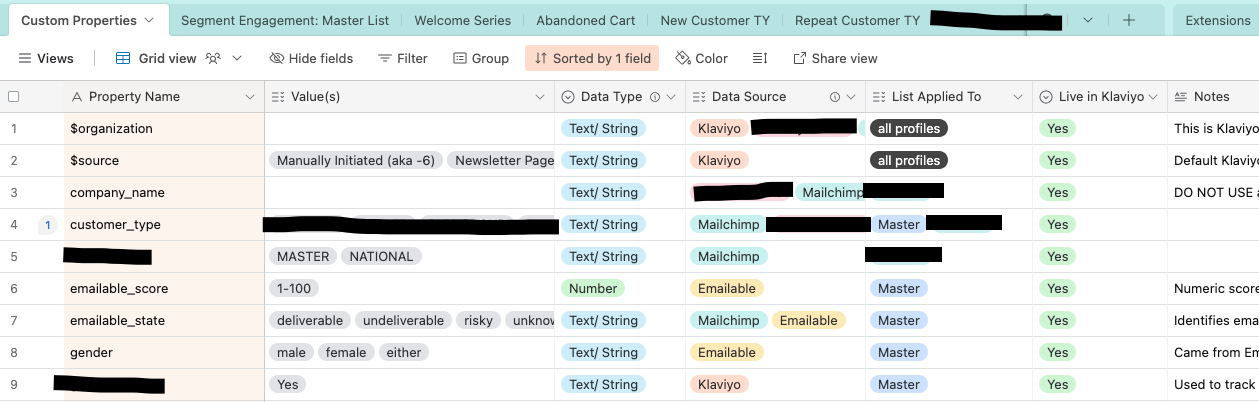
I’d highly encourage you to create a “dictionary” or reference doc to help yourself/ your team keep track of custom profile properties created, the data type you set for each one, and the values created for each property.
This is an example of how I’ve set that up in Airtable for one of my clients’ Klaviyo accounts.
Some details redacted for confidentiality
What type of custom property to use?
For your purposes, you’ll want to set this up as a List data type custom property. That enables you to hold multiple values, like “grandparent, teacher” instead of having one new value replace the prior existing value. Here’s a great help doc on data types.
How to set up the custom profile properties?
The best thing to do is export the whole list(s) you’re working with, one at a time. I’d export the email address, and any other data that will help inform the custom profile property you’re creating. Klaviyo will use the email address to reference existing profiles, and update their information - so no duplicates will be created. No information will be lost either, as long as you set up the custom profile properties correctly. So I always save backup CSVs just in case I have to redo something later. This help doc will show you how to do a bulk import via CSV to set up List data type custom profile properties.
Using the custom profile properties after setup
Once you have the custom profile properties you need setup in a CSV file, then you can import that file into your Master list. The custom properties will give you the conditions you need to create segments.
Last thing, re your question here:“And do I understand right… that trying to offer these options in our form before having at least 1 profile already using that property will mean the form won’t collect that data?”
If the custom profile property does not already exist in your account, then you can’t reference it when building signup forms. List data type properties can be tricky, so the most reliable path is to set it up in your account using the CSV bulk import method first. Then after that’s done, you can build signup forms that reference the existing property you’ve created.
This help doc might overall help you get familiar with custom profile properties in Klaviyo.
P.P.S. If you’re not already on a paid Klaviyo account, I highly recommend doing that if it’s feasible for your business. Live chat support has helped me troubleshoot custom property setup in real time, with many imports, and it’s super helpful when you’re trying to figure out what went wrong - if something doesn’t look right. But hopefully, you’ll get it right the first time. (:
Klaviyo Champion + ATX Klaviyo Meetup host | Client Strategy Director at ebusiness pros - a lifecycle marketing agency based in Austin