


Problem Solver II
October 25, 2023
Solved

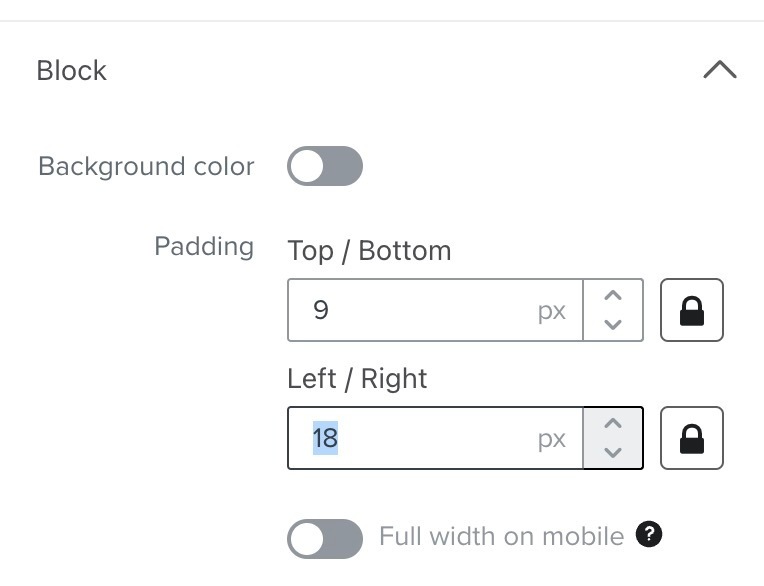
How to change Klaviyo's default 9px / 18px block spacing?

  • October 25, 2023
  • 3 replies
  • 171 views

Hi There,

We’re trying to gain more consistency across email templates and are having trouble with the default block spacing of 9px/18px (see attached).

We can set defaults for the template overall but we can’t see a way to set defaults on each block - how do we do this?

Cheers, Ben
 

    This topic has been closed for replies.
    Best answer by Taylor Tarpley

    Hi @Ben


    The easiest way to set a default to any blocks or block styles in your email would be to utilize our saved blocks and sections feature!


    Hope this helps!

    -Taylor 

    3 replies

    BenAuthor
    Problem Solver II
    October 25, 2023

    Actually, how do you set defaults for all of the content blocks? Like setting text styles on buttons?

    Taylor Tarpley
    Community Manager
    Community Manager
    October 30, 2023

    Hi @Ben


    The easiest way to set a default to any blocks or block styles in your email would be to utilize our saved blocks and sections feature!


    Hope this helps!

    -Taylor 

    BenAuthor
    Problem Solver II
    October 30, 2023

    Thank you and understood, it’s what we do. But people love those drag-and-drop icons! They’re super intuitive which is surely why they were built? But to be on-brand, you can’t use them. Bummer!

    REQUEST: Allow us to set default styles for the drag-and-drop editor 

    It’d be faster, more intuitive and ultimately more enjoyable if the drag-and-drop editor was on-brand. Even if styles had to be set via css or json, or however they’re currently set.

    Or put another way... 

    Why do we want the drag-and-drop editor to conflict with our templates? Surely nobody wants this. Everyone loves those drag-and-drop icons - I know I do!

