



OasisAdaptogens
Contributor II
Contributor II
November 6, 2021
Solved

How to change link text color on NEW email template

  • November 6, 2021
  • 41 replies
  • 9851 views

Hi friends!
I assume this would be an easy answer but I can’t seem to figure it out. With the old/previous “editing templates”, I had no issues changing the Link Text details however using the new/updating editing template, looks what's happening.
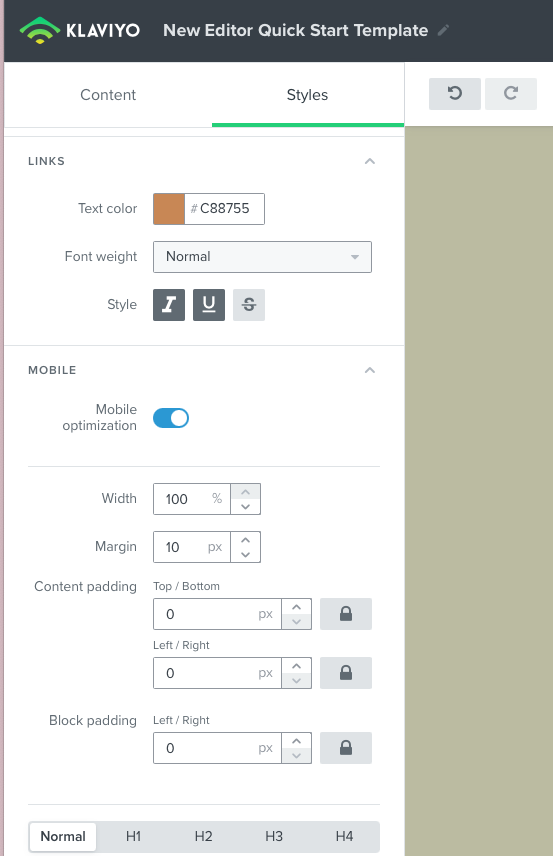
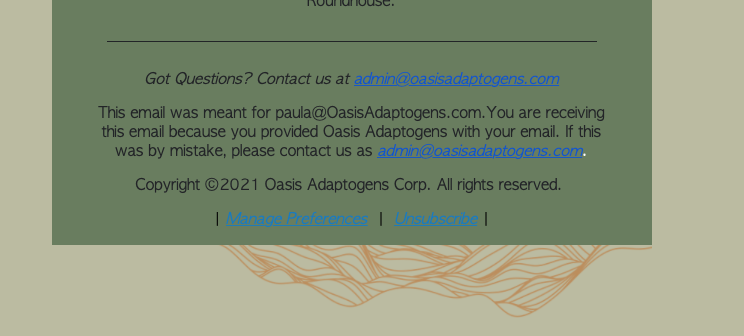
New template link color #C88755
email campaign test run: shows blue link text color when I want #c88755


As you can see I'd like to change Link Text color to #c88755 however, when I test out a campaign and view this in preview, it’s blue! How come? Thanks in advance 🍃 

    This topic has been closed for replies.
    Best answer by David To

    Hey Community members,

    I know it wasn’t that long ago that I posted, but wanted to share that our Product Team did recently release a fix to resolve this behavior of links always turning blue despite what their styling was set as.

    I also just want to thank everyone’s patience as our team worked towards implementing a solution for this bug.

    Have a great day!

    David 


    41 replies

    Active Contributor IV
    August 7, 2023

    @Drazdauskas - there has not been a hardcoded fix to the (“solved”) issue.

    What you can do is (manually - to each template/universal content block) is change the default Unsubscribe and View Online to {% web_view_link %} and {% unsubscribe_link %} then you can add HTML parameters around it that will stick - like link text and color.

    For example:
    <span style="font-weight: 400;"><a href="{% unsubscribe_link %}" style="color: #999999; font-weight: 400;">Unsubscribe</a></span>.


    See its really simple and not a giant design flaw effecting 100% of klaviyo users….