



OasisAdaptogens
Contributor II
Contributor II
November 6, 2021
Solved

How to change link text color on NEW email template

  • November 6, 2021
  • 41 replies
  • 9870 views

Hi friends!
I assume this would be an easy answer but I can’t seem to figure it out. With the old/previous “editing templates”, I had no issues changing the Link Text details however using the new/updating editing template, looks what's happening.
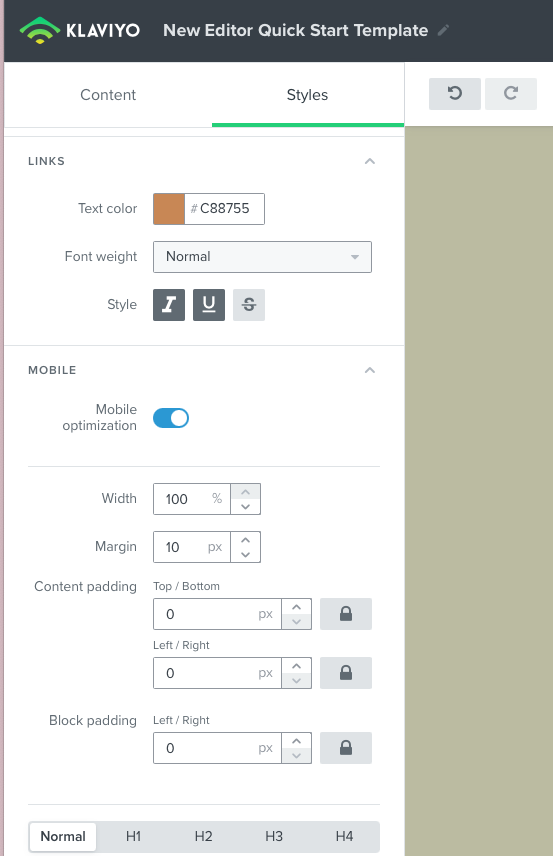
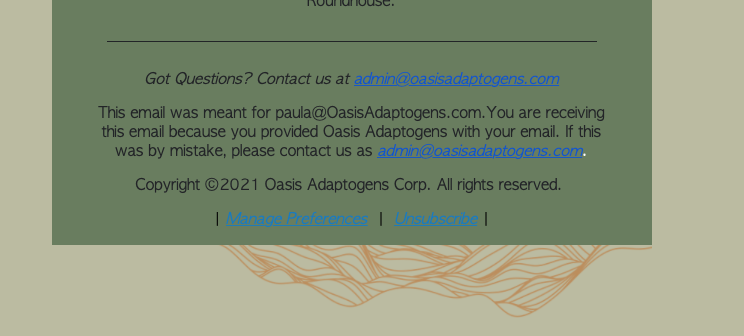
New template link color #C88755
email campaign test run: shows blue link text color when I want #c88755


As you can see I'd like to change Link Text color to #c88755 however, when I test out a campaign and view this in preview, it’s blue! How come? Thanks in advance 🍃 

    This topic has been closed for replies.
    Best answer by David To

    Hey Community members,

    I know it wasn’t that long ago that I posted, but wanted to share that our Product Team did recently release a fix to resolve this behavior of links always turning blue despite what their styling was set as.

    I also just want to thank everyone’s patience as our team worked towards implementing a solution for this bug.

    Have a great day!

    David 


    41 replies

    David To
    Klaviyo Employee
    Klaviyo Employee
    June 22, 2022

    Hey @gmc,

    This isn’t so much a bug but rather a function of many inbox providers. In case you may have missed my comment prior:

    Hey @WhlM and @MBrown,

    As you may have noticed, the provided workaround for hyperlinks by overriding the CSS typically wouldn’t work for email addresses. Unlike hyperlinks, Gmail and some other inbox providers will actually automatically see email addresses, telephone numbers, and sometimes street addresses as “functions” to launch a compatible app or software. Because of this, inbox providers will typically have much stricter CSS weight to them that would oftentimes not allow you to override them. 

    David

    Since you’re surfacing an email address in your email - regardless of the method such as referencing an event variable - inbox providers will still attempt to launch a compatible app from these entries. 

    I would also suggest taking a look at @WhlM’s comment above where they provide a great workaround to convert the email into a link by wrapping it in an <a href> and then overriding the color. An example of the code they used is: <a href="{{ email }}" style="color: #ffffff !important;">{{ email }}</a>

    David

    Problem Solver I
    June 22, 2022

    thanks - will give it go

    Contributor I
    October 18, 2022
    <span>{% unsubscribe '<span style="color: #000000;"><u style="text-decoration-color: #000000;">Unsubscribe</u></span>' %}</span>


    This just saved my life this morning. Thank you!

    Jakub
    Partner - Silver
    Partner - Silver
    December 22, 2022
    <span>{% unsubscribe '<span style="color: #000000;"><u style="text-decoration-color: #000000;">Unsubscribe</u></span>' %}</span>


    This just saved my life this morning. Thank you!

    This really helped :)

    -=JB=-
    Jakub
    Partner - Silver
    Partner - Silver
    December 23, 2022

    Will there be any system option to adjust not this workaround. Again as i was recommend some time ago if there will be color option with !important value in editor would be great 🙏

    -=JB=-
    David To
    Klaviyo Employee
    Klaviyo Employee
    December 23, 2022

    Hey @Jakub,

    At present, I’m not aware of any system options to adjust those specific hyperlink colors.

    Although an !important tag is often used to make it so the style of an object cannot be overridden, inbox providers won’t always adhere to this. This is to make it so that these sensitive links/hyperlinks stand out as as a measure of spam prevention - making it easier for users to unsubscribe or manage their preference. 

    Using these workarounds is great to have these important hyperlinks align with your brand design, but in practice may not be the best. 

    In my opinion, I rather have a highly visible unsubscribe or manage preference link that’s easily identifiable. Else, the next option for users when they don’t see these options is to mark your email as spam. Or, they’ll simply ignore and delete the email going forward without interacting with any of your future email outreaches. In either cases, this would impact your overall sending reputation. I’ve definitely caught myself doing both before. 

    I hope this clarifies some things!

    David

    Jakub
    Partner - Silver
    Partner - Silver
    January 2, 2023

    Hi @David To,

    I'm fully agree with you, but sometimes because they are default they are invisible and to stand them out I want to change the color using workaround every time is not so smooth solution :)

    -=JB=-
    Active Contributor IV
    April 24, 2023

    Hi, I am having a similar issue form the other side - our links are defaulting to a grey nearly invisible color and I cannot seem to edit them no matter what I try - please help!

    Tried making the text bright red just to test
     

    Link still doesn’t come through - tried editing it in the code and it looked like it was working
     

    I really don’t get it, the same issue was happening with the unsubscribe link but this code snippet fixed it in the footer, maybe because this is a dynamic link Klaviyo is struggling to let me style it?


    Please help :)

    Active Contributor IV
    June 27, 2023

    Hi everyone, I've been having this same issue for months and tried every code change and ended up with things looking fine in editor then spitting out HTML into the preview:
     

    The default link color is a grey and invisible for our unsubscribe and web view links.

    I finally found this page and changed the default {% web_view %} that the “Add Personalization” button creates to the suggested {% web_view_link %} as posted above and it is now working - but that was a lot of headache to discover and edit the code the system spits out.

    After over a year of this thread’s existence…. PLEASE just update the default personalization button to spit out a functional code string so literally 100% of Klaviyo customers don’t need to fumble around your support pages to hopefully find this thread! 

    Having an invisible unsubscribe and view online link is not okay!

    Thanks :)

    Drazdauskas
    Contributor IV
    Contributor IV
    August 5, 2023

    Was this fixed - as I’m having this issue??

    Just trying to get s**t done!