I have set up a 10% off coupon Signup Form in Klaviyo. I would like to use anyone that submits their email address to this Signup Form popup to then trigger the email Flow I have created for these visitors. But when I go to choose the trigger for my Flow the Signup Form list does not show up.
Each sign-up form should be associated with a specific list that users are submitted to after they fill the form and confirm their subscription (by default, though the subscription confirmation step can be disabled. More information on that here).
It sounds like you may need to update the list to submit in the sign-up form to align it with an existing list in the lists and segments tab. From there, that list can trigger the flow.
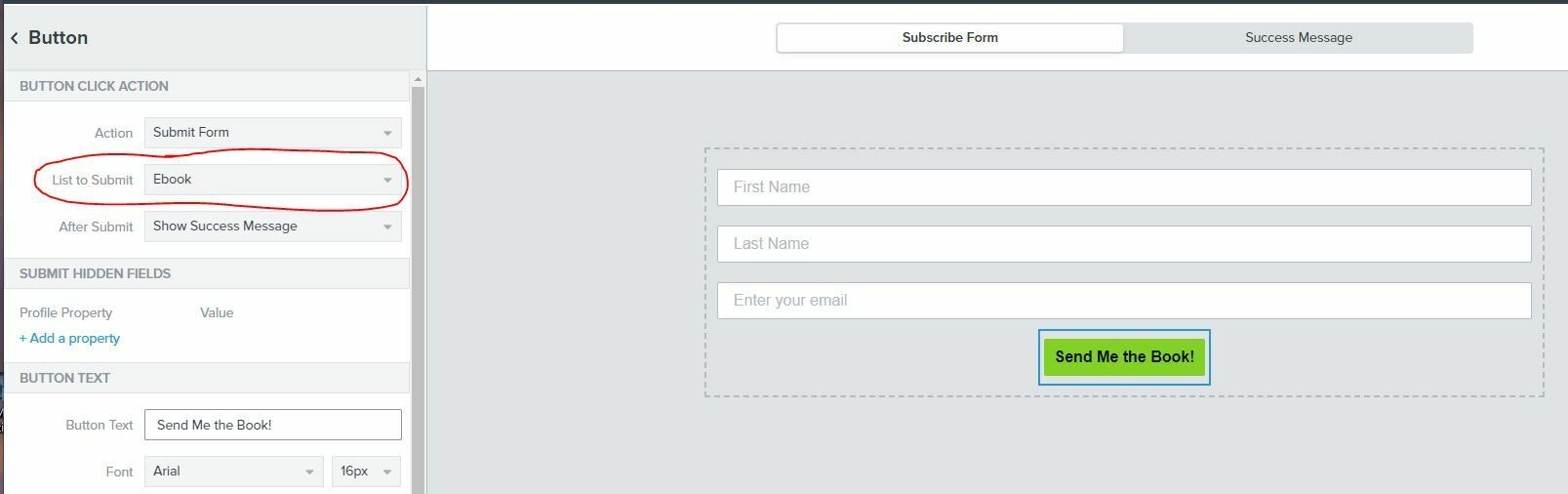
In order to align all of this, navigate into the sign-up form editor and click on the Call to Action (CTA) button and look under “List to Submit”. Ensure a list is selected here and that it is the correct list that triggers the flow. Here is an example image from another post of where you should be looking. The menu on the left will appear after you click your CTA button.
Once you have this list in the sign-up form editor and it aligns with an existing list in the lists and segments tab, if your existing flow does not trigger off this list, you can clone your existing flow and then select this list as the trigger. That will remedy any misalignment between the form list and list that triggers the flow.
Yes you can still have these contacts that subscribe through a signup form route to the same list as all of your other opted in contacts and just trigger a Welcome series for subscribers who came through specific signup form(s). When a subscriber signs up through a Klaviyo signup form, they will automatically get the $source profile property associated with their profile. In order to locate/change the $source associated with a signup form, you can click on the submit button of the form in Klaviyo’s signup form editor and see it nested under ‘Hidden Fields.’ You’ll want to add the flow filter to your welcome flow “properties about someone where $source=x.”
The $source property will be overwritten if a new sign up form is used after initially subscribing. You can create a segment of profiles with a property, and make that segment the trigger of your flow. You could also make a segment that collects any profile that has one of multiple $source values, as shown in the example screenshot below.
We unfortunately don't have any specific tracking in place for profiles that used the same form multiple times. Also, I'm sure that you know this already but it's not possible to be added to a list or trigger a flow more than once.
Klaviyo forms allow for you to hide/show based on either existing in your account or in a specific list or segment, this can be found in the behaviors tab:
This setting might be a good call if you think that profiles are using the same form more than once.
However, if a contact first submits Form A and weeks later Form B, he will leave the “Source = Form A” segment and enter the “Source = Form B” segment, as the property gets overwritten, right?
That would ensure he then receives the Form B welcome journey, but what if I want to send a follow up email to everyone who has submitted Form A after a few months? The source property of this certain contact would not contain the info that he once submitted Form A.
In other tools, I’ve seen static lists for these kind of operations that contacts can be added to. What would be the way to go with Klaviyo?
For that use case, we suggest using custom properties to label a profile for each time they submit so that you can track what forms they have submitted.