


Contributor I
January 13, 2025
Solved

i cant find where to change form response text

  • January 13, 2025
  • 4 replies
  • 113 views

Have already read through the threads it sends and nothing is even close to the question. I did an email sign up form with a response “a 25% discount code will be sent to your email” once they enter it. I CANNOT find where to change this response. I cannot find help from the company either. Thanks for any assistance. 😘

    Best answer by Adam Ragsdale

    Hello ​@Klaviyette


    Welcome to the Klaviyo Community and thank you for your question!  I believe I can help. 

    Click the name of your form from the Sign-Up Forms menu, then select “Edit Form”. Or, click the 3-dots to the right of your form name and then select “Edit”.

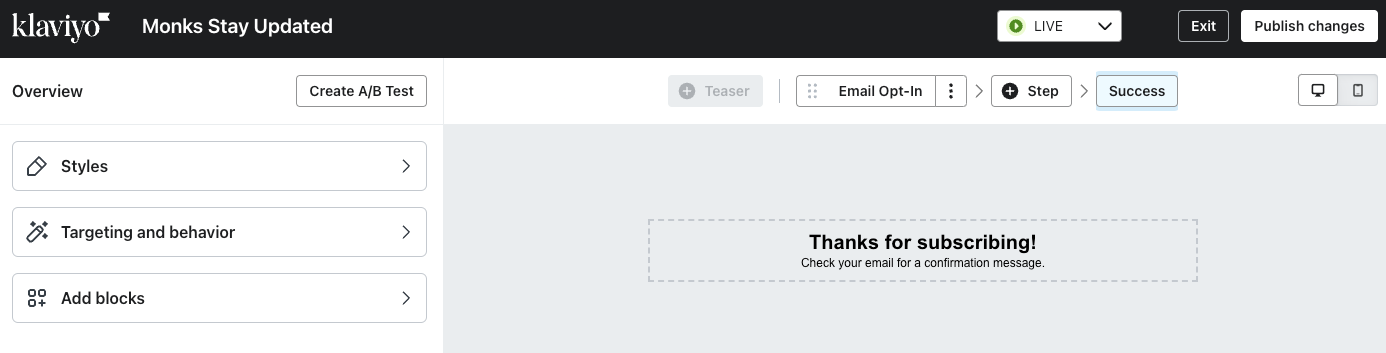
    You should then see a screen like the enclosed example, where you can edit the form. Select the “Success” step in the horizontal row of form steps. Edit the text however you wish. Click the “Publish changes” button in the top-right of the screen. 


    Hopefully this helps. Please let us know how it goes! 

    4 replies

    Adam Ragsdale
    Partner
    2025 Champion
    January 13, 2025

    Hello ​@Klaviyette


    Welcome to the Klaviyo Community and thank you for your question!  I believe I can help. 

    Click the name of your form from the Sign-Up Forms menu, then select “Edit Form”. Or, click the 3-dots to the right of your form name and then select “Edit”.

    You should then see a screen like the enclosed example, where you can edit the form. Select the “Success” step in the horizontal row of form steps. Edit the text however you wish. Click the “Publish changes” button in the top-right of the screen. 


    Hopefully this helps. Please let us know how it goes! 

    Adam Ragsdale | Email Strategist | R Bar Solutions
    Amos Peace
    Problem Solver III
    Problem Solver III
    January 13, 2025

    Hello ​@Klaviyette ,


    It sounds like you're trying to locate where to edit the confirmation message for your email signup form that mentions the "25% discount code will be sent to your email." 

    To update the message for your email signup form in Klaviyo, kindly follow these steps:

    1. Log in to Klaviyo and go to the Signup Forms tab.
    2. Select your form and click Edit Form.
    3. Look for the Success Message or Thank You Text section.
    4. Update the message, e.g., “Thank you for signing up! Your 25% discount code has been emailed to you.”
    5. Save and publish the changes.

    If you don’t see this option:

    • Check the Flows tab for automations linked to the form.
    • Review the HTML or custom code if the form is embedded.

    Still stuck? Reach out to Klaviyo support or share more details for further guidance.


    Best Regards,

    Peace.

    Peace - Turning Emails Into Opportunities 💼 Email Marketing Specialist | 🚀 Klaviyo Expert 📧 amosfolashade2@email.com WhatsApp -+2349023453575 “Delivering the right message, to the right person, at the right time.”
    MANSIR2094
    Expert Problem Solver IV
    Expert Problem Solver IV
    January 13, 2025

    Hello ​@Klaviyette ,


    To change the response message in your email signup form, follow these steps:

    1. Log into your account and navigate to the section where you manage your forms or sign-up pop-ups.
    2. Find the specific email signup form you created.
    3. Look for the thank you message or confirmation message settings. This is where the response, like "a 25% discount code will be sent to your email," is usually customized.
    4. Edit the message to say what you want, then save the changes.

    If you're still having trouble finding it, try checking the help documentation or searching for "edit signup form response" in their support center.

    Feel free to ask for further help if you're stuck! 😊

    Mansir Digital Portfolio
    Contributor I
    January 16, 2025

    Thank you for your response and kind offer of help in the future - I may be taking you up on it!!