

Solved

Linking list to checkboxes in email preferences page (or is there a better way?)

  • January 17, 2023
  • 3 replies
  • 928 views

Hi,

We’re setting up our Klaviyo (and it’s all going very well so far, I’m enjoying it! πŸ˜€)

I’ve got a little question regarding self-segmentation. We would like our customers to choose what kinds of messaging they receive (news/offers/guides) and subject areas of interest (e.g. teaching/accountancy/healthcare). We don’t want to send them emails about irrelevant subjects.

I’d like them to be able to manage that so instead of choosing to unsubscribeΒ from all, they might just choose to receive emails on a narrower selection of topics.

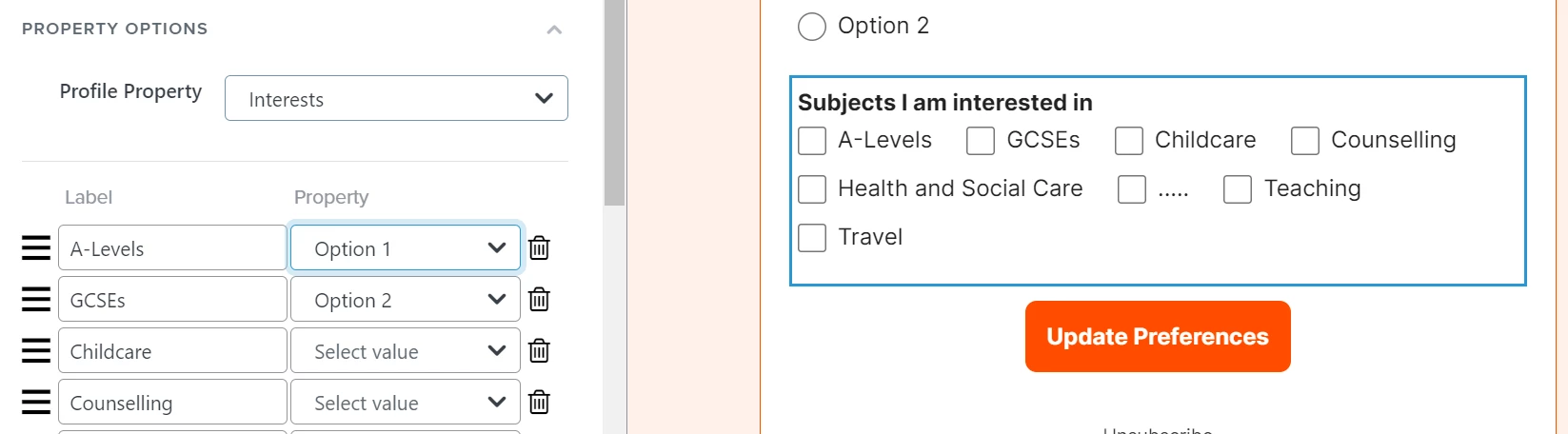
Initially I thought I could tie a list of options to a profile property. If someone choose β€œChildcare” and β€œCounselling” in this example the profile property Interests would contain the two list values β€œChildcare, Counselling”. However I don’t think that’s how Klaviyo’s model works?
Β 

Is there something I’ve missed here? Or would I be right in thinking we need to use a custom page?
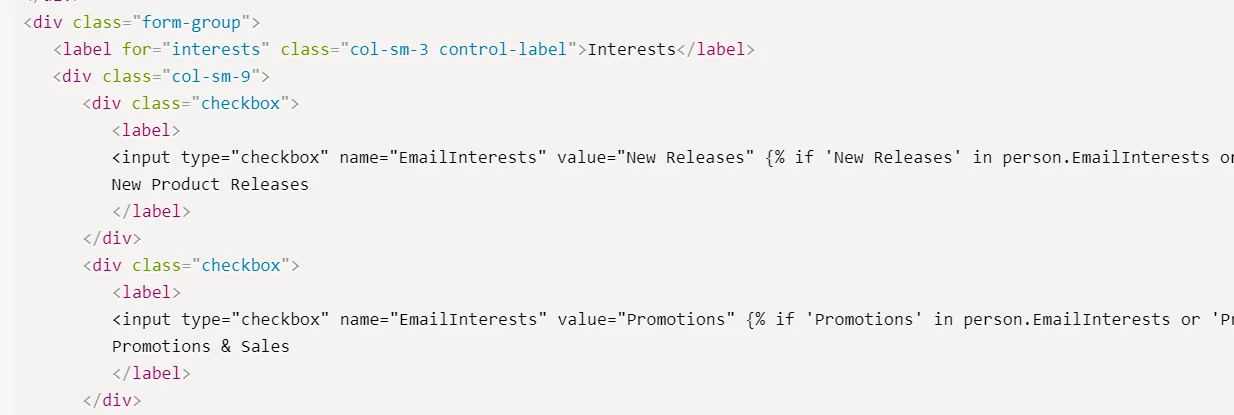
https://help.klaviyo.com/hc/en-us/articles/115005077067-How-to-custom-code-consent-pages#use-custom-consent-pages-for-a-list7

This seems to indicate that with the custom form we could submit an array/list back to Klaviyo?
Β 

Β 

Best answer by Dov

Hi @gregrobson,

Wanted to jump in and close the loop here just in case there were any lingering doubtsΒ - that’s exactly right. Those are simply placeholders to be replaced by the values you wish to mapΒ profile properties to.

Thanks for being a community member.

This topic has been closed for replies.

3 replies

alex.hong
Forum|alt.badge.img+58
  • Klaviyo Alum
  • January 17, 2023

Hi @gregrobsonΒ ,

Welcome to the Community and glad to hear you are enjoying the Klaviyo product so far.

After building out your multi checkbox form, you do want to input this into your email content as aΒ custom profile property.Β  Once your customers have these various selections listed on their profile, you can insert the property into an email to dynamically populate with their selections using theΒ insert property drop-downΒ or by typing in aΒ person|lookup tag. However, if you have all options contained in either aΒ list or stringΒ property for the customer's profile property, you won't be able to separate out the values without using custom if/then statements.Β  You will be able to show you chose Option 1, Option 2, Option 3Β but you likely won't be able to break out the individual values of the property to show options 2 and 3 in one sentence and optionΒ 1Β in another.Β 

However, what you can do is utilize theΒ Klaviyo Hide/ShowΒ featureΒ and create blocks for the various products and set them to show for customers that have selected those various interests.Β  For example, you would set a block to show to customers who have chosen Option 1. You can use AND and OR clauses in the settings for your blocks to show if customers have selected a certain combination of values for the property.Β 

If you don't want to utilize the hide/show feature, we would suggest eitherΒ conditional splitsΒ for the various user selection combinations or different flows based on segments of the user selections. Lastly, please make note that when testing for properties, you should create a test profile to see if these properties are loaded accordingly into your Klaviyo profiles.


Thanks!
Alex​​​​​​​


  • January 18, 2023

Hi Alex,

Thank you for that detailed reply. It does explain how the profile field/list can be used for customising emails.

However, it doesn’t seem to address my question - I’m looking to find out whether a series of checkboxes can be synced with a checkbox list on a manage preferences page. For example if someone has their Interests fieldΒ in their profile as a list of [β€œA-Levels”, β€œCounselling”, β€œTeaching”] can the manage preferences page be set up (using the dashboard’s page builder) so that if someone clicked the preferences page the checkboxes for A-Levels, Counselling and Teaching would be checked?

I can see in the editor I can select a Profile PropertyΒ - at that point I would expect each checkbox entry to map to an item in the list and not seeΒ Option 1, Option 2Β etc in the list.

I think I’ve probably answered my own question in reading the documentation for the custom pages. I have a call with our onboarding expert today so I’ll ask them.

Β 


Dov
Forum|alt.badge.img+61
  • Klaviyo Alum
  • Answer
  • February 1, 2023

Hi @gregrobson,

Wanted to jump in and close the loop here just in case there were any lingering doubtsΒ - that’s exactly right. Those are simply placeholders to be replaced by the values you wish to mapΒ profile properties to.

Thanks for being a community member.