


Contributor I
April 17, 2024
Solved

Opt In Form Submit Button Not Working

  • April 17, 2024
  • 2 replies
  • 150 views

We have an opt in form on our website for customers to join our Discount Club, however the submit button is not showing on mobile even though it is on desktop. As a large amount of customers use mobile they are having trouble joining. It used to come up and work fine but we are unaware as to when it stopped appearing. Can anyone throw any light onto this please?

This topic has been closed for replies.
Best answer by sonomaemail

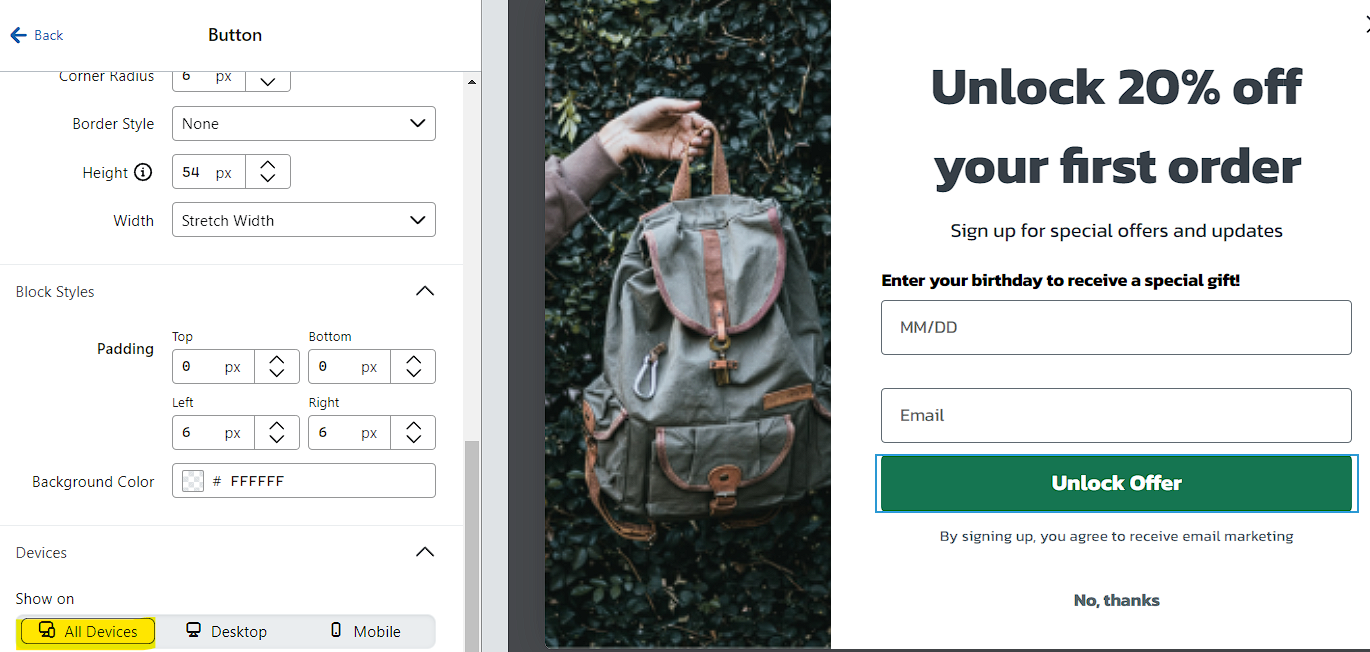
Possibly someone accidentally changed the display setting while updating the form?

  1. Open the form in edit mode and click your submit button
  2. In the left column that appears, scroll down to the Devices section
  3. If only Desktop is selected, change this to All Devices
  4. Publish your changes

Adrienne


2 replies

sonomaemail
Problem Solver III
Problem Solver III
April 17, 2024

Possibly someone accidentally changed the display setting while updating the form?

  1. Open the form in edit mode and click your submit button
  2. In the left column that appears, scroll down to the Devices section
  3. If only Desktop is selected, change this to All Devices
  4. Publish your changes

Adrienne


valwigsAuthor
Contributor I
April 18, 2024

Hi, thanks for your reply,

Yes the ‘All Devices’ button is still chosen. We have another opt in as a pop up and the button appears ok on that one, it just seems to be the embedded one that the button has disappeared on
