


Problem Solver I
March 18, 2024
Solved

Pop up image background and button optimisation

  • March 18, 2024
  • 2 replies
  • 183 views

Hi,


I’ve made the pefect pop-up for my business. 


But i have 2 questions : 


In the following image :
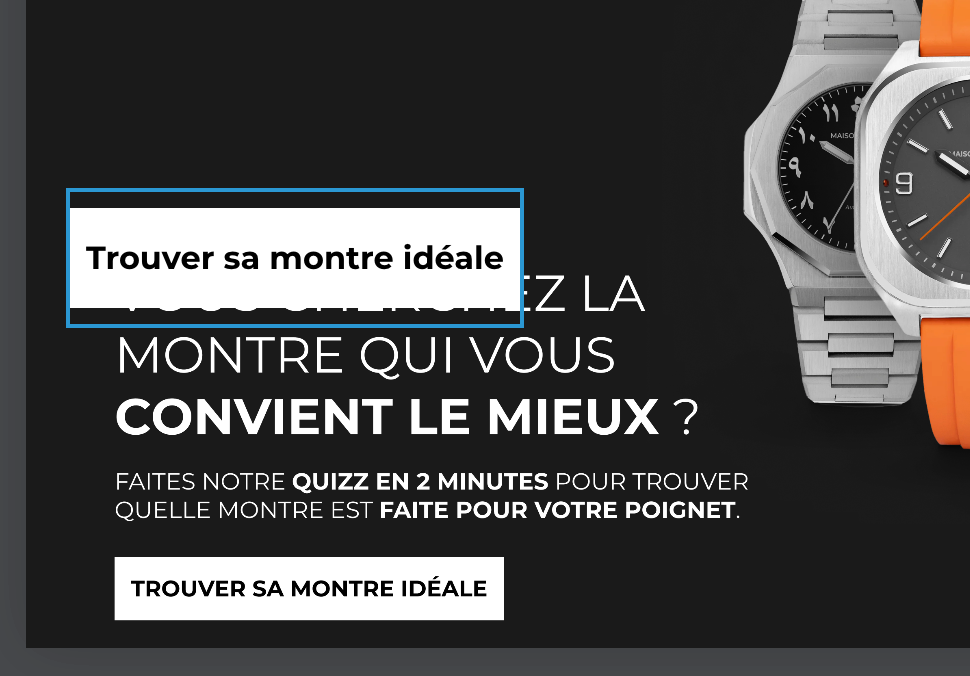
 

As you can see, the button “Trouver sa montre idéale” is not at the same place to the button on my image background.


So 2 questions :


How can i delete this block button. And insert an Image background redirection, and then people gonna to the URL i want.


If this possible, my problem is sovled. 


if It’s not, how can i place the button (in blue) at the place of the button (down the image).


Thanks for your help ! 

    This topic has been closed for replies.
    Best answer by Taylor Tarpley

    Hi there @Mathieu Malige


    Thanks for sharing your question with us ! Happy to help! 


    If you notice that your form doesn’t look like on your website how it did in your form builder then this might be a hint that something on your website is amiss. I would investigate the backend of your website to see if there’s any conflicting CSS on your site that might be changing the display on your form.


    I’d checkout this similar thread to gain more insight on how conflicting CSS can affect your form’s look.


    Hope this helps!

    -Taylor 

    2 replies

    Taylor Tarpley
    Community Manager
    Community Manager
    March 20, 2024

    Hi there @Mathieu Malige


    Thanks for sharing your question with us ! Happy to help! 


    If you notice that your form doesn’t look like on your website how it did in your form builder then this might be a hint that something on your website is amiss. I would investigate the backend of your website to see if there’s any conflicting CSS on your site that might be changing the display on your form.


    I’d checkout this similar thread to gain more insight on how conflicting CSS can affect your form’s look.


    Hope this helps!

    -Taylor 

    KatherineB
    Partner - Platinum
    Champion & Partner
    March 20, 2024

    Hi @Mathieu Malige in addition to what Taylor mentioned above, another thought is if you have added that image as a background image, then you might need to adjust the padding around the button to move it to the position you want. This Klaviyo thread explains how padding works if you’re not familiar. Essentially, you would add padding, or space, above the button, which would move the button down the page. You may need to adjust the padding and margins for the form itself in addition to the padding of the button. 


    Katherine

    Katherine - &BAM | 2023 Klaviyo Champion and Elite Partner
