I have been trying to connect my shopify account with klaviyo for a long while now, please help me out as I'm tired now and frustrated. The integration wasn't successful, and I have been trying it over and over again
I’m sorry you’re having challenges getting your Klaviyo account integrated with Shopify. Can you describe some of the problems you’re running into?
Integrating Klaviyo with Shopify should be a fairly straight-forward process. For most Shopify merchants, you have to install the Klaviyo Shopify App, and configure a few Shopify Settings depending on what you want to do in the Integrations → Shopify → View Settings. This will then allow Klaviyo to pull all the basic Metrics from Shopify.
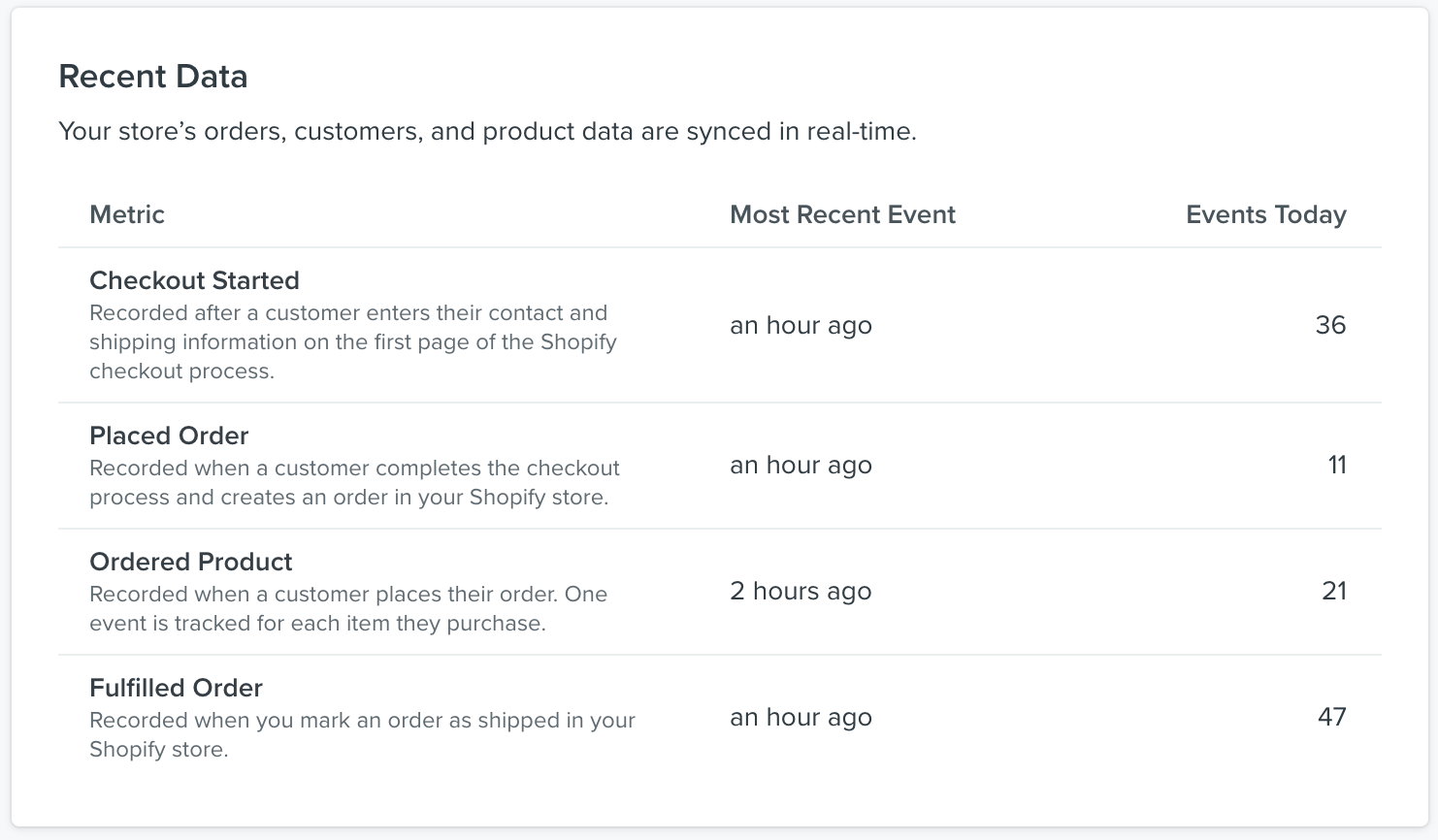
You can verify everything is working if you see results in the Recent Data panel like this:
Also, there’s a bunch of great starter documents here on Klaviyo if you need help:
I’m sorry you’re having challenges getting your Klaviyo account integrated with Shopify. Can you describe some of the problems you’re running into?
Integrating Klaviyo with Shopify should be a fairly straight-forward process. For most Shopify merchants, you have to install the Klaviyo Shopify App, and configure a few Shopify Settings depending on what you want to do in the Integrations → Shopify → View Settings. This will then allow Klaviyo to pull all the basic Metrics from Shopify.
You can verify everything is working if you see results in the Recent Data panel like this:
Also, there’s a bunch of great starter documents here on Klaviyo if you need help:
Checking in here to see if there were any specific error messages or pictures you can share with us so that we could better debug and understand your integration issue. @retention has done a great job outlining the guides and provided excellent documentation on the subject. Please follow up with any success or further errors that you may have so we can understand and help better.
Thank you!
Alex
A
Anonymous
Nov 3, 2021 4:26 PM UTC
Having a similar issue. The seemingly simple Intergration just isn't happening. Whenever I attempt to publish, I get this error:
I've u installed, reinstalled, checked the code & still not sure how to fix this. When I reached out for live support, I was told only paying subscribers have access to humans. I don't feel comfortable paying for a service I can't even set up 😕
Happy to look into this for you and give some info on what might be going on.
I would suggest taking a look at your Organizational Contact Information to confirm that you are using the correct URL, since this is the field that we use to populate information in your templates (ie. anywhere you see {{ organization.URL }}).
Additionally, I would make sure you properly installed the Klaviyo.js to your site so that you can actually publish sign up forms. This is a key step.
As a side note, we do have documentation on Signup Form Troubleshooting that I recommend keeping around in case another error with forms appears!
Have a good day,
Alex
A
Anonymous
Nov 3, 2021 8:59 PM UTC
Awesome! Thanks for your speedy reply!
Checking the organizational contact now and I read in the documentation that the Klaviyo.js is automatically installed when you add the app via Shopify, so you don’t need to manually add it to the code. This is the part I’m confused about as it doesn't seem to be installed and I don't know where to put it.
-niCo
A
Anonymous
Nov 3, 2021 9:11 PM UTC
Adam!
You are a lifesaver!!! I wanted the video in the link you shared and it worked!
Checking the organizational contact now and I read in the documentation that the Klaviyo.js is automatically installed when you add the app via Shopify, so you don’t need to manually add it to the code. This is the part I’m confused about as it doesn't seem to be installed and I don't know where to put it.
-niCo
Hey there @niCoRob!
This can happen if you first integrated without checking the box to automatically add Klaviyo's onsite javascript, but then checked the box at a later date. It is indeed an automatic process, if selected. But it sounds like Adam from somewhere got your solution so thats great to hear!
Hi there, I am also having the exact same issue. Not sure what could be wrong as Klaviyo was added to my Shopify store using the app section on their website. I then used the integration feature on Klaviyo to connect my store to the platform.
Every time, I try to publish the signup form I receive the error message below. If anyone can help, that would be appreciated. Thanks!
Unable to detect that signup forms are successfully installed on your site. Please view the installation documentation.
This could be due to a possibility that the Klaviyo's onsite javascript was properly added to your Shopify site. This can happen if you first integrated without checking the box to automatically add Klaviyo's onsite javascript, but then checked the box at a later date. Klaviyo's onsite javascript is necessary for tracking onsite behavior as well as publishing Klaviyo-made Signup Forms. Without it, you will experience an error when attempting to publish Signup Forms (just as you've shown in your screenshot). To fix this, you can simply remove the Shopify integration and reconnect it. It is important to note that this does not delete any important data within Shopify or in Klaviyo. Please follow the steps outlined below:
Login to your Klaviyo account via an incognito/private window of your web browser. If you need assistance opening an incognito/private window of your web browser, please click here.
Open a new tab within the incognito/private window of your web browser to login to your Shopify admin.
Click the arrow next to Disable Integrationand select Remove Integration.
Navigate to the Integrations Page within Klaviyo
Search for “Shopify” and re-add the Integration
This will take you through the authentication process within Shopify to ensure that Klaviyo has the proper permissions to connect to you store. Some notes to consider:
Make sure that the box to Automatically add Klaviyo onsite javascript is CHECKED when re-authenticating
Do not click the back button or navigate elsewhere before the authentication process completes, as this can cause your integration to be disabled again.
Once you have completed these steps, your Integration should perform as expected. You can verify this by checking that there are no error messages here and you should also be able to publish Signup Forms as desired.
Please let me know if that is not the case, after following all of the steps outlined above. I hope this helps!
I have followed all of these steps and am still getting the same error. “Unable to detect that signup forms are successfully installed on your site. Please view the installation documentation.”