Contributor I
March 10, 2024
Solved

Shopify newsletter subscribers are not sync into klaviyo newsletter list

  • March 10, 2024
  • 5 replies
  • 535 views

Hello, 
I have a problem with shopify subscription sign up on my website. 

The subscribers are not added to my klaviyo “Newsletter” list but it appears at my profiles

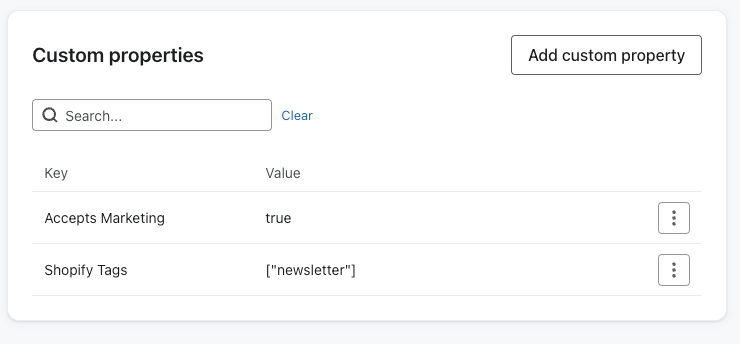
  • When a new subscriber signs up, they are added to the “email subscribers” list with the tag “newsletter” in shopfiy, but it does not get added to any list on Klaviyo.
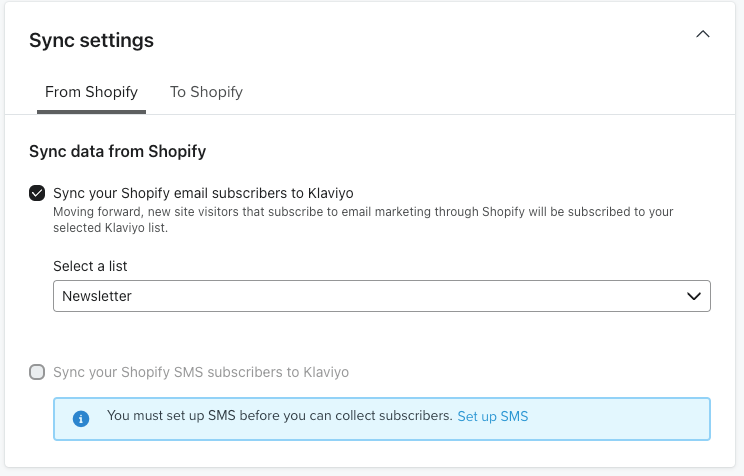
  • In the integrations tab, I have selected “Newsletter” for the list for the subscribers who accept marketing through Shopify.
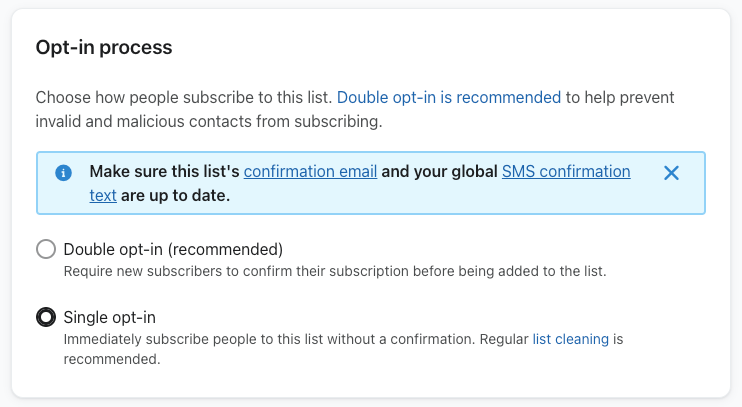
  • I have “single opt in” selected

I would appreciate any suggestions! 

Thanks
 

This topic has been closed for replies.
Best answer by Taylor Tarpley

Hi @nuumor


Following up here! 


Are you still having this issue? I would test with a new email and subscribe to your Shopify footer to confirm what Klaviyo list you are brought into! 


It seems like your integration is setup correctly, so this should be working! 🤔 I wonder if users came into your account before your List was set to single opt in and these users hadn’t confirmed their subscription a second time just yet and were therefore in the profiles section, but now your ‘Newsletter’ List.


Hope this helps!

-Taylor 

5 replies

stam_marko
Expert Problem Solver II
March 11, 2024

Hi there,

Can you confirm that your sign-ups form(s) sync with your Newsletter list?

Feel free to reach out at: stam@retenso.com
Kylie W
Partner - Silver
Champion & Partner
March 11, 2024

Hi @nuumor 

Welcome to the Klaviyo Community and thank you for your question.

Just a few items to check off first;

  • Is Klaviyo an enabled App in your Shopify Store under Customize?
    • You’ll be able to double check this by looking at profiles in Klaviyo and ensuring data is being tracked, ie; Active on Site etc
  • For the subscription signup, is this via a native Shopify Popup, or checkout?
    • Or are you using a Klaviyo Popup to collect subscribers?

Based on your screenshot for sync settings, these customers should just flow through.

Thanks,

Kylie

Berridge Strategy Group, Your eCommerce Partner - eCommerce results, without the Complexity | Klaviyo Partner & 2024 Klaviyo Community Champion | www.berridgestrategy.com
nuumorAuthor
Contributor I
March 11, 2024

Hi there,

Can you confirm that your sign-ups form(s) sync with your Newsletter list?

Hi, How can I confirm that my sign-up form is sync with the list? 😅

nuumorAuthor
Contributor I
March 11, 2024

Hi @nuumor 

Welcome to the Klaviyo Community and thank you for your question.

Just a few items to check off first;

  • Is Klaviyo an enabled App in your Shopify Store under Customize?
    • You’ll be able to double check this by looking at profiles in Klaviyo and ensuring data is being tracked, ie; Active on Site etc
  • For the subscription signup, is this via a native Shopify Popup, or checkout?
    • Or are you using a Klaviyo Popup to collect subscribers?

Based on your screenshot for sync settings, these customers should just flow through.

Thanks,

Kylie


Hi Kylie,

  1. Are you referring to this? Because I don’t see any Active on Site date being tracked


  1. This is via shopify footer subscription box sign up. For the Klaviyo Popup is working fine
Taylor Tarpley
Community Manager
Community Manager
March 21, 2024

Hi @nuumor


Following up here! 


Are you still having this issue? I would test with a new email and subscribe to your Shopify footer to confirm what Klaviyo list you are brought into! 


It seems like your integration is setup correctly, so this should be working! 🤔 I wonder if users came into your account before your List was set to single opt in and these users hadn’t confirmed their subscription a second time just yet and were therefore in the profiles section, but now your ‘Newsletter’ List.


Hope this helps!

-Taylor