When a contact subscribes to SMS, their 'sms_optin' custom property will be set to 'yes'. Therefore they will fail the display logic - person|lookup:'sms_optin' != 'yes' (does not equal 'yes') - and your block will not be shown to them. It will only be shown to contacts who have any other 'sms_optin' value i.e contacts who have not subscribed to SMS.
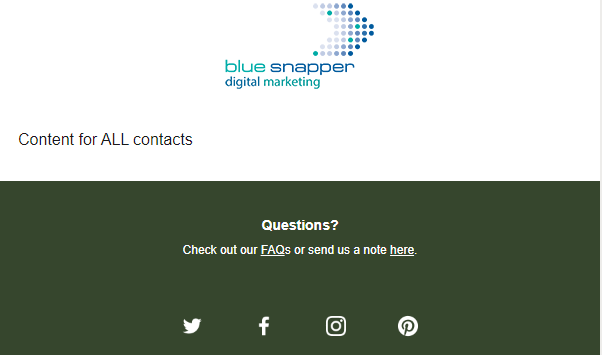
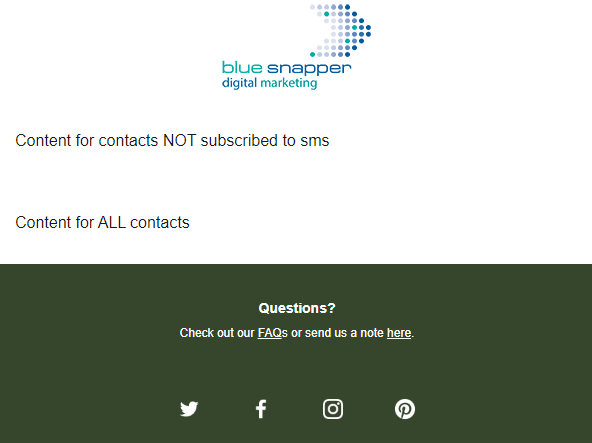
The best way to check everything is OK is to add the custom property 'sms_optin' to a test profile and set it to 'yes'. Then add your block to your email template with the conditional display of person|lookup:'sms_optin' != 'yes'. Go to Preview & Test, search for your test profile, and check the block is hidden. Then pick a random contact and the block should be displayed. My test examples are below.
Remember, you’ll need to update historical SMS optins so that their 'sms_optin' has the value yes otherwise they will see the block.
This is possible to do in flows by creating a conditional split. The definition in the conditional split would be = “If someone is consented to receive SMS” - if they have consented, they will go to the “yes” path and if they haven’t they will go to “NO” path. The email on the “No” path will have the content block that you want to show to profiles who haven’t subscribed yet. (Both emails are essentially just clones of each other, with the only difference being that content block that you want to show to non SMS subscribers.)
For campaigns - you would essentially just send to a segment who are non SMS subscribers.
HI @julie.digital thanks for posting in the Klaviyo Community. The suggestion above is a great way to differentiate people who have signed up for SMS and who haven’t yet.
Unfortunately, show/hide blocks don’t work with SMS consent because of how the information is stored in Klaviyo, but hoping this will be a future feature.
In case you’re interested, here is a bit more information about show/hide blocks.
This article from Klaviyo shows you how to create a show/hide blocked based on a profile’s variables.
Just to add to the great responses by @ArpitBanjara and @ArpitBanjara there is a solution using a custom property if you prefer to use display logic.
On your SMS opt-in form, on the button click action, add a hidden field with a new profile property 'sms_optin' (or similar) and a value of 'yes' that is set when a contact subscribes to SMS updates. See the form configuration screengrab below.
For any existing SMS subscribers you have, you'll need to export those and re-import them with an 'sms_optin' field set to 'yes' and mapped to your 'sms_optin' custom property to ensure your SMS block is hidden from that group.
In your email display block logic use: person|lookup:'sms_optin' != 'yes' which will select contacts who have NOT opted into SMS marketing and display your SMS message block to that audience.
A consideration with this approach is that if a contact opts-in to SMS, then they subsequently opt-out, the custom field 'sms_optin' will still be set to 'yes' for these contacts. just something to be aware of.
This is possible to do in flows by creating a conditional split. The definition in the conditional split would be = “If someone is consented to receive SMS” - if they have consented, they will go to the “yes” path and if they haven’t they will go to “NO” path. The email on the “No” path will have the content block that you want to show to profiles who haven’t subscribed yet. (Both emails are essentially just clones of each other, with the only difference being that content block that you want to show to non SMS subscribers.)
For campaigns - you would essentially just send to a segment who are non SMS subscribers.
HI @julie.digital thanks for posting in the Klaviyo Community. The suggestion above is a great way to differentiate people who have signed up for SMS and who haven’t yet.
Unfortunately, show/hide blocks don’t work with SMS consent because of how the information is stored in Klaviyo, but hoping this will be a future feature.
In case you’re interested, here is a bit more information about show/hide blocks.
This article from Klaviyo shows you how to create a show/hide blocked based on a profile’s variables.
Just to add to the great responses by @ArpitBanjara and @ArpitBanjara there is a solution using a custom property if you prefer to use display logic.
On your SMS opt-in form, on the button click action, add a hidden field with a new profile property 'sms_optin' (or similar) and a value of 'yes' that is set when a contact subscribes to SMS updates. See the form configuration screengrab below.
For any existing SMS subscribers you have, you'll need to export those and re-import them with an 'sms_optin' field set to 'yes' and mapped to your 'sms_optin' custom property to ensure your SMS block is hidden from that group.
In your email display block logic use: person|lookup:'sms_optin' != 'yes' which will select contacts who have NOT opted into SMS marketing and display your SMS message block to that audience.
A consideration with this approach is that if a contact opts-in to SMS, then they subsequently opt-out, the custom field 'sms_optin' will still be set to 'yes' for these contacts. just something to be aware of.
Hope that helps
Andy
Thanks for this @bluesnapper ! SUPER HELPFUL! I think this solves my problem :)
I just have a clarification. In this statement, person|lookup:'sms_optin' != 'yes' will select those who have NOT opted in.
[In your email display block logic use: person|lookup:'sms_optin' != 'yes' which will select contacts who have NOT opted into SMS marketing and display your SMS message block to that audience.]
Shouldn’t it be person|lookup:'sms_optin' != 'no' ? Because in your first statement, the value for those who subscribe to SMS updates will be YES. And what we want to do is display a block to those who have not subscribed yet?
[On your SMS opt-in form, on the button click action, add a hidden field with a new profile property 'sms_optin' (or similar) and a value of 'yes' that is set when a contact subscribes to SMS updates.]
Please let me know if my understanding is correct? or incorrect? Thank you!
When a contact subscribes to SMS, their 'sms_optin' custom property will be set to 'yes'. Therefore they will fail the display logic - person|lookup:'sms_optin' != 'yes' (does not equal 'yes') - and your block will not be shown to them. It will only be shown to contacts who have any other 'sms_optin' value i.e contacts who have not subscribed to SMS.
The best way to check everything is OK is to add the custom property 'sms_optin' to a test profile and set it to 'yes'. Then add your block to your email template with the conditional display of person|lookup:'sms_optin' != 'yes'. Go to Preview & Test, search for your test profile, and check the block is hidden. Then pick a random contact and the block should be displayed. My test examples are below.
Remember, you’ll need to update historical SMS optins so that their 'sms_optin' has the value yes otherwise they will see the block.
When a contact subscribes to SMS, their 'sms_optin' custom property will be set to 'yes'. Therefore they will fail the display logic - person|lookup:'sms_optin' != 'yes' (does not equal 'yes') - and your block will not be shown to them. It will only be shown to contacts who have any other 'sms_optin' value i.e contacts who have not subscribed to SMS.
The best way to check everything is OK is to add the custom property 'sms_optin' to a test profile and set it to 'yes'. Then add your block to your email template with the conditional display of person|lookup:'sms_optin' != 'yes'. Go to Preview & Test, search for your test profile, and check the block is hidden. Then pick a random contact and the block should be displayed. My test examples are below.
Remember, you’ll need to update historical SMS optins so that their 'sms_optin' has the value yes otherwise they will see the block.
Let me know if you have any further questions.
Regards
Andy
sms_optin = yes
sms_optin = any other value
Andyyyy! Thank you! I get it now, with this != means 'does not equal'