jasondstainton
Partner - Platinum
Partner - Platinum
January 14, 2021
Solved

Targeting blank values for conditional statements / IF ELSE content blocks

  • January 14, 2021
  • 16 replies
  • 7220 views

Hi all,


Ok so originally I started writing this because i was struggling to hide / show content based on blank values but I found the article i needed and i’ve figured it out ... :sweat_smile: .


I’ll still post because it might be useful for someone but there’s also an extra question at the end that would be good to know for future reference!

---

I’ve been trying to get a text block to hide / show based on blank or no value i.e First_name has no value so display X instead.


Example below is what i’m trying to do ;
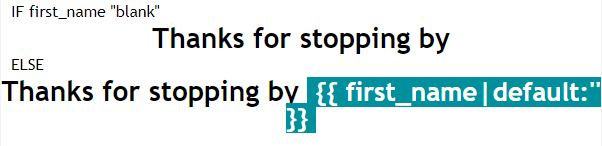


I saw this example on an article which makes sense for use in a text block but i’m struggling to write valid syntax / target the value or no value i need which is firstname:


{% if person|lookup:'Interested in Dogs?' and not person|lookup:'Interested in Cats?' %}
    Like dogs? Check out some great toys for your canine. 
{% elif person|lookup:'Interested in Cats?' and not person|lookup:'Interested in Dogs?' %}
    Like cats? Check out some great toys for your feline. 
{% else %} 
    Check out some great toys for your pet! 
{% endif %}


Also saw the following for conditional blocks which is what i’m using currently to achieve what I need;
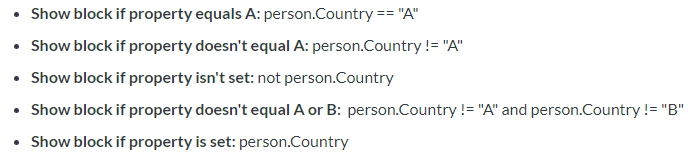
 

First block (non personalised) is;

not person.first_name


Second block (personalisation);

person.first_name


But!... it would be good to know how to write this as an if / else statement for use in a conditional content block (for example - everything contained within one text block), was assuming it would be along the lines of;


{% if person|'first_name' = ''  %}

If firstname blank content

{% else %}

Show personalisation content

{% endif %}


Could i get a hand with getting the syntax above to work?


Thanks!


Jason

This topic has been closed for replies.
Best answer by retention

@jasondstainton Glad to see that people are utilizing the if/else statements to create powerful personalization. I’ll try to answer both questions. Let’s jump to it.

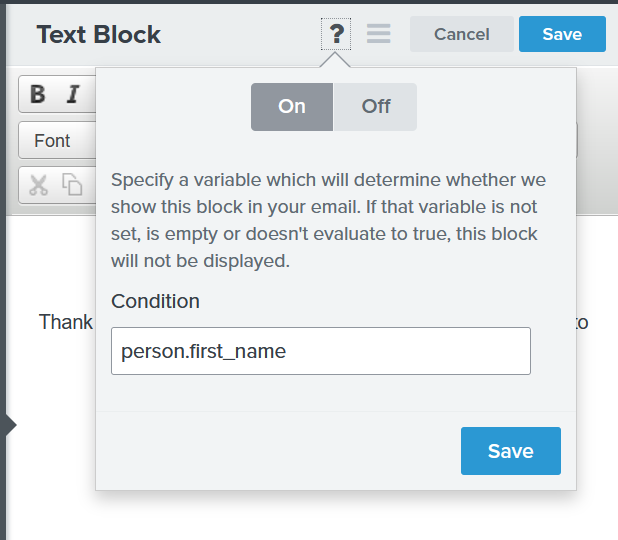
When it comes to hiding entire blocks I recommend using the question mark symbol (?) option.


In this case (person.first_name), if the person has First Name the block will appear, and if he doesn’t have a First Name the block will be hidden.

On the other hand, if you just want to show/hide certain paragraph or word from a text block, you can use the if/else statements inline to achieve that. Let’s create an example.

You are a pet store and you want to say:

We care about animals very much.
And we know that you love your _____ (dog, cat, pet)!
That’s why we’ve created this super cool toy……


If you have the pet type property for your subscribers stored as “Pet Type = Dog/Cat”, this is how you can use the if/else statements to personalize the email.

We care about animals very much.
And we know that you love your
{% if "Dog" in person|lookup:"Pet Type" and not "Cat" in person|lookup:"Pet Type" %} dog.
{% elif "Cat" in person|lookup:"Pet Type" and not "Dog" in person|lookup:"Pet Type"  %} cat.
{% else %} pet. {% endif %}
That’s why we’ve created this super cool toy……


The results will be:
- If subscriber owns a dog, but not a cat: It will show “dog.”
- If subscriber owns a cat, but not a dog: It will show “cat.”
- If subscriber owns both dog and cat: It will show “pet.”
- If subscriber owns neither dog nor cat: It will show “pet.”

You can play around with the logic and use it to conditinally show or hide certain words or entire paragraphs.
 

Now for your specific question about the First Name, if you don’t want to use the “default” fallback option you can use the if/else statement to hide that entire section:

{% if person.first_name %}{{ first_name }}, {% endif %}Happy New Year!

If the subscriber has First Name it will show:

John, Happy New Year!


If the subscriber doesn’t have First Name it will show:

Happy New Year!


You can apply this same logic in the Subject Line and it should work fine.

You can also check our tutorial on How to Set Show/Hide Blocks Based on a Custom Profile Property, where we go over the basic settings and conditional options.

Hope this helps!

16 replies

Taylor Tarpley
Community Manager
Community Manager
September 27, 2021

Hi @getlikeminded


Thanks for the additional info, it was helpful! 


Upon further investigation, the problem might be that as you are looking to bring up the sixth image of an array, the number should be 5, not 6 in your code. As the first image of an array has 0 for its title, the sixth image would be called by using 5 in the code, as using a 6 would call the seventh image. 


Additionally, when problems like this arise or when you you need intensive investigation into your account to diagnose troubleshooting, it would be best to defer to Support in these cases as they are able to take a more thorough, deep dive into your account! 


Thanks for your participation in the Community ! 


-Taylor 

Problem Solver I
September 27, 2021

Hi Taylor,


Thanks for that!


I did start with support :) - I was referred to the partner program so thought I would utilise the hive mind before I went down the paid partner route

Problem Solver I
September 27, 2021

Sorry I should have mentioned that the image is in the media gallery not the variants as I can see that the code

{% if item.product.variant.images.6.src %}{{item.product.variant.images.6.src}}{%else%}{{item.product.images.0.src}}{%endif%}

mentions variant image, would this still work or does the re need to be an image in the 5/6th variant?


and just to make sure I am putting this is the correct place I am putting it in the dynamic section where it says 

Enter an email placeholder that contains an image URL:

Contributor IV
February 4, 2022

Hi all,

Trying to figure out a similar thing to OP, but if there is a way to hide a block if the dynamic content is completely empty?

I’m setting up an order confirmation that shows the billing address used, but I want to hide a line if it’s empty, for example if the customer hasn’t filled out “State” when checking out.

I’ve managed it for numbers, like hiding the discount section using event|lookup:'TotalDiscount' = 0 

Is this at all possible?

Any help would be much appreciated!


retention
Partner - Platinum
2025 Champion
February 7, 2022

Hey @maddiemhc, the if/endif *should* work with the simple IF statement like this:{%if …state variable here… %} if the value is truly “empty.”   The IF condition is only true if there some value (not empty value) in the variable.  

However, you may have to debug it a bit, sometimes addresses may appear empty, but in fact has a value like a single space or another placeholder value like “none” or “NAN”  depending on your integration and which platform you’re on.

Try out a few other conditions like:

{% if ...state variable here...|length > 1 %}

OR

{% if ...state variable here... is not None %}

Don’t forget to close the block with a {% endif %}

Let us know which one worked for you!

Joseph Hsieh // retentioncommerce.com // X: @retention
Jakub
Partner - Silver
Partner - Silver
October 31, 2023

@retention 

And if i want to personalize content based on part of the url that customer use to register.

Is there a way to do statement with contains this string? 

-=JB=-